Manual vs AI WordPress Updates: What's Better?
Compare manual and AI WordPress updates—trade control for speed, weigh security and time savings, and learn when to use manual, automated, or hybrid maintenance.
Manual vs AI WordPress Updates: What's Better?
Keeping your WordPress site updated is critical for security and performance. But should you handle updates manually or let AI take over? Here's the bottom line:
- Manual updates give you full control, letting you choose when and what to update. This is ideal for custom setups but requires time and technical skills.
- AI-powered updates automate the process, saving time and reducing errors. They’re perfect for standard WordPress sites or managing multiple sites but may struggle with complex customizations.
Key Takeaways:
- Manual updates: Best for custom sites, but time-intensive and prone to delays.
- AI updates: Great for speed and consistency but less flexible for unique setups.
- Hybrid approach: Automate routine updates and handle major ones manually for the best of both worlds.
Quick Comparison Table:
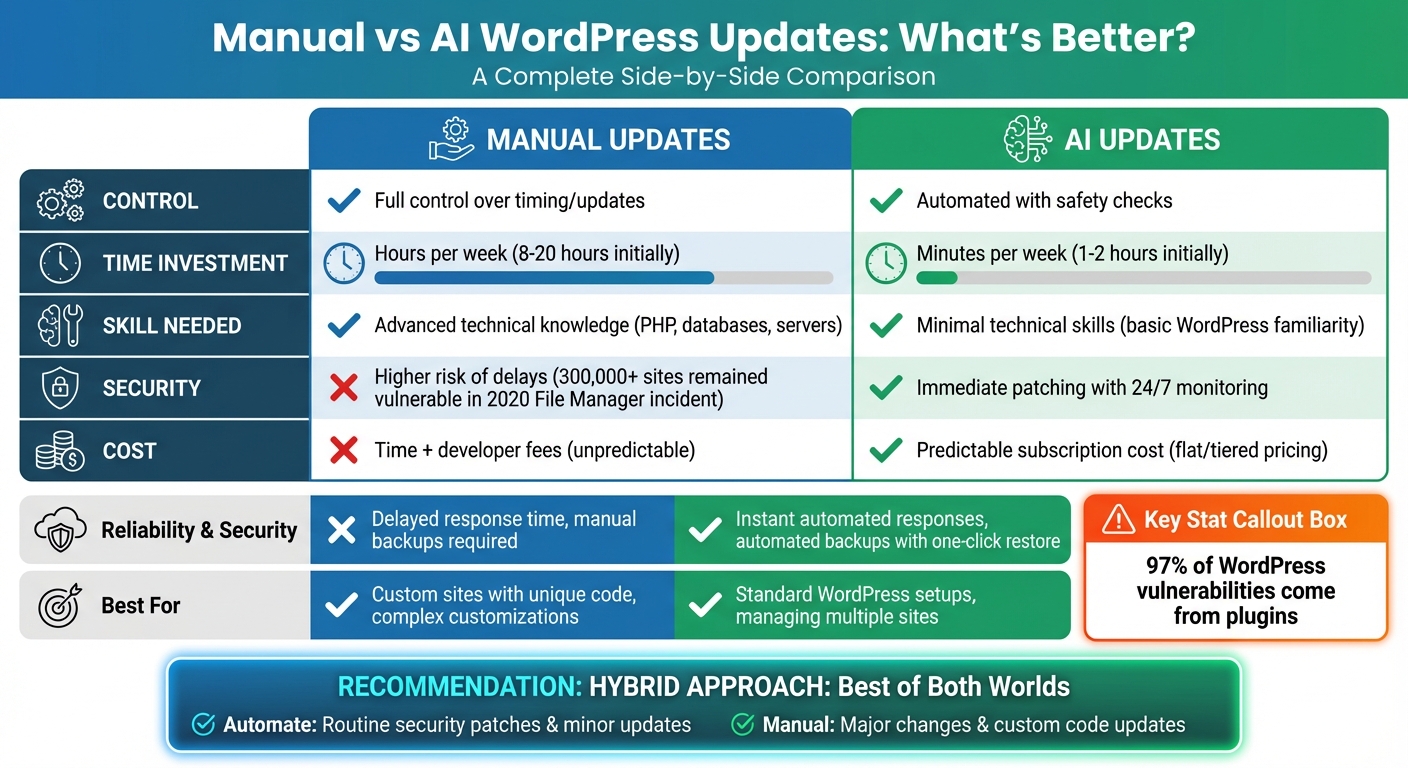
| Factor | Manual Updates | AI Updates |
|---|---|---|
| Control | Full control over timing/updates | Automated with safety checks |
| Time Investment | Hours per week | Minutes per week |
| Skill Needed | Advanced technical knowledge | Minimal technical skills |
| Security | Higher risk of delays | Immediate patching |
| Cost | Time and developer fees | Predictable subscription cost |
Whether you prioritize control or efficiency, choosing the right method depends on your site's needs and your comfort level with technology.
Manual vs AI WordPress Updates: Complete Comparison Guide
How to Automatically Update WordPress Core, Plugins, and Themes
Manual WordPress Updates Explained
Manual updates put you in the driver’s seat, giving you full control over when and how your WordPress site is updated. This hands-on method ensures you’re actively managing your site’s security and performance while keeping all components compatible.
What Manual Updates Involve
With manual updates, you log in to your WordPress dashboard, check which plugins, themes, or core files need updates, and handle the process yourself by clicking the update button. After each update, it’s crucial to test your site to ensure everything is functioning as expected.
Before diving into updates, always back up your database, files, plugins, themes, and configuration settings to a remote location. For major updates, it’s a good idea to deactivate all plugins and temporarily switch to a default theme to avoid potential conflicts. Once the update is complete, you can gradually reactivate plugins and themes, checking for issues along the way.
While this process gives you control, it also requires a significant time commitment. Let’s look at why this hands-on approach might be worth it.
Benefits of Manual Updates
One of the biggest perks of manual updates is timing control. You decide when to apply updates, making it easy to schedule them during low-traffic periods - like late at night or on weekends. This flexibility also allows you to review changelogs or test updates in a staging environment before rolling them out live. By taking this proactive approach, you can identify compatibility issues, unexpected design changes, or bugs before they impact your users.
Another advantage is selective updating. If a plugin update has mixed reviews or reports of bugs, you can hold off until a more stable version is released while still updating other components. This is especially helpful for sites with custom code or unique customizations that might break during a general update. To spot changes easily, you can open key pages in two browser tabs - one before and one after the update - and compare them side by side.
Despite these benefits, manual updates come with their own set of challenges.
Drawbacks of Manual Updates
Manual updates require ongoing attention and technical know-how, which can lead to human error or delays. For non-technical users, the process can feel daunting and time-intensive.
Delaying updates can leave your site exposed to cyberattacks. It’s worth noting that 97% of new WordPress vulnerabilities come from plugins, making outdated components a prime target for exploitation.
Additionally, the WordPress dashboard itself can be overwhelming for beginners. Its many settings and features come with a steep learning curve, and plugin conflicts - especially considering the sheer number of plugins available - can cause unexpected issues that require troubleshooting.
While manual updates offer control and flexibility, they also demand careful attention and technical expertise to avoid potential pitfalls.
AI-Powered WordPress Updates Explained
AI-driven updates take the hassle out of managing WordPress sites by automating tasks that would otherwise demand constant attention. Instead of spending time on manual updates, you can focus on growing your business and creating engaging content. Let’s explore how these tools work in practice.
How AI Updates Function
AI-powered systems, like Kintsu.ai, use real-time monitoring to keep an eye on your site's performance, identify security vulnerabilities, and spot available updates. When an update is detected, these tools automatically back up your site before applying changes. If something goes wrong, they can instantly roll back updates to restore your site.
But this technology isn't just about automation. It also includes advanced features like visual regression testing, which takes screenshots of your site before and after updates. By comparing these images, the system can pinpoint any visual glitches caused by the update. Additionally, status code checks ensure your site remains functional by monitoring HTTP responses.
Some platforms simplify the process even further with text-based commands. Instead of navigating through complicated dashboards, you can describe the update you need in plain language, and the system will handle the technical details. Many tools also include automated scheduling, so you can set updates to run during off-hours - like early Sunday mornings - while incorporating safety measures to avoid disruptions.
AI is also being used by development teams to improve update quality before changes even reach your site. For instance, WooCommerce uses "AI-based critical issue detection" and tools like CodeRabbit to perform detailed code reviews.
Together, these features make AI updates a game-changer for managing WordPress sites.
Benefits of AI Updates
AI updates come with several key advantages, starting with time savings. By automating routine tasks like plugin updates and backups, these tools free up hours that would otherwise be spent on maintenance. This is especially valuable if you're managing multiple sites.
Another major benefit is reduced human error. AI systems are designed to check for compatibility issues, test how plugins interact, and ensure updates don’t disrupt your site’s functionality. These tools can also analyze performance data, catch visual issues, and run extensive tests at a speed that no human team could match.
Security is another area where AI excels. Automated updates significantly lower the chance of missing critical security patches. Some tools even offer virtual patching, which blocks potential threats before official fixes are available.
Drawbacks of AI Updates
Despite their advantages, AI updates aren't without risks. Relying too heavily on automation can create challenges, especially if you don’t fully understand how these systems work. This "paradox of AI enthusiasm" highlights the risks of adopting AI without recognizing its limitations.
AI systems that interact directly with core components like databases and file systems can also introduce new vulnerabilities. For example, the Model Context Protocol (MCP), which allows AI to modify your site, could become a target for attackers if not properly secured.
Complex or highly customized sites may also pose problems for AI tools. While these systems are great for standard WordPress setups, they may struggle with unique configurations or custom functionality that falls outside their programming.
sbb-itb-42d7c06
Manual vs AI WordPress Updates: Side-by-Side Comparison
Here’s a breakdown of how manual and AI-powered WordPress updates compare, helping you decide which approach fits your needs best.
Control and Customization
With manual updates, you’re in the driver’s seat. You control when updates happen, which plugins are updated, and how conflicts are resolved - perfect for sites with custom code or unique testing needs.
AI tools like Kintsu.ai simplify this process by automating decisions. You describe what you want in plain language, and the tool handles the technical work. However, this convenience comes with limitations, as AI frameworks might not support highly tailored customizations.
| Aspect | Manual Updates | AI Updates |
|---|---|---|
| Decision Control | Full control over timing and updates | Automated scheduling with safety checks |
| Customization | Unlimited custom coding and configurations | Best for standard WordPress setups |
| Testing Flexibility | Test specific scenarios on staging sites | Automated testing with visual comparisons |
| Immediate Changes | Real-time adjustments | Adjustments via AI-guided workflows |
Next, let’s dive into how each method measures up in terms of reliability and security.
Reliability and Security
Manual updates can leave room for human error. For instance, in September 2020, a vulnerability in the File Manager plugin impacted over 600,000 WordPress sites. Over 300,000 of those remained at risk because updates weren’t applied quickly enough. This delay can create a window of opportunity for hackers.
AI-powered tools provide constant monitoring and adaptive protection, applying patches as soon as vulnerabilities are detected. While these systems occasionally generate false positives and need proper configuration, they significantly reduce the risk of exploitation.
| Security Factor | Manual Updates | AI Updates |
|---|---|---|
| Vulnerability Exposure | Higher due to delays and human oversight | Immediate patching lowers exposure risks |
| Monitoring | Relies on manual security checks | 24/7 automated monitoring |
| Response Time | Delayed until updates are applied | Instant, automated responses to threats |
| Backup Systems | Requires manual backup creation | Automated backups with one-click restores |
| Major Update Handling | Allows thorough testing for complex setups | May struggle with highly customized sites |
This highlights the trade-off between manual control and the speed of automated protection.
Time Investment and Efficiency
Manual updates demand regular attention - checking for updates, reviewing changelogs, testing on staging sites, and monitoring after updates are applied. This hands-on approach can take hours each week, especially if you manage multiple sites.
AI tools streamline these tasks, reducing the time required to just minutes per week. They centralize updates, backups, and security checks, making them especially useful for agencies managing several client sites.
| Time Factor | Manual Updates | AI Updates |
|---|---|---|
| Setup Time | Minimal initial setup | Quick configuration |
| Ongoing Maintenance | Hours per week | Minutes per week with automation |
| Multi-Site Management | Time increases with each additional site | Scales efficiently with central management |
| Emergency Response | Hands-on troubleshooting required | Automated rollback and restoration |
| Learning Curve | Requires ongoing technical learning | Simplified through conversational interfaces |
Cost Comparison
At first glance, manual updates might seem cheaper. However, hidden costs like developer fees, time spent on maintenance, and potential errors can add up. AI tools, on the other hand, offer predictable subscription pricing, making budgeting simpler.
| Cost Element | Manual Updates | AI Updates |
|---|---|---|
| Direct Costs | Developer fees or your own time | Predictable subscription pricing |
| Hidden Costs | Opportunity costs and error-related expenses | Minimal hidden costs |
| Error Recovery | Time and money to fix mistakes | Automated rollback features |
| Scaling Costs | Costs grow with more sites | Flat or tiered pricing for multiple sites |
| Long-Term Budget | Unpredictable with potential surprises | Consistent and easier to plan for |
Technical Skill Requirements
Manual updates require a solid grasp of technical skills, including PHP, database management, plugin architecture, and troubleshooting. You’ll need to read changelogs, identify conflicts, and manually resolve issues.
AI tools like Kintsu.ai eliminate much of this complexity. Using a no-code approach, they allow even non-technical users to manage site updates through simple, conversational commands. While having some WordPress knowledge is helpful, it’s no longer a necessity.
| Skill Requirement | Manual Updates | AI Updates |
|---|---|---|
| Technical Knowledge | Advanced skills in PHP, databases, and servers | Basic familiarity with WordPress |
| Troubleshooting | Requires manual problem-solving | AI-guided resolution |
| Learning Curve | Steep and ongoing | Simplified with minimal technical learning |
| Team Requirements | Needs technical staff | Manageable by non-technical team members |
| Documentation Reading | Relies heavily on technical guides | No-code management simplifies this |
This comparison makes it clear that while manual updates offer control and customization, AI tools provide unmatched efficiency and ease of use.
How to Choose the Right Approach for Your Site
Picking the right update strategy depends on your site's complexity, your technical skills, and how much time you can dedicate to maintenance. Let’s break down where manual updates shine and when automation can save the day.
When Manual Updates Make Sense
Manual updates are ideal for websites with heavy customizations. If you’ve built custom plugins, made significant theme modifications, or use WooCommerce with unique payment gateways, manual updates ensure your custom work isn’t accidentally overwritten. This method also helps when your site relies on multiple plugins that interact in specific ways. In these cases, testing updates in a staging environment before going live is crucial to avoid compatibility issues.
Before diving into manual updates, always back up your site and briefly review any relevant documentation. This extra step can save you from potential headaches.
When AI Updates Are a Better Fit
AI-powered updates are perfect for standard WordPress setups, especially for users who aren’t tech-savvy or agencies juggling multiple sites. Tasks like minor WordPress core updates and security patches often need quick attention and rarely cause issues, making automation a time-saver. For agencies managing several client sites, automated tools streamline repetitive tasks, handling updates across all sites from a single dashboard.
This method works best when your site doesn’t have extensive customizations and you prioritize convenience over detailed control.
Mixing Manual and Automated Updates
For many, a hybrid approach offers the best balance. By combining both strategies, you can automate routine updates - like security patches and minor core releases - while reserving manual updates for major changes, significant plugin updates, or anything involving custom code. This way, you get the efficiency of automation without losing the precision of manual oversight.
Conclusion
Choosing the right update method for your WordPress site depends on your specific needs. Manual updates offer complete control, making them a good fit for highly customized sites. However, they require a significant time commitment and can expose your site to security risks if updates are delayed. On the other hand, AI-powered updates prioritize efficiency and deliver quicker security patches, making them a great option for standard WordPress setups or agencies managing multiple sites.
For context, manual updates can take anywhere from 8 to 20 hours initially, while AI-assisted methods cut that down to just 1–2 hours. Additionally, automated tools provide real-time security monitoring and instant patching, addressing plugin vulnerabilities more effectively than manual processes.
"There's still huge room for growth with WordPress. It's not going anywhere - but it needs to keep up with the standards of modern web performance".
For most users, a hybrid approach strikes the perfect balance. Automating routine security patches and minor updates while manually handling major changes and custom code allows you to leverage AI's speed without compromising the precision needed for complex sites. Tools like Kintsu.ai make this even easier by offering AI-driven, real-time updates through a conversational interface, removing technical hurdles while ensuring reliability.
Ultimately, staying up-to-date is the most important factor. Regular maintenance keeps your WordPress site secure, fast, and running smoothly - no matter which method you choose.
FAQs
Should I use manual updates or AI-powered updates for my WordPress site?
The right choice really comes down to what your website needs and how comfortable you are with managing updates. If you're someone who values complete control, especially when it comes to major changes that require careful testing, then manual updates might be your best bet. They let you fine-tune every detail, ensuring everything works exactly as intended.
On the flip side, AI-powered updates are a great option if you're looking to save time, streamline tasks, and avoid human errors. These tools shine when paired with a strong backup and staging system, allowing updates to be handled efficiently without compromising safety.
Think about what matters most to you. If precision and customization are your priorities, manual updates are worth the effort. But if automation and security are key, AI tools can take care of updates smoothly while keeping risks to a minimum.
What security risks can arise from postponing manual updates?
Keeping up with manual updates is crucial for your website's security. When updates are delayed, your site becomes an easier target for new threats. This leaves it more susceptible to hacking attempts, malware infections, and even data breaches.
Hackers actively look for outdated software to exploit, which can lead to unauthorized access, stolen user data, or disruptions to your site's functionality. By staying on top of updates, you can protect your site and ensure it runs smoothly and securely.
Can AI handle WordPress updates for custom plugins and themes?
When it comes to managing WordPress sites with custom plugins and themes, AI-powered updates can be a game-changer. By using tools that work seamlessly within the WordPress ecosystem, these systems can automate much of the update process, saving time and minimizing errors.
That said, if your website relies on heavy customizations or has highly specialized features, manual testing and review remain essential. Taking the time to double-check ensures that everything continues to run smoothly and stays compatible after updates, especially for more complex setups.