WordPress Maintenance Checklist for Small Business
Monthly checklist to secure, back up, update, and optimize your WordPress site - plus automation tips to save time and reduce risk.
WordPress Maintenance Checklist for Small Business
Your WordPress site is your business’s digital storefront, but without regular maintenance, it can quickly become a liability. Neglecting upkeep can lead to security breaches, slow performance, and lost revenue. Here's what you need to know:
- Security: Outdated plugins and weak passwords make your site a target. Use SSL, strong passwords, and two-factor authentication.
- Backups: Automate daily backups and test them in a staging environment.
- Updates: Keep WordPress core, plugins, and themes current, but always back up and test updates first.
- Performance: Optimize images, use caching, and monitor uptime to ensure fast loading speeds.
- Critical Features: Regularly test contact forms, checkout processes, and key content to avoid losing leads or sales.
Automation tools like Kintsu.ai can simplify these tasks, saving you time and reducing risk. From backups to updates and security monitoring, AI-powered tools handle the technical work so you can focus on growing your business.
WordPress Maintenance Statistics: Security Risks and Business Impact
Monthly Website Maintenance Checklist [Full Walkthrough]
Backup and Recovery
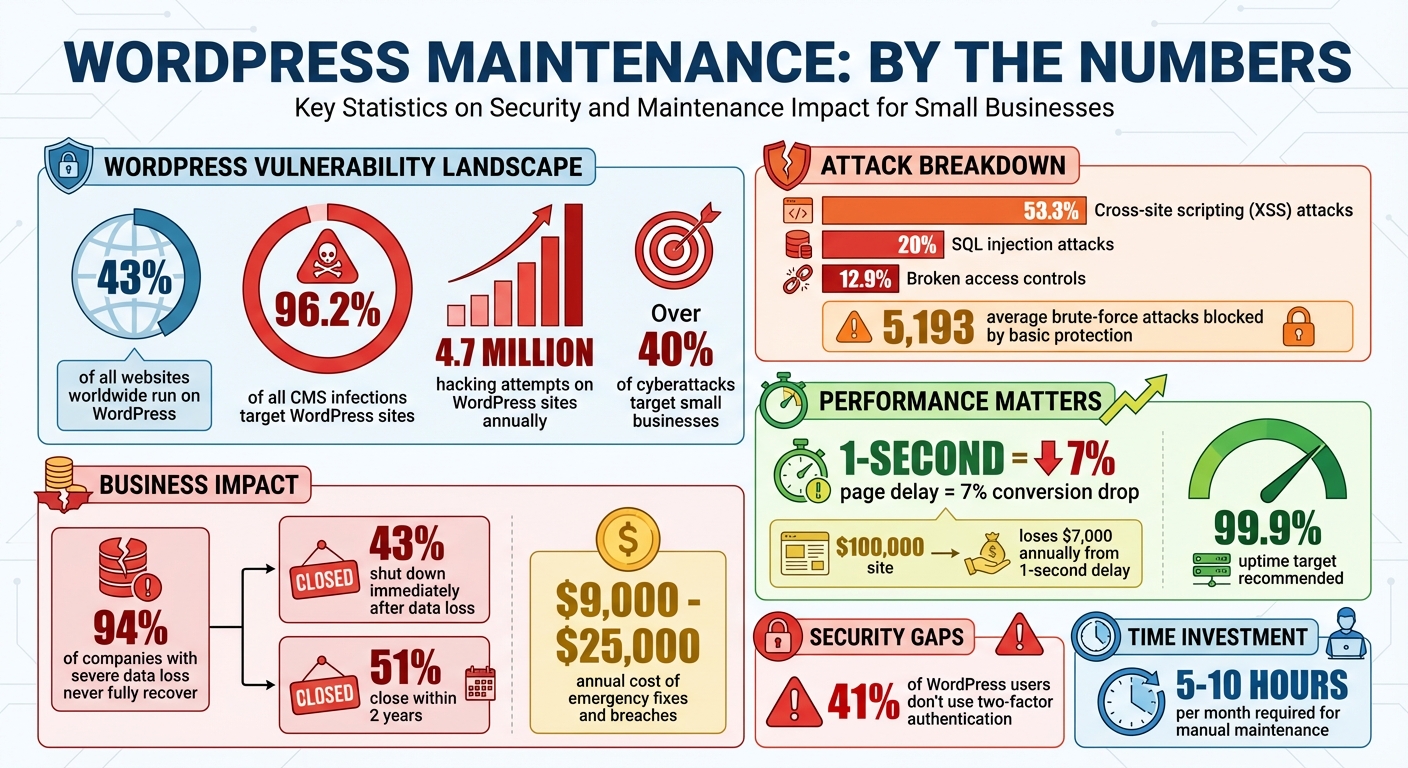
Think of a backup as your safety net: one unexpected hack, system crash, or accidental deletion can wipe out your entire site. Here's a sobering fact: 94% of companies that experience severe data loss never fully bounce back - 43% shut down immediately, and another 51% close their doors within two years. For small businesses, this isn't just a setback; it’s a matter of survival.
Types of Backups You Need
A proper backup includes two critical components: your database (posts, comments, user information, settings) and your site files (WordPress core, plugins, themes, images, and custom code). If you're missing either part, a full site restoration simply isn't possible.
Full backups are snapshots of your entire site. Set up automated daily backups during low-traffic times (like 2:00–4:00 AM) and always perform a manual backup before making significant changes. These backups ensure you have a reliable restore point if something goes wrong.
Testing Your Backups
Having backups is one thing, but making sure they work is just as important. Never test restores on your live site. Use a staging environment or a local development setup instead. With one-click restore tools, you can verify that your pages load correctly and all essential functions operate as expected. Keep notes on any issues you encounter so you can refine your backup process as needed.
Using Kintsu.ai for Backup Management
Managing backups doesn’t have to be complicated. Kintsu.ai streamlines the process with its intuitive conversational interface. Need to create a backup? Just say, “Create a full backup before I update my theme.” Want to schedule regular backups? Ask, “Schedule daily backups at 3:00 AM.” Curious about your backup history? Simply inquire, “When was my last backup?” and get an instant response.
Next, discover how Kintsu.ai can help you safely update your WordPress core, plugins, and themes.
Updating WordPress Core, Plugins, and Themes
Outdated software is an open door for hackers. In 2022, a staggering 96.2% of all CMS infections targeted WordPress sites. Updating your WordPress core, plugins, and themes isn’t just about accessing the latest features - it’s about patching security vulnerabilities that could put your site at risk.
How to Update Safely
Before making any updates, always back up your database and files. This step ensures you have a fallback if something goes wrong. Use a staging site to test updates first, and schedule them during low-traffic hours or enable maintenance mode to minimize disruptions. Once the updates are complete, thoroughly check your site’s functionality. Test critical areas like your homepage, contact forms, checkout process, and any custom features to confirm everything is running smoothly.
Removing Unused Plugins and Themes
Inactive plugins aren’t just sitting idle - they can become security liabilities. Beyond security risks, they can slow down your site, cause code conflicts, and clutter your database. Regularly review your plugins and themes, keeping only what you actively use. After removing unused ones, clear your cache and check the wp-content folder to ensure no leftover files remain.
Managing Updates with Kintsu.ai
WordPress auto-updates can be risky since they don’t validate changes before applying them, which could lead to broken functionality. Kintsu.ai adds an extra layer of protection by running regression tests to detect potential issues before updates go live. If a problem is identified, it automatically rolls back the update and restores the previous version, reducing the risk of downtime. Whether you’re managing multiple plugin updates or just reviewing available options, Kintsu.ai simplifies the process while keeping you in control.
Strengthen your site further by implementing robust monitoring tools to guard against future threats.
Website Security
WordPress, which powers a staggering 43% of websites worldwide, is a prime target for cyberattacks, facing around 4.7 million hacking attempts each year. Small businesses are especially vulnerable, with over 40% of cyberattacks aimed directly at them. The fallout from a breach can be severe - financial losses, erosion of customer trust, compliance fines, and even legal troubles if user data is compromised. To mitigate these risks, it's crucial to have robust security protocols, effective threat detection, and automated management systems in place.
Security Measures to Implement
Start by installing an SSL certificate to encrypt communications between your site and its visitors. Many hosting providers now offer this feature for free. Secure all critical accounts - like your WordPress admin, hosting, database, and FTP/SFTP accounts - with strong, unique passwords that are at least 16 characters long and include a mix of uppercase and lowercase letters, numbers, and symbols. Avoid default usernames such as "admin", which are easy targets.
Adding two-factor authentication (2FA) is another essential step. Despite its effectiveness, 41% of WordPress users still skip this extra layer of protection.
Consider deploying a web application firewall (WAF) to block malicious traffic before it even reaches your server. Cloud-based WAFs are particularly well-suited for small businesses. Additionally, limit login attempts - locking out an IP address for 20 minutes after 3–5 failed attempts is a good rule of thumb - and change your default login URL (/wp-admin) to something less predictable to fend off brute-force attacks.
Other measures to tighten security include:
- Adding CAPTCHA to login pages, registration forms, and comment sections to deter bots and spam.
- Disabling file editing in the WordPress dashboard by adding
define('DISALLOW_FILE_EDIT', true);to yourwp-config.phpfile. - Configuring proper file permissions to restrict unauthorized access.
- Automatically logging out inactive users to reduce exposure.
Monitoring for Security Threats
Implementing security measures is just the first step - ongoing monitoring is equally important. Use security plugins to schedule regular malware scans, catching harmful code before it causes damage. In 2023, cross-site scripting (XSS) attacks accounted for 53.3% of new vulnerabilities in WordPress, while SQL injection attacks were responsible for about 20% of breaches, particularly affecting WooCommerce sites.
Keep an eye on activity logs for unusual behavior, such as unexpected login attempts, plugin modifications, or content edits. Basic protection tools have blocked an average of 5,193 brute-force attacks. Regularly audit user roles and permissions, ensuring only trusted individuals have Administrator access. Remove inactive accounts to minimize risk, as 12.9% of WordPress security issues in 2023 stemmed from broken access controls.
Security Management with Kintsu.ai
Managing all these security tasks manually can feel overwhelming. That’s where Kintsu.ai steps in to simplify the process. This AI-powered platform automates vulnerability detection by scanning for potential risks, reviewing security configurations, and flagging issues. With Kintsu.ai, you can focus on growing your business while knowing your website is safeguarded.
"The cost of recovery from a hack is usually higher than the cost of prevention."
sbb-itb-42d7c06
Performance and Uptime
Once security measures are in place, the next step is to ensure your website performs efficiently and stays online consistently. A sluggish website can drive visitors away and hurt your bottom line. For instance, a mere 1-second delay in page load time can lead to a 7% drop in conversions. If your site earns $100,000 annually, that delay could cost you $7,000 - a loss no business, especially small ones, can afford.
Improving Site Speed
The foundation of a fast website starts with solid hosting. Look for hosting providers that offer managed WordPress services, SSD storage, and the latest PHP versions. Choosing a data center close to your audience reduces latency, improving your site's Time to First Byte (TTFB). To further enhance speed, implement caching and use a Content Delivery Network (CDN) to serve compressed images and minified files from servers near your visitors.
Optimize images before uploading by compressing them and using modern formats like WebP. Minify and combine CSS and JavaScript files to reduce their size and the number of HTTP requests. Regularly clean out unnecessary data, such as post revisions, spam comments, and transients, to keep your database running smoothly. Also, review your plugins and themes periodically - disable or remove those that are unused or poorly coded, as each active plugin adds extra load to your site.
Tracking Website Uptime
Your website's availability is critical. Even brief downtime can lead to lost revenue, unhappy customers, and a hit to your search engine rankings. Aim for 99.9% uptime or better. Automated monitoring tools can help you stay on top of this. For example, services like UptimeRobot can check your site's status every five minutes, while some tools offer even more frequent checks. These alerts ensure you can address issues as soon as they arise.
Streamlining Performance with Kintsu.ai
Manually managing speed optimizations and uptime monitoring can become overwhelming. That’s where Kintsu.ai steps in. This platform analyzes your site's performance data and provides actionable recommendations. Rather than digging through complex technical reports, you can rely on Kintsu.ai's conversational interface to identify bottlenecks and prioritize fixes based on their impact. Just like backups and updates, efficient performance management with Kintsu.ai is essential for keeping your site secure, fast, and reliable - especially during critical business hours.
Business-Critical Features
While maintaining your website's technical health is essential, it's equally important to ensure that features directly tied to revenue and lead generation are functioning seamlessly. A glitchy contact form or a checkout page that doesn't work as intended can quietly harm your business without any obvious warning signs.
Testing Forms and Checkout
Make it a habit to test your site's critical features every month by replicating a typical customer journey. Submit every contact form, complete a test purchase on your e-commerce pages, and confirm that all related emails (like confirmations) are being delivered. Pay attention to forms - ensure they submit without errors, confirmation emails arrive as expected, and checkout processes run smoothly from start to finish.
If emails aren't being delivered, check your SMTP settings or consider using a dedicated email service to ensure reliability. For added security, configure your contact form plugins to save submissions directly to your WordPress database. This way, even if emails fail, you'll still have a record of customer inquiries.
Don't forget to test on different devices and browsers to catch any display or functionality issues that could be slipping through the cracks.
Keeping Content Current
Stale or outdated information can damage customer trust and even lead to lost sales. Review key pages on your site monthly to ensure details like these are accurate:
- Pricing is correct and displayed in USD.
- Business hours are up to date, including time zones relevant to U.S. customers.
- Product descriptions accurately reflect what you're selling.
Also, keep seasonal promotions, holiday hours, and time-sensitive offers updated to reflect your current operations. This keeps your site relevant and trustworthy for visitors.
Content Management with Kintsu.ai
Updating your site's most critical content doesn't have to be a chore. With Kintsu.ai's conversational interface, you can make changes effortlessly. Instead of logging into WordPress and manually editing pages, simply describe the updates you need in plain English. Kintsu.ai can identify outdated information across your site and handle routine updates - like adjusting business hours, updating pricing, or refreshing contact details. This automation ensures that your revenue-driving features stay accurate and functional, all while supporting your broader website maintenance efforts.
Conclusion
Keeping your WordPress site in good shape might feel like a big task, but breaking it down into regular, smaller steps can make all the difference. These efforts not only safeguard your investment but also ensure your site runs smoothly for your customers.
Skipping maintenance can be costly - businesses face expenses ranging from $9,000 to $25,000 annually due to emergency fixes, lost sales, and recovering from security breaches. With WordPress accounting for 96.2% of all CMS infections, staying on top of upkeep is more than just a good idea - it's a necessity.
For small business owners already juggling countless responsibilities, dedicating 5–10 hours a month to technical maintenance can feel like a drain on time better spent growing the business. That’s where automation steps in. Tools like Kintsu.ai simplify these tasks through an intuitive conversational interface. You can manage backups, updates, security checks, performance optimization, and even content updates - all without logging into WordPress or touching a single line of code.
Taking a proactive approach to maintenance is not just smarter - it’s more cost-effective. Studies show that improving your website’s load time by just 1 second can boost conversions by 7%. Automated solutions save you time and protect your business from expensive interruptions, ensuring your site remains a reliable source of revenue. By embracing proactive and automated maintenance, your WordPress site can continue to be a valuable asset for your business.
FAQs
What’s the best way to automate WordPress maintenance tasks?
To make managing WordPress websites easier, consider using AI-driven tools to take care of crucial tasks like software updates, backups, security checks, and performance tracking. These tools simplify your workflow by automating repetitive tasks, helping you save time while keeping your site secure and running smoothly.
There are various platforms available that can schedule updates and run routine maintenance checks automatically. This way, your site stays up-to-date and functional without requiring constant manual attention.
What happens if you don’t update your WordPress plugins and themes regularly?
Keeping your WordPress plugins and themes up to date is crucial for protecting your website. Outdated code can leave your site open to security risks, making it easier for hackers to exploit weaknesses. This could result in data breaches, site crashes, or even the loss of sensitive customer information.
Beyond security, outdated plugins and themes can create compatibility problems with newer versions of WordPress or other tools you rely on. These issues may break certain features or disrupt your site’s functionality. By staying on top of updates, you help ensure your website remains secure, stable, and runs smoothly.
How does Kintsu.ai help keep my WordPress site secure and running smoothly?
Kintsu.ai takes the hassle out of WordPress maintenance by automating critical tasks such as regular backups, uptime monitoring, and security audits. On top of that, it offers real-time threat detection, keeping your site safe from potential dangers.
By using Kintsu.ai, you can keep your website secure, fast, and dependable without spending hours on manual upkeep. This means more time to focus on what really matters - growing your business.