WordPress Management for Non-Technical Users Guide
Manage WordPress without coding: learn the dashboard, block editor, AI-powered edits, maintenance, and security best practices for non-technical users.
WordPress Management for Non-Technical Users Guide
Managing a WordPress site doesn’t have to be intimidating, even if you have no technical experience. This guide highlights how WordPress simplifies website management with its intuitive dashboard, block-based editor, and vast plugin library. Tools like Kintsu.ai make it even easier, enabling you to update your site through natural language commands like “Change the homepage headline” or “Add a contact form.”
Key Takeaways:
- User-Friendly Dashboard: Easily navigate sections like Posts, Pages, Media, and Appearance.
- Block Editor: Create and organize content using movable blocks for elements like text, images, and buttons.
- AI Tools: Use Kintsu.ai to manage content, automate tasks, and troubleshoot errors without coding.
- U.S.-Specific Settings: Default formats for dates, currency, and measurements align with U.S. standards.
- Security and Maintenance: Stay safe with regular updates, strong passwords, and AI-monitored login activity.
Whether you’re running a blog, business site, or online store, WordPress and AI tools streamline the process, letting you focus on your content and goals.
How To Make a Website With WordPress (Beginners Tutorial)
Getting Started with the WordPress Dashboard
WordPress Dashboard Navigation Guide for Beginners
Understanding the Dashboard Layout
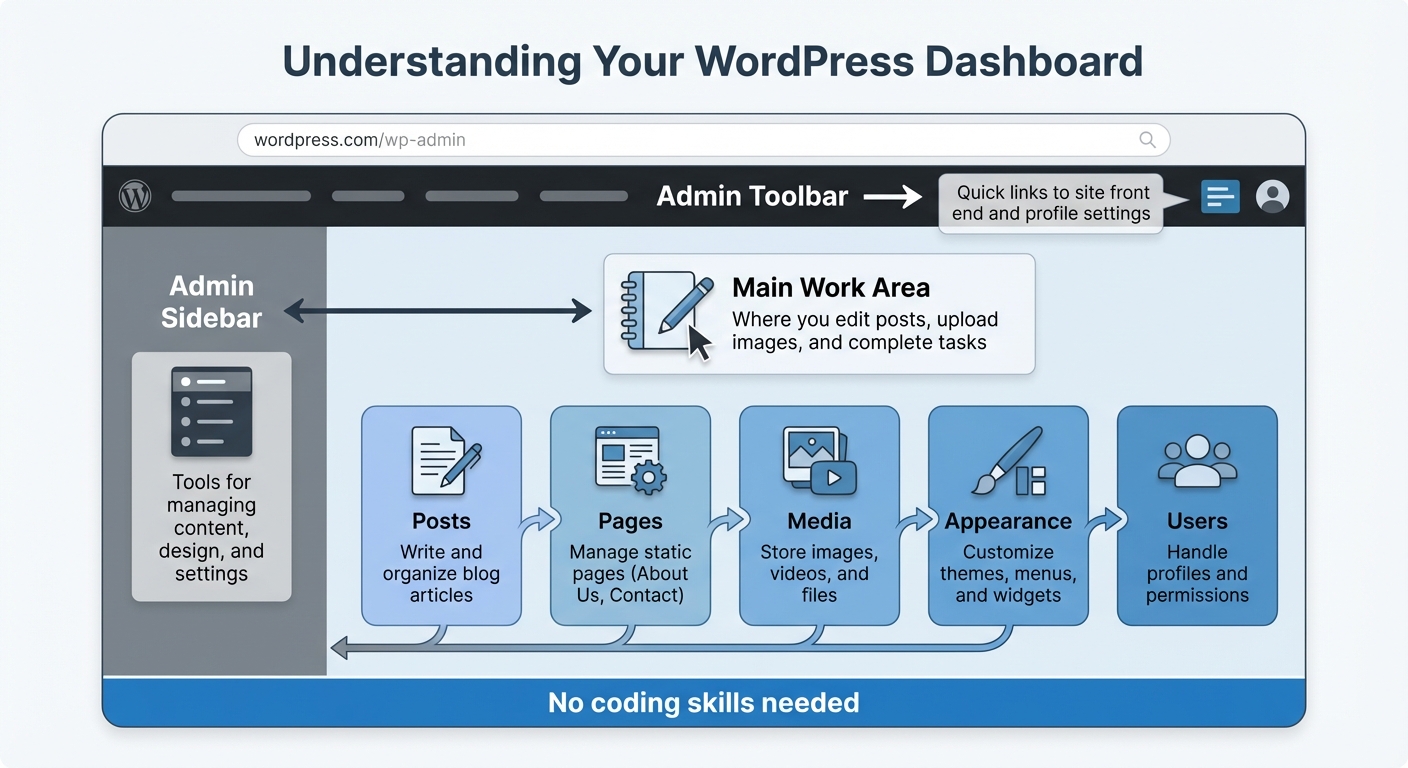
When you log in to WordPress, you'll land on the dashboard - essentially the command center for your site. The dashboard is divided into three main sections: the admin toolbar at the top, the admin sidebar on the left, and the main work area in the center.
- The admin toolbar offers quick links to your site's front end and profile settings.
- The admin sidebar houses tools for managing your site's content, design, and settings.
- The main work area is where you’ll do most of your tasks, like editing posts or uploading images.
This consistent layout ensures you can navigate your WordPress site efficiently. Once you're familiar with these areas, you’ll be ready to dive into the sections you’ll use most often.
Main Areas for Non-Technical Users
For day-to-day site management, here are the key sections you’ll rely on:
- Posts: Write and organize blog articles using categories and tags.
- Pages: Manage static pages like "About Us" or "Contact."
- Media: Store and organize images, videos, and other media files.
- Appearance: Customize your site’s design, including themes, menus, and widgets.
- Users: Handle user profiles and permissions.
These sections cover nearly everything required to keep your site running smoothly - no coding skills needed.
Working with the Block Editor
When you create or edit a post or page, WordPress uses the Block Editor, also known as Gutenberg. Instead of working in one big text box, you build content using individual, movable blocks. Each block represents a specific element, like a paragraph, image, or button.
For example, want to add a photo gallery or a call-to-action button? Just insert the corresponding block. You can move, style, or delete blocks independently, giving you complete control over your layout.
To make things even easier, tools like Kintsu.ai integrate with WordPress. With Kintsu.ai, you can use natural language commands to create and edit blocks. For instance, type “add a testimonial section with three columns,” and the AI will generate it instantly. This eliminates the need to search for specific block types or worry about formatting, streamlining the entire process.
Using AI to Manage Content Without Coding
Making Content Changes with Natural Language
Imagine being able to update your WordPress site without needing to navigate its technical interface. With Kintsu.ai, you can make changes simply by typing commands in plain English. For example, you could type, "Change the homepage headline to 'Welcome to Our New Collection'" or "Update the contact page phone number to (555) 123-4567." The AI takes your instructions, interprets them, and makes the changes instantly.
What makes this possible is the AI's ability to understand context. Whether your request is highly specific - like "Add a blue button that says 'Shop Now' below the hero image" - or more general - such as "Make the about page more professional" - the tool translates your words into precise WordPress actions. It handles all the technical aspects, from formatting to placement, so you can focus on what matters most: your content.
Common Content Tasks Made Simple with AI
Kintsu.ai simplifies everyday content management tasks. Need to add a new section, position an image, or draft a blog post? No problem. You can even optimize your SEO titles and meta descriptions directly within WordPress. For instance, typing "Create a blog post about December 2025 holiday hours" will generate a properly formatted draft based on your prompt.
But it doesn’t stop at basic edits. Kintsu.ai also helps fine-tune your content for better performance. With its built-in SEO tools, you can generate optimized titles and meta descriptions tailored to your content. Just click the AI optimization icon, and you'll get several suggestions to choose from. It can even create FAQ sections with the correct markup or draft social media posts - all without leaving the WordPress editor.
Reviewing AI-Generated Updates
Once the AI completes your updates, a quick review ensures everything looks and feels right. Use the "Preview" button to check how your page appears with the changes applied. This is your chance to confirm that headings are properly capitalized, dates follow the MM/DD/YYYY format, and prices display correctly with the dollar sign ($) in place.
While AI is a powerful assistant, human oversight is crucial. Think of it as a creative partner that enhances your productivity but still relies on your judgment. Take a moment to review the tone, verify factual details, and ensure the content aligns with your brand's voice and goals. This extra step ensures your updates meet professional standards and are ready to go live without a hitch.
sbb-itb-42d7c06
Managing Your Site with AI Assistance
AI doesn’t just simplify content updates - it makes managing your site’s structure and upkeep a breeze.
Managing Menus, Site Identity, and User Roles
Updating your site’s navigation, branding, or team permissions no longer requires technical skills. With tools like Kintsu.ai, you can handle these tasks with simple instructions. For example, you can say, “Change site tagline to ‘Quality Home Goods Since 2020’” or “Add a link to the new Services page” to update your site title or adjust the main menu effortlessly.
Need to manage user roles? Just tell the AI, “Make Sarah an editor” or “Give John contributor access”, and it will adjust permissions accordingly, ensuring everyone on your team has the right access.
Now, let’s see how AI can simplify routine maintenance.
Automating Routine Maintenance Tasks
Kintsu.ai takes the hassle out of ongoing housekeeping. It can organize your media library by sorting images, removing duplicates, or standardizing file names. Want to clean up unused images from a specific year or categorize product photos? Just give the command, and the AI handles it for you.
For tasks like ensuring consistent formatting across blog posts - such as standardizing headings or making sure all prices include the correct dollar sign ($) - you can describe the style you want, and the AI will apply it across your site. This ensures your website maintains a polished and cohesive appearance without requiring extra effort.
Keeping Your WordPress Site Safe and Stable
You don’t need to be a tech expert to safeguard your WordPress site. With AI-powered tools, complex security tasks are handled in the background, giving you the freedom to focus on growing your business.
Why Updates Are Crucial
WordPress updates do more than introduce new features - they’re a critical defense against security threats. Hackers often exploit outdated software, making timely updates essential. AI tools simplify this process by testing updates for compatibility before applying them, reducing the risk of site disruptions and minimizing human error.
Simple Security Tips for Non-Technical Users
Strong passwords are a must, but AI takes security a step further. AI-driven authentication systems monitor login behavior, flag unusual activity, and trigger additional verification when needed. Proper user role management is equally important - team members should only have access to what’s necessary. AI tools enhance this by continuously monitoring login attempts, blocking malicious bots, and identifying suspicious activity in real time. These measures integrate seamlessly with WordPress management, ensuring a proactive approach to security.
Tackling Technical Errors with AI Assistance
Encountering technical errors can be frustrating, especially when error messages are unclear. AI tools simplify troubleshooting by translating cryptic codes into actionable solutions. For instance, if you face a "500 Internal Server Error" or the dreaded "White Screen of Death", AI can pinpoint the cause - whether it’s a plugin conflict, memory issue, or corrupted file - and guide you through the fix. For more advanced issues, AI tools can create detailed reports for professionals and even detect corrupted files during backups, allowing for quick recovery with minimal downtime.
Conclusion and Key Takeaways
How AI Simplifies WordPress for Everyone
AI-powered tools take the guesswork out of managing WordPress. They turn what used to be complicated processes into straightforward tasks, saving you time and letting you focus on growing your business instead of getting bogged down in technical details. These tools also learn from your content to ensure your brand stays consistent, helping you avoid costly errors while keeping your site running smoothly.
What to Do Next for Your WordPress Site
Ready to see what AI can do for your WordPress site? It's easy to get started, and there's no risk involved. Start with a free trial to explore how AI can simplify content creation, streamline site updates, and improve SEO.
With tools like Kintsu.ai, you can describe the changes you want for your website, and they’ll be applied in real time - no coding skills needed. Test out the features to find what works best for your workflow. Over time, you'll feel more confident managing your site and making it truly your own.
FAQs
How does Kintsu.ai make WordPress management easier for beginners?
Kintsu.ai takes the stress out of managing WordPress for beginners by providing AI-driven tools that handle tasks like website updates, design tweaks, and content management - all without needing to write a single line of code.
Thanks to its intuitive conversational prompts, automated content creation features, and a straightforward interface, Kintsu.ai lets you effortlessly manage your website. Whether you're updating pages, customizing the design, or publishing fresh content, it empowers non-technical users to maintain a polished, professional site with ease.
What are the key advantages of using the WordPress block editor?
The WordPress block editor provides an intuitive, visual tool for building and managing content, perfect for those without coding experience. It makes tasks like adding, rearranging, and personalizing elements on your site straightforward, opening up website creation to everyone.
With its versatile layout features, you can craft polished pages and posts while keeping complete control over their design. Plus, the editor encourages teamwork by enabling multiple users to collaborate and edit content effortlessly.
How can AI tools help keep my WordPress site secure?
AI tools can enhance the security of your WordPress site by spotting unusual patterns, identifying potential threats, and addressing risks such as malware or brute-force attacks as they happen. These tools rely on behavior analysis and predictive threat detection to block suspicious activities before they can cause any damage.
With their ability to learn and adjust to evolving attack methods, AI-driven security solutions reduce false alarms and offer automatic protection. This means you can focus on other tasks without needing to constantly monitor your site or have advanced technical skills.