WordPress Plugins vs AI Management Tools Compared
Compare WordPress plugins and AI site-management tools to see when to use plugins for advanced features and when AI speeds content, design, and maintenance.
WordPress Plugins vs AI Management Tools Compared
Running a WordPress site? You’ve got two main options: plugins or AI tools. Plugins are great for adding specific features like SEO, security, or e-commerce. AI tools, on the other hand, simplify tasks like content creation, design tweaks, and data analysis with natural language commands.
Key Takeaways:
- Plugins: Offer flexibility and specialized features but require manual setup and regular updates.
- AI Tools: Speed up tasks, reduce maintenance, and are ideal for non-technical users.
For most, the best approach combines both: use plugins for advanced needs (e.g., security, payment systems) and AI tools for faster, easier site updates and management.
| Feature | Plugins | AI Tools |
|---|---|---|
| Setup Time | Manual, takes longer | Faster, uses plain language commands |
| Content Creation | Needs extra plugins | Automated based on input |
| Maintenance | Requires updates and troubleshooting | Mostly automated |
| Best For | Advanced, specialized features | Simplifying routine tasks |
Your choice depends on your needs: plugins for control and customization, AI tools for ease and speed.
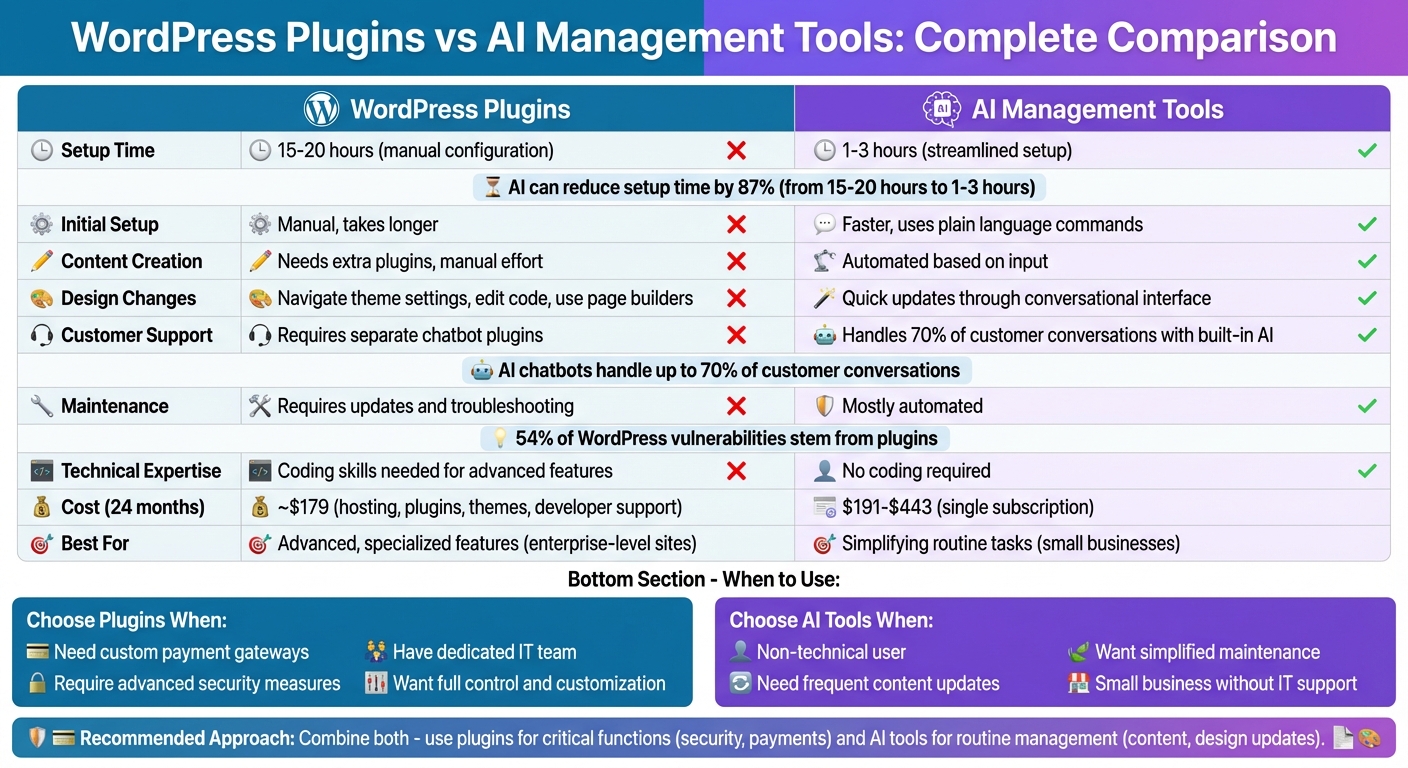
WordPress Plugins vs AI Management Tools: Feature Comparison Chart
The Top WordPress AI Agents, Plugins & More | EP53
How WordPress Plugins Work for Site Management
WordPress plugins are like mini software applications that enhance your website's functionality. You can install them directly from the WordPress dashboard, and they integrate seamlessly with your site using built-in hooks and filters. Let’s break down what plugins do and how they fit into your site management toolkit.
Main Functions of WordPress Plugins
Plugins handle a wide range of tasks, from content creation to site optimization. For example:
- Content Management: Plugins can help you write blog posts, product descriptions, and even meta tags.
- SEO Tools: They improve your site’s visibility by managing keywords, creating sitemaps, and analyzing performance metrics.
- Security Features: Security plugins add layers of protection, like two-factor authentication and threat monitoring, to keep your site safe.
- Backup Solutions: These plugins schedule automatic backups, ensuring your data is protected in case of a failure.
- Performance Enhancements: They boost speed by compressing images, caching pages, and minimizing unnecessary code.
Some plugins even let you customize your site with unique design elements or custom code - without needing to touch the theme files.
Typical Workflows and Technical Requirements
Activating a plugin is straightforward: head to the Plugins > Installed Plugins section in your dashboard, and you’re good to go. For basic features, like adding a contact form or setting up analytics, no technical expertise is needed. However, if you’re diving into advanced customizations, such as integrating custom APIs or tweaking plugin behavior, you might need some coding skills.
Most plugins come with user-friendly settings interfaces. That said, troubleshooting issues - like compatibility problems or performance slowdowns - may require more technical know-how.
Problems and Limitations of Plugins
Using multiple plugins can complicate site management. Here are some common pitfalls:
- Compatibility Issues: Plugins don’t always play well together. Conflicts can arise between plugins, your theme, or even WordPress updates, making it tricky to pinpoint the problem.
- Performance Slowdowns: Each plugin adds extra CSS and JavaScript files, which can slow down your site. This affects load times and, ultimately, the user experience.
- Security Risks: Plugins are a major target for cyberattacks. In fact, 54% of WordPress vulnerabilities stem from plugins. Keeping them updated and choosing trusted developers is crucial, especially when handling sensitive customer data.
- Maintenance Overload: Every plugin requires regular updates, security patches, and compatibility checks, which can become time-consuming as your site grows.
These challenges have sparked interest in newer solutions, like AI-powered management tools, which aim to simplify site maintenance. Comparing traditional plugins with these emerging technologies offers an interesting perspective on how to streamline WordPress management.
How AI Management Tools Handle WordPress Sites
AI management tools make managing WordPress sites much easier by interpreting plain language commands and automatically carrying out tasks. Instead of juggling multiple plugins for different functions, you simply tell the AI what you need - like "add a contact form to my homepage" or "write a blog post about summer sales" - and it takes care of the technical details. This not only simplifies day-to-day tasks but also speeds up how quickly you can manage and update your site.
Main Features and Benefits of AI Tools
AI tools can cut WordPress setup time from 15–20 hours down to just 1–3 hours. For small businesses in the U.S. that don’t have dedicated IT teams, this time savings means lower costs and a faster launch. Tools like Kintsu.ai use a conversational interface, so you can describe the changes you want, and the AI implements them instantly - no coding required.
These tools also guide users through the website creation process step by step, making it easy even for those without technical skills. They can generate initial content, layouts, and visuals automatically, giving you a ready-to-use framework instead of starting from scratch. Beyond that, AI can handle tasks that usually require multiple plugins, like managing customer interactions. For example, AI chatbots can take care of up to 70% of customer conversations.
Where AI Tools Have Limitations
While AI tools are great for many tasks, they do have their limits. For example, more complex e-commerce needs - like custom payment gateways or multi-currency pricing - often require specialized plugins. Similarly, advanced security setups, such as custom firewall rules or high-level threat detection, may be beyond what AI tools can handle. If your site requires unique business logic or enterprise-level security, you might still need to rely on additional plugins to fill those gaps.
sbb-itb-42d7c06
WordPress Plugins vs AI Management Tools: Side-by-Side
Let’s break down the key differences between traditional WordPress plugins and AI management tools. While both aim to simplify website management, they approach the task in entirely different ways. This comparison will help you decide which option aligns best with your website's needs.
Feature and Workflow Comparison
Plugins often involve manual setup and maintenance, while AI tools rely on conversational commands to simplify tasks.
| Task | WordPress Plugins | AI Management Tools |
|---|---|---|
| Initial Setup Time | Requires manual configurations and detailed setup. | Simplifies the process with faster, streamlined setup. |
| Content Creation | Depends on manual effort or additional content-focused plugins. | Automatically generates content based on user input. |
| Design Changes | Involves navigating theme settings, editing code, or using page builders. | Allows quick design updates through a conversational interface. |
| Customer Support | Requires separate chatbot plugins and configurations. | Handles customer inquiries seamlessly with built-in AI support. |
| Maintenance | Demands regular updates, security checks, and resolving plugin conflicts. | Automates maintenance tasks, reducing the need for constant oversight. |
This table highlights how AI tools can simplify workflows, particularly for users who prefer a more hands-off approach.
Cost and Technical Complexity
Managing plugins can quickly become overwhelming - both financially and technically. Traditional setups often involve multiple expenses, including hosting fees, premium plugins, themes, and developer support. Additionally, they require technical know-how to handle plugin conflicts, security updates, and performance tuning.
AI management tools, on the other hand, consolidate these needs into a single subscription fee. This bundled approach eliminates the hassle of juggling multiple services, making it a more straightforward option for standard website needs. While plugins may excel in delivering highly specialized functions, AI tools prioritize simplicity and efficiency, particularly for users who value speed and ease of use.
When to Use Each Option
The choice between plugins and AI tools depends on your specific needs:
- WordPress Plugins are ideal for websites requiring specialized features, such as custom payment systems or advanced security measures. This option works best for enterprise-level sites with dedicated IT teams capable of managing the technical demands.
- AI Management Tools are perfect for small business owners or individuals who want to launch and manage a site without technical expertise. For example, Kintsu.ai is designed to help businesses handle frequent content updates, make design changes, and streamline customer interactions - all without needing coding skills or extra developer support. Its conversational interface ensures quick updates, keeping your site flexible and easy to manage.
Selecting the Right Solution for Your WordPress Site
What to Consider Before Choosing
Think about your technical skills and the resources you have available. If you're comfortable handling code, managing updates, and troubleshooting issues, plugins can give you a lot of flexibility and customization options. On the other hand, if you'd rather focus on growing your business and avoid technical headaches, AI tools can simplify site maintenance and management.
Take a close look at your costs, too. Add up expenses like hosting, licenses, themes, and developer support, then compare them to the cost of an AI management tool. If your site requires frequent updates, this comparison becomes even more important. Managing multiple sites? Keep in mind that plugins will need individual updates and security checks for each site, whereas AI tools often let you manage all your installations from one dashboard.
These factors highlight how WordPress management is shifting and why it's worth rethinking your approach.
What's Next for WordPress Management
Looking ahead, the future of WordPress management seems to be a mix of both plugins and AI tools. Plugins are reliable and offer specialized features, while AI tools bring speed and convenience to the table. AI is already changing how websites are created and managed by complementing plugins. For example, AI can handle tasks like generating content or setting up initial designs quickly, while plugins remain essential for critical operations like security or payment processing.
WordPress itself is also evolving. Updates like Gutenberg Phase 3 are adding exciting features, such as real-time collaboration. For most site owners, the key isn’t about choosing between AI tools and plugins - it’s about finding the right balance. You might use an AI tool like Kintsu.ai for routine updates and design adjustments, while still relying on plugins for advanced features like payment gateways or enhanced security. This approach combines the efficiency of AI with the reliability of plugins, giving you the best of both worlds.
Conclusion
Main Points to Remember
Managing a WordPress site today involves navigating a mix of plugins and AI tools, each excelling in different areas. Plugins are indispensable for tasks like security, backups, performance caching, complex e-commerce setups, and ongoing maintenance. On the other hand, AI tools shine when it comes to content creation, on-page SEO, generating design snippets, and analyzing data.
The most effective strategy often blends the strengths of both. For instance, AI tools can help reduce plugin overload by creating lightweight code snippets for simpler tasks. Meanwhile, plugins remain essential for handling technical SEO, GDPR compliance, and integrations.
Your choice depends on your technical expertise and the time you're willing to dedicate. If you’re comfortable spending 15–20 hours and want full control, plugins might be the better fit. However, if you’re looking to get up and running in just 1–3 hours and prefer easier updates, AI-assisted tools can simplify routine management while core plugins handle more complex needs.
Cost is another important consideration. A traditional WordPress setup typically costs around $179 over 24 months. AI-powered solutions, however, can range from $191 to $443 during the same period. Weigh the costs of hosting, licenses, themes, and developer support to find the right balance for your budget, skills, and available time.
FAQs
How do AI tools make managing a WordPress site easier compared to plugins?
AI tools make managing WordPress sites much simpler by automating tasks that typically require significant effort. These tasks include generating content, optimizing for SEO, and even providing real-time customer support using chatbots. Additionally, AI can offer smart design recommendations and cut down on the need for multiple plugins, which not only saves time but also enhances site performance.
With AI integration, you can streamline your workflow, reduce manual labor, and concentrate on creating a smooth and engaging user experience - without the hassle of managing countless tools or constant updates.
What challenges can arise when using AI tools to enhance WordPress site features?
AI tools bring convenience and automation to WordPress sites, but they can also come with a few challenges. One common issue is the reduced control over core systems, which can make it tricky to fine-tune specific features. Integration hiccups are another concern - sometimes, these tools fail to work seamlessly, and the lack of clear error messages can make troubleshooting a headache.
It's also worth noting that AI tools often can't fully replace dedicated plugins for tasks like security, performance tuning, or detailed customizations. While they simplify many processes, it's crucial to assess whether they align with your site's unique requirements before relying on them entirely.
When is it better to use WordPress plugins instead of AI management tools?
WordPress plugins are an excellent option when you need to tackle specific tasks such as technical SEO (like generating XML sitemaps or adding schema), website backups, security measures, and performance improvements. These tools are typically built to deliver dependable, automated solutions for critical website functions without requiring much ongoing attention.
For sites that need basic functionality or if you prefer a hands-on approach to customization, plugins can give you better control and flexibility compared to AI-driven tools. They’re particularly handy for smaller websites or projects where advanced automation isn’t a priority.