How AI Improves WordPress Design Feedback
Learn how AI gives instant, no-code WordPress design feedback—fixing layout, accessibility, and responsiveness while saving time and cost.
How AI Improves WordPress Design Feedback
AI tools are transforming WordPress design by making it faster, easier, and more accessible for everyone. Instead of relying on coding skills or expensive developers, you can now get instant design suggestions and updates with simple, plain-language commands. Tools like Kintsu.ai analyze your site in real time, suggest changes, and even apply them directly - saving you time and money.
Here’s what you need to know:
- Instant Feedback: AI evaluates your site's layout, spacing, colors, and more, offering actionable suggestions in minutes.
- Accessibility Fixes: AI ensures your site meets WCAG standards, improving usability for everyone.
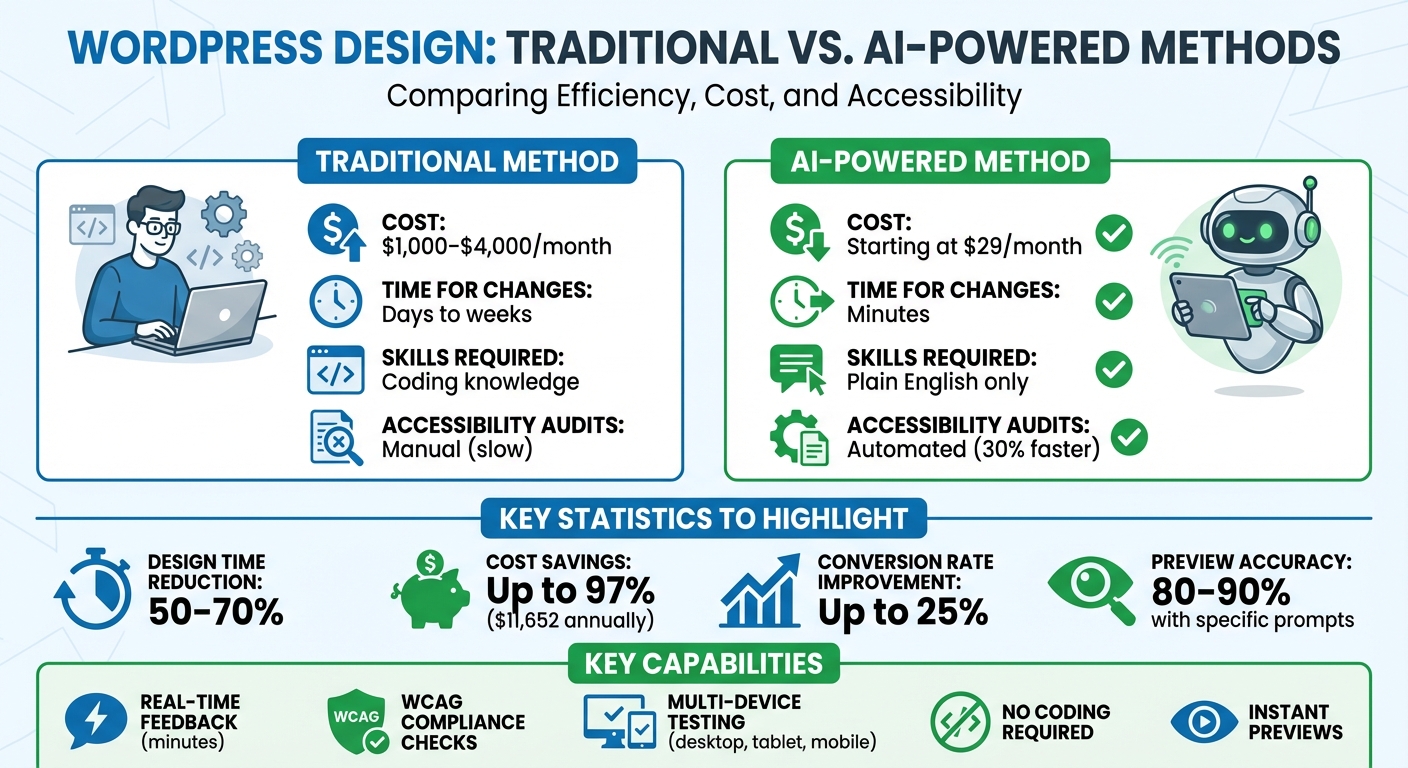
- Cost Savings: AI-powered design tools start at $29/month, compared to traditional costs of $1,000–$4,000/month.
- Device Testing: AI automatically checks your design across desktop, tablet, and mobile to prevent layout issues.
- No Coding Required: Use plain English to request changes, like “Make the buttons more visible” or “Add space between sections.”
With AI, you can manage your WordPress site efficiently, whether you're a beginner or a professional. Keep reading for step-by-step instructions on connecting AI tools, optimizing your design, and reviewing changes.
AI vs Traditional WordPress Design: Cost and Time Comparison
Get design feedback with AI (try this prompt)
sbb-itb-42d7c06
How AI Improves WordPress Design Feedback
AI is changing the way WordPress design feedback works by offering real-time analysis and actionable suggestions. Instead of relying on guesswork or waiting for feedback, AI evaluates your design against established standards and proposes specific changes you can make immediately. Take tools like Kintsu.ai, for example - they allow you to describe edits in plain language, like “increase header spacing by 30px and center-align the logo,” and the AI executes those changes in minutes without requiring any coding. These capabilities cover a range of areas, including layout, style, and content placement.
Real-Time Layout Adjustments
AI tools analyze your site's HTML and CSS to detect issues like poor spacing, misalignment, or inefficient layouts. Say your hero section only has 5px margins - AI might suggest increasing the padding to 40px on the top and bottom for a more balanced look. Some tools even integrate prompt generators directly into the editor, helping you draft layouts with optimized spacing, color palettes, and typography choices.
Automated visual QA is another major benefit. Before your site goes live, AI checks how your design performs across devices - desktop, tablet, and mobile - flagging problems like overlapping elements or alignment issues.
Style and Theme Optimization
AI doesn’t stop at layout fixes. It reviews your entire theme for visual consistency and accessibility. If your site uses clashing fonts or colors that fail accessibility standards, AI can suggest modern alternatives, like switching from Arial to Inter for better readability or adjusting your primary color from #007CBA to #1E40AF for improved contrast.
Accessibility is a key focus here. AI ensures that your color contrast ratios meet WCAG standards (at least 4.5:1), making your site easier to navigate for users with visual impairments. It also standardizes key design elements - like button styles, heading hierarchies, and spacing - to give your site a cohesive and polished appearance.
Visual and Content Placement Suggestions
AI evaluates how elements are positioned on your pages and how users interact with them. By studying user behavior, it can recommend moving call-to-action buttons to more effective locations, like from the footer to mid-page, or repositioning hero images above the fold. It might also suggest adjusting typography hierarchy - for example, setting H1 text at 48px and body text at 16px - for improved readability.
These changes aren’t just aesthetic - they can significantly boost engagement. Research shows that AI-optimized element placements can increase conversion rates by as much as 25% through predictive user behavior analysis. Additionally, AI refines your content structure by fixing heading hierarchies, adding missing alt text to images, and ensuring your key information is front and center. The result? A site that’s not only visually appealing but also guides visitors more effectively through your content.
Step-by-Step Guide: Using AI for WordPress Design Feedback
Connecting AI to Your WordPress Site
To start using AI for design feedback on your WordPress site, you'll need to set up a plugin connection. Head to your WordPress dashboard, click on Plugins > Add New, and search for the plugin associated with your AI tool. For instance, if you're using Kintsu.ai, there's a plugin tailored for that purpose. Once you've installed and activated it, securely authorize the connection using API keys or OAuth over HTTPS - your credentials stay private and protected.
After the connection is established, you can manage multiple websites from a single dashboard in a secure sandbox environment. This setup allows you to test AI-generated design suggestions without risking changes to your live site. Once everything is linked, you can start giving design commands using plain, everyday language.
Requesting Design Changes with Natural Language
With the connection in place, you can now request design tweaks without needing to write a single line of code. Instead, type out your instructions in plain English using a user-friendly design interface. For example, you can say, "Increase header height to 100px and add 20px padding to the logo", and the AI will generate a real-time preview of the changes.
The key to getting accurate results is providing clear and specific instructions. For example, a detailed request like "Align footer links left with 15px margins" typically produces 80–90% accurate previews. On the other hand, vague commands like "Make the layout better" may require several rounds of adjustments. To refine your instructions, use Discussion Mode, where you can collaborate with the AI, ensuring it fully grasps your vision before implementing changes.
Reviewing and Applying AI Suggestions
Once the AI generates previews of your requested changes, it’s time to review them. You’ll get side-by-side previews that let you compare your current design with the proposed updates. The editor also tests how the changes look across different devices and flags any alignment or responsiveness issues.
Take your time reviewing the updates. Check for improvements in accessibility, load times, and overall visual harmony. When you’re happy with the results, you can apply the changes using the "Accept All" button or select individual changes to implement. To ensure nothing breaks, the platform includes smart guardrails that alert you if a change could interfere with your theme or active plugins. Plus, every edit is saved in a version history, so you can roll back any changes instantly if something doesn’t work as expected - saving you the hassle of manual backups or troubleshooting.
Benefits of AI-Driven Design Feedback for WordPress Users
AI tools are transforming how WordPress users approach design, offering quicker revisions, improved accessibility, and user-friendly features for those without technical expertise.
Faster Design Iterations
Waiting days for design revisions is now a thing of the past. With AI-driven tools like Kintsu.ai, you can make changes and see previews almost instantly. This tool translates natural language prompts into layout adjustments in minutes, saving you the back-and-forth with developers or freelancers. What used to take days can now be achieved in a fraction of the time. This speed allows you to experiment with ideas, fine-tune details, and launch your site much faster. The ability to iterate quickly often results in a more polished and user-friendly website.
Accessibility and Usability Improvements
AI doesn’t just enhance the look of your site - it makes it more functional for everyone. Kintsu.ai identifies accessibility issues and suggests fixes to align with WCAG standards. According to user feedback, these automated checks can speed up compliance fixes by as much as 30% compared to manual audits. The tool also optimizes content placement and interactive elements, ensuring touch targets and typography are suitable for all devices, from desktops to smartphones. This combination of speed and usability improvements makes AI an invaluable tool for creating accessible, user-friendly designs.
Simplified Design for Non-Technical Users
For those who aren’t tech-savvy, AI-driven design feedback is a game changer. With Kintsu.ai, you don’t need to know a single line of code. The tool allows you to make real-time design updates using plain language commands. This levels the playing field, giving small business owners, bloggers, and solopreneurs the ability to manage and refine their sites without hiring costly developers. Experts estimate that AI-driven design feedback can cut design time by 50–70%, making it a practical solution for anyone looking to streamline their workflow.
Best Practices for Using AI in WordPress Design
To get the most out of AI tools in WordPress design, focus on clear communication, carefully review suggestions, and ensure your tools are always up-to-date. These steps help create precise and reliable design updates powered by AI.
Use Specific Prompts for Better Results
Clear instructions lead to better outcomes. Instead of vague requests like "Nothing works - fix it", provide detailed explanations. For example, say, "The homepage hero section has gone blank after the last edit". This gives the AI the context it needs to address the issue effectively.
When directing the AI, pinpoint specific areas of your site. Use phrases such as "On the homepage hero", "Only in the footer", or "On mobile only". If you're looking for design improvements, be descriptive: "Make the buttons more prominent and modern", "Increase spacing between sections for a cleaner look", or "Update the hero area to feel less cramped". For more sensitive sections, like checkout flows, include extra instructions like "proceed cautiously and detail your reasoning". You can also ask for a site audit or performance report before making changes, allowing for a more informed approach. These precise prompts work hand-in-hand with the AI's ability to provide immediate feedback.
Combine AI Recommendations with Manual Review
AI is a tool - not the final decision-maker. Use features like Discussion Mode to refine instructions and ensure the AI aligns with your brand's vision. Document your brand standards, including hex codes for colors, font families, and spacing guidelines, so the AI can follow them consistently. Always preview changes in a sandbox environment to catch potential issues before publishing.
Even after automated testing, manually review visual changes across desktop, tablet, and mobile devices to ensure everything looks as intended. Focus on making small, incremental updates rather than large-scale redesigns. Smaller changes are easier to test and reduce the chance of breaking your layout. Staying up-to-date with your tools also ensures these practices remain effective.
Keep AI Tools Updated
Updates unlock better features and protect your site. Regular updates ensure your AI tools can handle real-time adjustments and stay optimized. For instance, platforms like Kintsu.ai frequently release updates that include features like multi-language content editing, block pattern suggestions, and automated accessibility enhancements. Other updates include Smart Guardrails to prevent risky changes and Plugin Conflict Detection to maintain compatibility with WordPress plugins.
Look for "(New)" or "(Beta)" tags in the dashboard to explore new features quickly. Joining the Discord community can also keep you informed and provide a space to exchange ideas. Regularly check the "Feature Updates" section in the official documentation to stay informed about improvements in responsive design, styling, and layout tweaks. Since the AI is continually trained on the latest WordPress practices, keeping your tools updated ensures your design feedback remains effective and current.
Conclusion
AI is transforming how WordPress users handle design feedback. Instead of waiting days for developers to make adjustments, you can now describe changes in everyday language and see them implemented within minutes. Tools like Kintsu.ai make this possible by combining conversational interfaces with built-in safeguards, allowing both professionals and non-technical users to tweak layouts, refine styles, and enhance user experiences - all without touching a single line of code.
The advantages go beyond just speed. AI-powered feedback ensures your site maintains consistent branding, automatically addresses accessibility concerns for ADA compliance, and creates layouts that adapt seamlessly across desktops, tablets, and mobile devices. Features like sandbox testing let you experiment freely, knowing your live site won't be affected by risky changes. Plus, using AI for WordPress management can cut costs by up to 97%, saving over $11,652 annually.
To make the most of these tools, precision is key. Provide clear, detailed prompts to describe the changes you want and where they should be applied. Use discussion modes to refine your instructions before implementing updates, and always combine AI suggestions with manual reviews to catch any visual inconsistencies. Keeping your tools updated ensures access to the latest features, like multi-language editing, block pattern suggestions, and plugin conflict detection, helping you stay ahead in a competitive landscape.
FAQs
Will AI changes break my WordPress theme or plugins?
AI tools such as Kintsu.ai are crafted to help you safely adjust WordPress themes and plugins in real time. The best part? These changes are designed to be reversible, reducing the chances of causing issues with your site or its functionality.
How do I keep AI edits on-brand with my colors and fonts?
To keep AI edits aligned with your brand, Kintsu.ai offers design tools that let you set style rules for your brand’s colors, fonts, and other visual elements across your site. By documenting these brand standards, Kintsu.ai can automate and enforce them during edits. This ensures your website maintains a consistent visual identity - no technical skills needed.
Can AI help improve Core Web Vitals and load speed?
AI can play a big role in improving Core Web Vitals and speeding up load times for WordPress sites. For instance, tools like Kintsu.ai can make real-time adjustments to layouts, styles, and content through a conversational interface. This automation simplifies the process of fine-tuning your site for peak performance.
AI can also pinpoint and fix issues that slow your site down, like implementing lazy loading for images or optimizing code. The result? Faster load times, smoother responsiveness, and a boost in SEO rankings - key factors for creating a better user experience.