ADA Compliance with AI for WordPress
AI plugins automate ADA compliance for WordPress—adding alt text, fixing code, improving navigation, and running continuous scans to lower legal risk.
ADA Compliance with AI for WordPress
Website accessibility is a legal requirement in the U.S., and failing to comply with ADA standards can lead to lawsuits and costly settlements. AI tools are making it easier for WordPress site owners to meet these standards by automating time-consuming tasks like adding alt text, fixing code issues, and ensuring proper navigation. Here’s what you need to know:
- ADA Compliance: Websites must be accessible to people with disabilities, following WCAG 2.1 Level AA guidelines.
- Legal Risks: In 2024, over 4,000 ADA lawsuits were filed, with settlement costs starting at $5,000.
- Challenges: Manual audits can take 80+ hours, and many websites fail to meet basic accessibility standards.
- AI Solutions: Tools like Kintsu.ai and models like Google Gemini and OpenAI Whisper automate tasks, reduce costs by up to 90%, and maintain compliance with continuous monitoring.
- Key Benefits: AI fixes source code issues, improves user experience, and lowers legal risks without slowing down website performance.
With AI tools, WordPress users can simplify ADA compliance, save time, and avoid legal troubles - all while making their websites accessible to everyone.
AI Tools for WordPress ADA Compliance
Core Features of AI Accessibility Tools
AI accessibility tools have revolutionized the way compliance tasks are handled by automating what used to be time-consuming, manual processes. For example, AI-powered plugins can scan and fix code-level issues like missing ARIA landmarks, redundant alt text, or incorrect focus outlines - all without requiring users to dive into the source code. Through semantic analysis, these tools ensure that link text clearly describes its purpose and that page titles provide enough context for screen reader users to navigate effectively.
Some of the most advanced tools go even further, using generative AI models to tackle media accessibility on a large scale. These models can generate descriptive alt text and video captions in bulk, saving countless hours of manual work. They also enhance keyboard navigation by identifying non-interactive elements and automatically applying fixes, such as adding tabindex="0" or restoring visible focus outlines. In fact, research shows that scripts powered by GPT-4o achieve an impressive 87.18% detection rate for accessibility issues, with one validation test reporting 92.4% accuracy in assessments generated by AI. These capabilities create a smoother experience for users while ensuring compliance.
How AI Tools Help WordPress Users
For WordPress users, these AI tools translate into tangible benefits. Real-time corrections powered by AI can reduce web accessibility errors by up to 51%. This is especially helpful for small business owners who might lack technical expertise - features like one-click fixes for missing ARIA labels or skip links eliminate the need to hire developers.
Agencies managing multiple websites also gain a significant advantage. Many AI-driven tools offer continuous monitoring, with automated scans running every 24 hours to detect and address new violations as content evolves. Among the available options, Kintsu.ai stands out for its ability to simplify compliance management through an intuitive conversational interface.
How Kintsu.ai Supports ADA Compliance
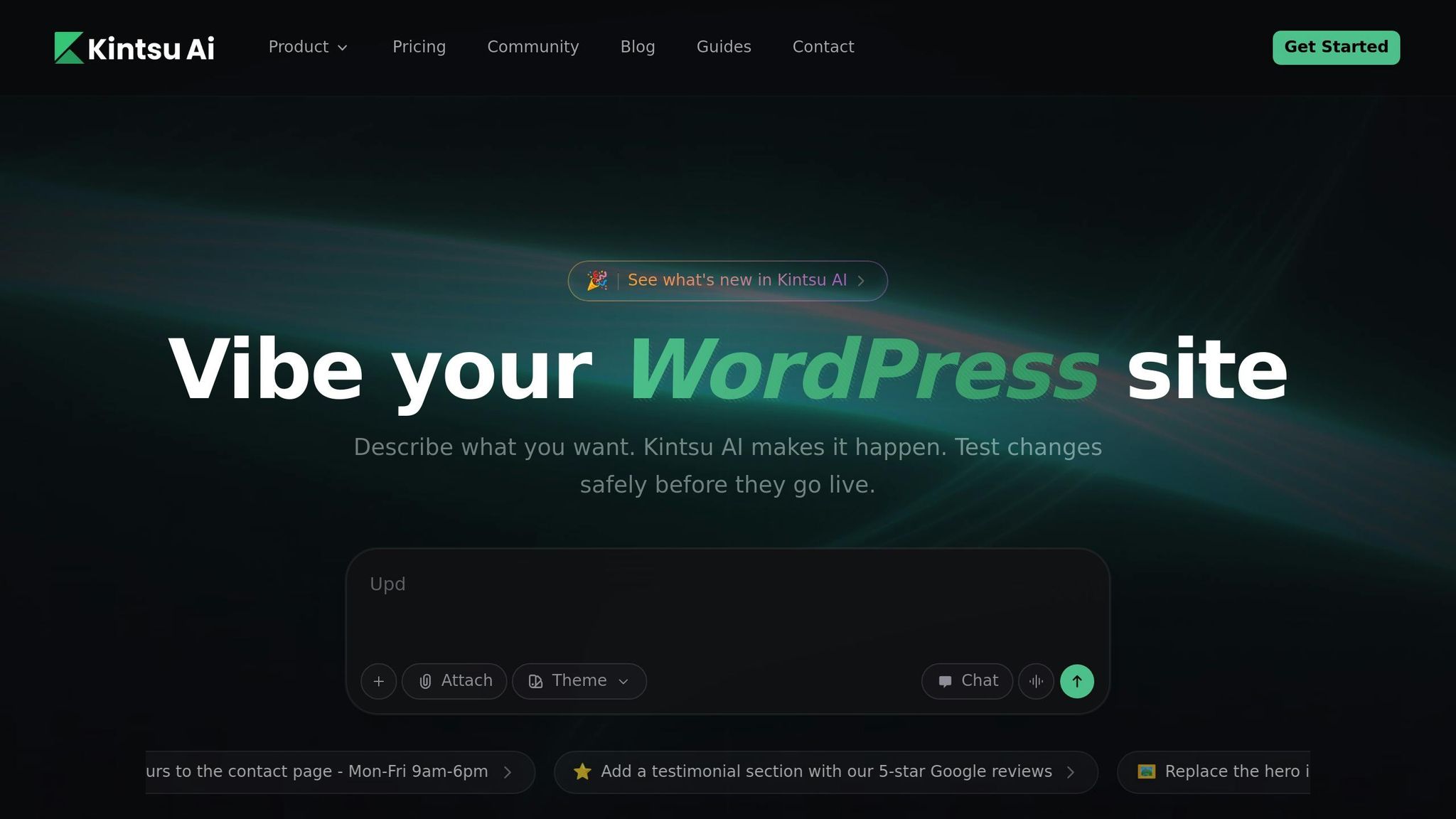
Kintsu.ai takes a unique approach to accessibility by making updates as simple as having a conversation. Instead of navigating through complex settings, users can rely on Kintsu.ai's conversational interface to manage WordPress accessibility tasks. Need to address a compliance issue? Just describe the change in plain language, and the AI takes care of the rest - no coding required.
This setup is particularly beneficial for agencies juggling multiple client sites or for individual creators managing their own WordPress properties. By removing technical barriers, Kintsu.ai streamlines compliance and ensures ongoing accessibility as new content is added or updated. It’s a game-changer for anyone looking to maintain ADA compliance effortlessly.
WordPress Accessibility Made Easy: Avoid $25K Lawsuits with This Plugin
Recent Research on AI and ADA Compliance
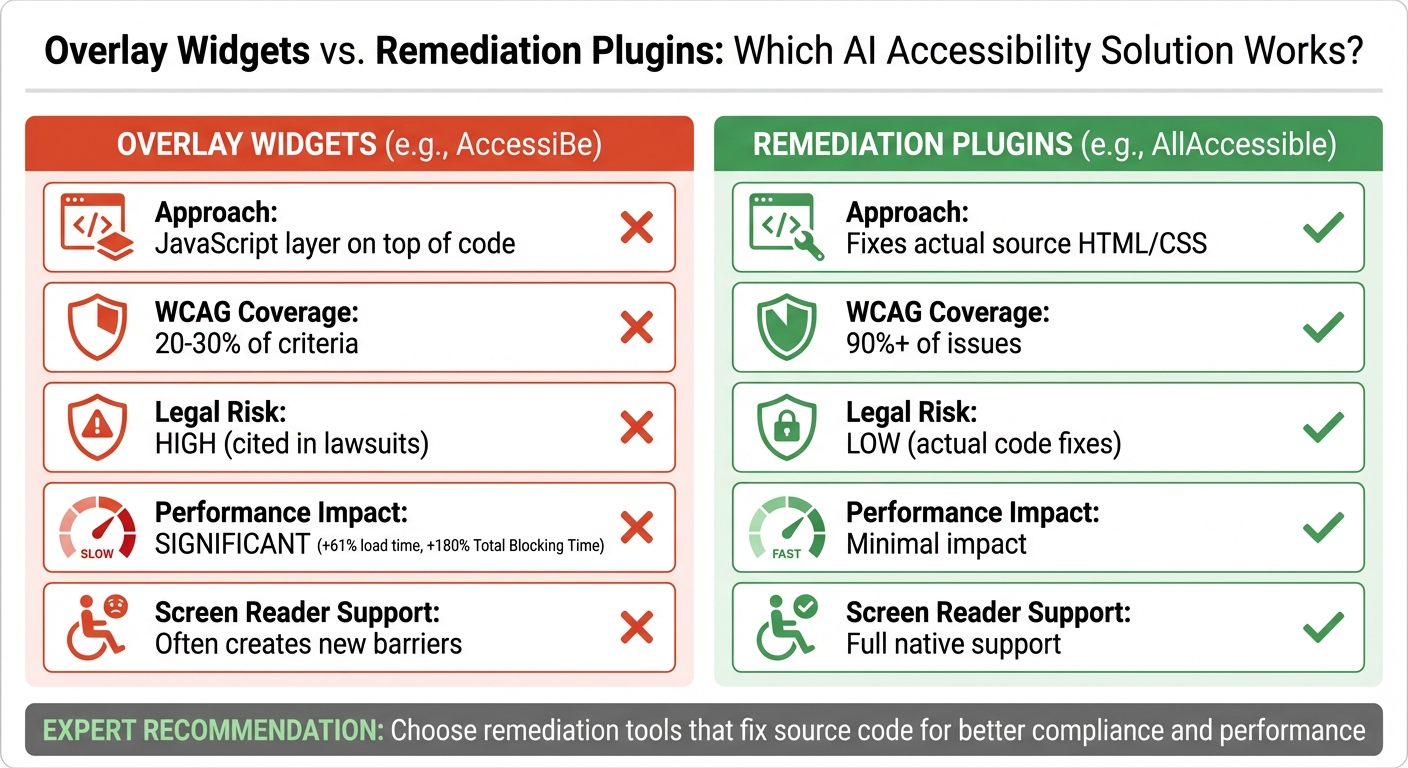
Overlay Widgets vs Remediation Plugins: AI Accessibility Tool Comparison
Study Results on AI-Driven Accessibility
Recent studies highlight how AI is reshaping website accessibility. For example, in 2025, researchers tested GPT-4o's ability to validate accessibility techniques that usually require manual review. The results were impressive: it achieved a 92.4% effectiveness rate in identifying WCAG violations and successes across 251 test cases. This included accurately assessing the quality of alt-text descriptions, rather than just confirming their presence.
Another study revealed that scripts based on large language models (LLMs) detected 87.18% of accessibility issues that traditional tools completely missed. These tools excel in tasks like semantic validation - evaluating whether link text clearly describes its purpose or if page titles provide enough context for screen reader users.
"The results demonstrate LLMs can augment automated accessibility testing to catch issues that pure software testing misses today." - Springer Research
From a legal standpoint, Deque Systems data shows that automated testing tools now identify 57.38% of accessibility issues across thousands of web pages - far surpassing the often-cited 20–30% coverage rate of older tools. These advancements have reduced error rates by 51% and lowered legal risks, which is critical given the 4,605 ADA lawsuits filed in 2024 alone.
These findings emphasize AI's growing importance in closing accessibility gaps, particularly for WordPress sites.
Comparison of AI Accessibility Tools
Looking deeper into the performance of AI accessibility tools, it becomes clear that their approaches and impacts vary significantly.
Not all tools operate the same way, and these differences directly affect compliance and user experience. A major distinction lies between overlay widgets (JavaScript layers) and remediation tools (direct source code fixes).
| Feature | Overlay Widgets (e.g., AccessiBe) | Remediation Plugins (e.g., AllAccessible) |
|---|---|---|
| Approach | JavaScript layer on top of code | Fixes actual source HTML/CSS |
| WCAG Coverage | ~20–30% of criteria | ~90%+ of issues |
| Legal Risk | High (cited in lawsuits) | Low (actual code fixes) |
| Performance Impact | Significant (+61% load time) | Minimal impact |
| Screen Reader Support | Often creates new barriers | Full native support |
The data confirms what accessibility experts have long warned about: overlay widgets can hurt performance, increasing Total Blocking Time by 180%, while failing to address the root code issues essential for legal compliance. On the other hand, AI-powered remediation tools that modify the underlying WordPress source code deliver more reliable legal protection and a smoother user experience - all without slowing down site performance.
sbb-itb-42d7c06
Best Practices for AI-Powered ADA Compliance on WordPress
Connecting AI Tools with WordPress Plugins
AI accessibility tools often integrate seamlessly with WordPress through specialized plugins. These plugins act as a bridge, connecting your site to the AI service. The process typically involves downloading a plugin from the WordPress directory and setting it up using API keys. For some, API key configuration is necessary to connect with third-party AI services.
Once installed, these tools can handle tasks like bulk operations across your media library. For instance, AI can automatically generate alt text for large collections of images. This feature is especially useful for WordPress sites with extensive archives of content.
When selecting integration methods, it's wise to choose plugins that directly modify your site's source code. These remediation plugins update the underlying HTML and CSS, addressing up to 90–100% of accessibility issues. In contrast, JavaScript overlay widgets often resolve only 10–20% of problems and can negatively impact site performance. Opting for source code modifications ensures more permanent and comprehensive accessibility fixes.
For users leveraging conversational interfaces like Kintsu.ai, the process becomes even simpler. Commands like "add alt text to all product images" or "adjust color contrast on navigation buttons" can be executed without technical know-how. This kind of integration complements AI-driven updates and makes compliance more approachable, forming a solid foundation for long-term accessibility efforts.
Using AI for Continuous Compliance Monitoring
Setting up your site for compliance is just the beginning - ongoing monitoring is essential to keep up as your content and structure evolve. Accessibility isn't a one-and-done task. Updates to WordPress themes, plugins, or content can unintentionally disrupt compliance, so regular checks are crucial. Some tools even run automated scans every 24 hours to catch new issues.
Real-time scanning plugins can integrate directly into the WordPress editor. These tools flag issues like skipped heading levels or missing alt text while you're creating content. Many plugins offer this type of functionality through tiered subscription plans.
To stay on top of accessibility, establish a testing schedule that combines both automated and manual reviews. For example:
- Run automated scans weekly.
- Test keyboard navigation monthly.
- Conduct full screen reader testing quarterly.
This approach ensures that technical errors, such as contrast issues, are identified by AI, while manual reviews confirm that alt text and other elements are accurate and meaningful. Given the strict legal and regulatory requirements surrounding accessibility, continuous monitoring isn't just recommended - it's essential.
"Accessibility is a journey, not a destination. The plugin gives you a strong foundation, but maintaining an accessible site requires continuous learning and regular testing." - AccessibleDocs
What's Next for AI in WordPress Accessibility
New AI Capabilities for Accessibility
As WordPress evolves, its approach to accessibility is taking a big step forward. Instead of just flagging issues for human review, the platform is moving toward an Agentic CMS model, where AI takes a more active role in managing accessibility. This includes performing audits, ensuring compliance, and even handling localization tasks autonomously.
The WordPress Core AI Team is at the forefront of this shift, integrating AI into the platform through tools like the WP AI Client and Abilities API. These innovations allow developers to interact with AI capabilities as seamlessly as they would query a database. Jason Adams, a contributor to the WordPress Core AI Team, captured the importance of this transformation:
"In order for AI to truly be a cornerstone of WordPress' next wave of success, AI has to be a win for the entire ecosystem... adoption by the ecosystem is not a nice to have, it's the most necessary goal."
AI is also becoming smarter and more versatile. Multimodal AI models like GPT-4o and Google Gemini are now capable of analyzing complex semantic structures. They can evaluate whether page titles are clear, interactive elements are labeled correctly, and content flows logically. Validation tests show these models are over 90% accurate in handling nuanced accessibility reviews.
Some of the tools already making waves include the AI Tabindex Manager, which fine-tunes DOM elements for better keyboard navigation, and OpenAI Whisper, which generates time-coded captions. Future updates could even include instant sign language avatars.
Another exciting development is the Workflows API, currently in progress. This feature will let users automate multiple AI tasks at once. For example, it could summarize a blog post, create alt text for images, and draft accessible email notifications - all in one streamlined process. Platforms like Kintsu.ai, which already let users make changes through conversational commands, show how intuitive and effective these advancements can be.
These tools and technologies are paving the way for a new standard in accessibility, making the web more inclusive and user-friendly.
Long-Term Impact of AI-Driven ADA Compliance
The impact of these advancements goes far beyond meeting legal requirements. With 95.9% of websites still failing to meet even basic ADA standards, the potential for improvement is massive. Companies that neglect accessibility are not just risking lawsuits - they're also losing out on an estimated $7 billion annually due to inaccessible digital experiences. AI-driven solutions could help reverse these trends.
The adoption of AI in accessibility is accelerating. By early 2026, over half of organizations (56%) are expected to integrate generative AI into their workflows, and 72% had already started using AI by early 2024. This shift is encouraging businesses to embed accessibility into their designs from the ground up, rather than addressing it as an afterthought. As Asim Mittal, Vice President of Engineering at Modus, put it:
"A lot of organizations try to address accessibility concerns after the fact... the cost of doing this is orders of magnitude greater than when you consider all these factors from the very beginning."
The legal stakes are also increasing. In 2024 alone, 4,605 ADA-related digital accessibility lawsuits were filed. Meanwhile, non-compliance with regulations like the EU AI Act could lead to hefty fines - up to €35 million or 7% of global revenue. AI-powered tools that can fix source code automatically offer businesses a much stronger legal defense compared to older overlay solutions.
Beyond compliance, AI is enabling personalized accessibility. Websites are beginning to offer features like motion-sensitivity settings, high-contrast modes, and adjustable font spacing. These AI-driven tools adapt interfaces to individual user needs, making sites more inclusive without requiring separate adaptations. Michael Stineman, Executive Vice President at Modus Agency, highlighted the potential:
"AI's capacity to automatically adjust the user interface for people with disabilities is potentially game-changing."
This shift is also reshaping how businesses view accessibility. As Netlynx Inc. pointed out:
"Accessibility is no longer considered compliance; it is a growth strategy."
With 1 in 4 U.S. adults living with a disability, creating accessible websites isn't just the right thing to do - it’s also a smart business move. Accessibility improves SEO, enhances user experience, and opens up access to a broader audience. AI-driven tools are setting the stage for a future where digital experiences are more inclusive, legally secure, and beneficial for everyone.
Conclusion
AI is reshaping how WordPress sites tackle ADA compliance, turning what was once a complex and expensive process into something much more manageable. With tools that can automatically generate alt text, fix code issues on the spot, and continuously monitor accessibility, site owners now have powerful options at their fingertips. Considering that 58.2% of home pages still lack alt text and fewer than 10% of websites are fully accessible, these advancements are arriving at a critical time.
On top of that, the way remediation is handled is also changing. AI tools that directly update HTML and CSS offer stronger legal protection while addressing over 90% of accessibility issues. It's worth noting that in 2024 alone, 4,605 ADA lawsuits were filed, highlighting the growing importance of compliance.
For WordPress users, platforms like Kintsu.ai are breaking down technical barriers. These tools allow users to make accessibility updates using conversational commands, making it easier for anyone - not just developers - to improve their websites. This aligns with a broader industry shift toward embedding accessibility into the design process from the beginning, rather than treating it as an afterthought.
The business case for accessibility is also clear. With 1 in 4 U.S. adults living with a disability, accessible websites can reach a vast audience. Add to that the benefits of continuous monitoring, which improves SEO, enhances user experience, and reduces long-term costs, and it’s easy to see why accessibility is more than just a legal requirement - it’s a smart growth strategy.
As AI technology advances with features like multimodal models, automated workflows, and personalized accessibility options, WordPress sites have an incredible chance to create inclusive digital experiences. The tools are here, the costs are reasonable (starting as low as $5 to $10 per month), and the advantages go far beyond compliance. Now is the time to embrace AI-driven accessibility.
FAQs
How can AI tools help WordPress sites comply with ADA standards?
AI tools make it easier to ensure your WordPress site aligns with ADA requirements by automating many accessibility-related tasks. For example, they can scan your website, generate precise alternative text for images, and pinpoint accessibility problems as they arise. This not only cuts down on manual work but also helps your site adhere to WCAG guidelines, improving usability for individuals with disabilities.
Beyond that, these tools often provide ongoing monitoring, alerting you to potential issues and, in some cases, offering or even implementing fixes automatically. By using AI, website owners can keep up with changing standards, maintain compliance more efficiently, and foster a more inclusive digital space.
What are the risks of not complying with ADA standards?
Failing to meet ADA standards can lead to serious consequences for your business. Websites that aren't accessible to individuals with disabilities may face lawsuits, steep fines, and even long-lasting harm to their reputation.
The rise in awareness around digital accessibility has made non-compliance a bigger target for legal actions. By ensuring your WordPress site adheres to ADA standards, you not only protect your business from these risks but also make your website more inclusive for everyone.
How does Kintsu.ai make managing website accessibility easier?
Kintsu.ai takes the hassle out of managing website accessibility by using AI to enable real-time updates to WordPress sites through a simple, conversational interface. Instead of diving into complex coding, you can just describe the changes you need - whether it’s fixing accessibility issues or tweaking content - and the tool handles the rest.
Some standout features include automated alt text generation for images and ensuring your site follows a proper semantic structure. These tools make it easier to meet ADA compliance standards without the usual time-consuming effort. Whether you're a seasoned web developer or a beginner, Kintsu.ai helps simplify accessibility improvements for everyone.