Common Accessibility Issues AI Fixes
AI automates fixes for alt text, contrast, headings, vague links, captions, and keyboard navigation to improve web accessibility.
Common Accessibility Issues AI Fixes
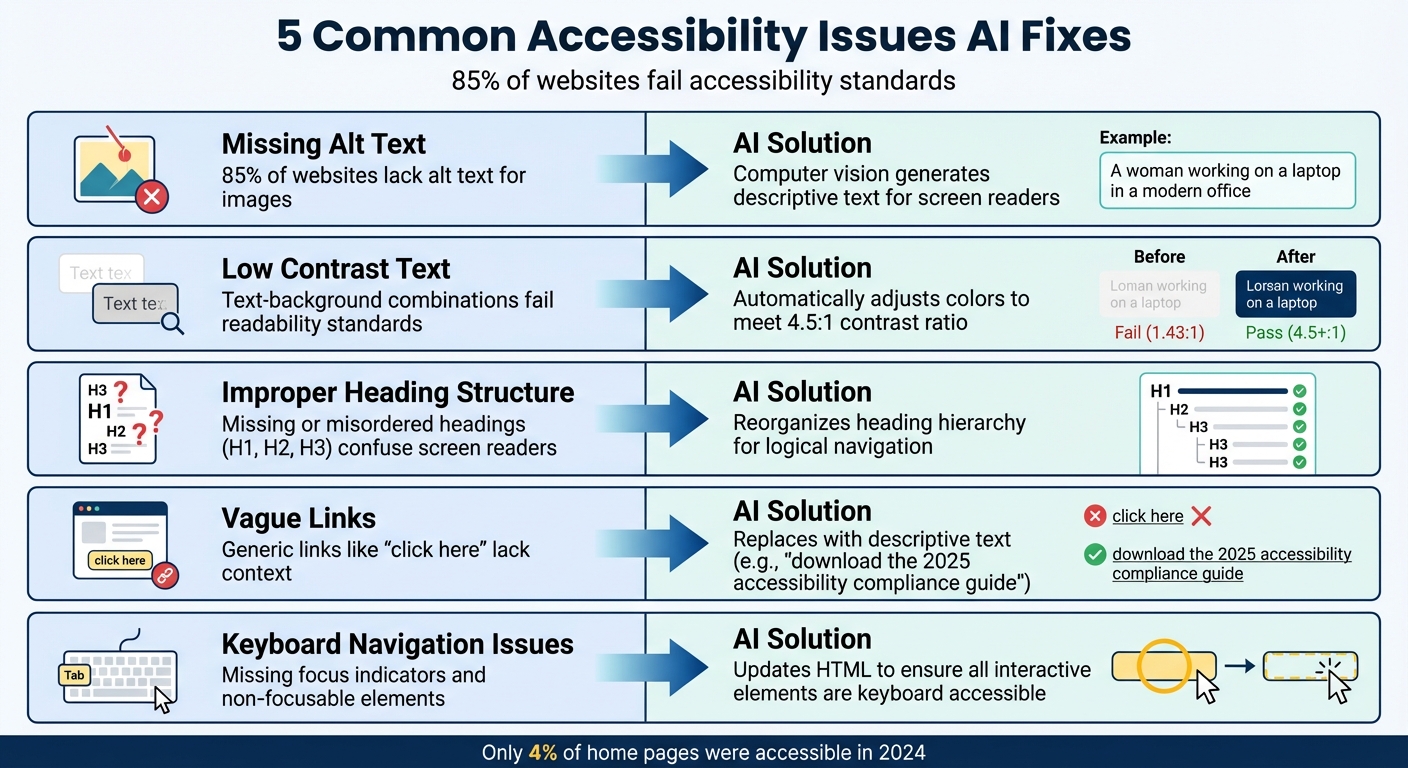
85% of websites fail accessibility standards, creating barriers for millions of users with disabilities. AI tools are stepping in to solve this problem by automating fixes for common issues like missing alt text, low contrast text, improper heading structures, vague links, and keyboard navigation problems.
Key takeaways:
- Missing Alt Text: AI generates descriptions for images, improving screen reader usability.
- Low Contrast Text: AI adjusts text-to-background contrast to meet readability standards.
- Improper Headings: AI reorganizes heading structures for better navigation.
- Vague Links: AI replaces generic links like "click here" with descriptive text.
- Keyboard Navigation: AI ensures all interactive elements are accessible via keyboard.
AI also tackles multimedia challenges like auto-generating captions for videos and tagging PDFs for screen readers. Tools like Kintsu.ai make these fixes simple with real-time scanning and no-code solutions, helping businesses avoid legal risks and improve usability.
5 Common Accessibility Issues and How AI Fixes Them
How to Use ChatGPT to Fix Website Accessibility Problems
Common Accessibility Problems and AI Solutions
Building on the challenges mentioned earlier, AI makes it easier to tackle specific accessibility issues that affect millions of users daily. These AI-powered tools can pinpoint and resolve problems without requiring any coding expertise. Let’s break down some common issues and how AI helps to solve them.
Missing Alt Text for Images
Missing alt text is one of the most widespread accessibility violations, impacting 85% of websites. Without it, screen readers can’t describe image content to visually impaired users.
AI steps in by using computer vision and image recognition technologies. These systems scan websites, detect images without alt attributes, and generate descriptive text based on their visual content. For instance, instead of leaving an image blank, AI might describe it as "a woman working on a laptop in a modern office." While these descriptions are often accurate, human review is sometimes necessary for context-specific images.
In 2025, tools like Microsoft's Seeing AI and the "Be My AI" feature from Be My Eyes have advanced these capabilities, offering detailed visual descriptions for individuals with visual impairments. Similarly, YouTube uses AI to create automatic captions, improving accessibility for deaf users.
Low Contrast Text
Low contrast between text and background makes content hard to read, especially for users with low vision or color blindness. AI tools can analyze text–background color combinations and adjust them to meet the minimum contrast ratio of 4.5:1, enhancing readability.
Improper Heading Structure
Headings provide a clear structure for content, helping users - and assistive technologies - navigate pages effectively. Proper hierarchy starts with H1 for main titles, H2 for major sections, and so on. Missing or misordered headings can disrupt this flow, confusing screen readers.
AI tools can review and reorganize heading structures to ensure logical hierarchy, making content easier to navigate without requiring manual audits.
Empty or Non-Descriptive Links
Links like "click here" or "read more" can be frustrating for screen reader users who rely on descriptive anchor text to understand link destinations. Vague or empty links leave users guessing.
AI can replace these generic labels with more informative text. For example, "click here" could become "download the 2025 accessibility compliance guide", providing clarity about the link’s purpose.
Lack of Keyboard Navigation
For users with motor impairments, keyboard navigation is essential. Barriers like keyboard traps, missing focus indicators, or non-focusable elements make websites difficult to use. According to WCAG’s Operable principle, navigation and interface components must function properly to accommodate keyboards and other assistive tools.
AI tools can detect and fix keyboard navigation issues by updating HTML to ensure all interactive elements are accessible. However, manual testing is still vital - tabbing through the site helps verify logical focus order and ensures every element is reachable.
An example from 2022 illustrates the importance of proper AI implementation. Patrick Perdue, a blind radio enthusiast, encountered an accessibility overlay that altered a website, hiding checkout and shopping cart buttons from his screen reader. This made completing his purchase impossible. Such cases underscore that while AI can remove barriers, poor implementation can create new ones. Quality matters.
AI Solutions for Multimedia Accessibility
AI doesn't just stop at improving text-based accessibility; it also tackles the challenges posed by multimedia content. Videos and PDFs, for example, often present unique obstacles. Without captions, videos can exclude users with hearing impairments, while untagged PDFs make navigation difficult for screen readers. AI steps in to bridge these gaps and make multimedia content more inclusive.
Auto-Generated Video Captions and Transcripts
AI leverages Automatic Speech Recognition (ASR) to convert spoken words into time-synchronized captions, making video content more accessible for everyone.
Recent studies highlight ASR's impressive progress, with some engines achieving up to 93% accuracy - a significant leap compared to YouTube's 60–70% accuracy range. Tools like Canva's Auto Caption Generator allow users to upload videos and instantly produce editable subtitles, making the process faster and easier.
However, AI-generated captions aren't perfect. Background noise, strong accents, technical terms, and non-speech audio can confuse the system. To meet WCAG Success Criterion 1.2.2, human review is often necessary to refine the captions and ensure they meet accessibility standards.
PDF Tagging for Accessibility
Just as ASR enhances video accessibility, AI-powered tools revolutionize how PDFs become usable for screen reader users. Untagged PDFs are a major hurdle because screen readers need structural tags - like headings, paragraphs, and tables - to interpret content correctly.
Adobe's PDF Accessibility Auto-Tag API, powered by Sensei AI, simplifies this by automatically identifying document elements, setting the proper reading order, and generating descriptive alt text for images. Similarly, in November 2025, Microsoft introduced generative AI in Word and PowerPoint (Version 2511, Build 19426.20168 or later) to create context-aware alt text for images, available to Microsoft 365 subscribers.
Alt text plays a critical role in ensuring screen reader users can fully engage with visual content. Traditionally, creating alt text manually can take anywhere from 2 to 5 minutes per image, with results varying widely. AI, on the other hand, can process thousands of images quickly and consistently. For organizations dealing with large PDF archives, this automation turns what was once a daunting task into something far more manageable.
sbb-itb-42d7c06
How Kintsu.ai Automates Accessibility Fixes
For WordPress site owners, tackling accessibility issues often means relying on developers to address specific challenges. Kintsu.ai changes the game by combining AI-powered detection with a conversational interface that allows users to resolve these issues - no coding required. This tool not only identifies accessibility barriers but also enables immediate fixes, helping maintain compliance and improve user experience. It’s a step toward seamless, automated oversight for your WordPress site.
Real-Time Accessibility Scans
Kintsu.ai continuously monitors WordPress sites to catch accessibility problems as they appear. The platform scans pages in real time, flagging issues like missing alt text, low contrast text, or improperly organized headings. This proactive approach reflects the growing emphasis on continuous monitoring in the industry, allowing site owners to address problems quickly.
While automated scans can detect around 25% of WCAG 2.1 AA issues, some challenges still require human judgment for more nuanced fixes. AI can handle many technical barriers, but it works best when paired with human oversight for comprehensive accessibility solutions.
Conversational Updates for Easy Fixes
One of Kintsu.ai’s standout features is its natural language interface, which lets users make updates without needing technical skills. For instance, a user can simply type, "add alt text to all product images" or "adjust text contrast on the homepage", and the AI takes care of the rest. This conversational approach eliminates the gap between identifying an issue and resolving it. What used to require coding expertise or developer assistance is now handled effortlessly, making the process faster and more efficient.
Manual Fixes vs. AI Automation
Kintsu.ai simplifies accessibility improvements by automating tasks that traditionally required technical know-how. Here’s a quick comparison:
| Task | Manual Approach | AI Automation with Kintsu.ai |
|---|---|---|
| Fixing color contrast issues | Needs CSS knowledge, testing tools, and manual edits | Describe the desired contrast, and AI applies changes |
| Correcting heading structure | Involves manual HTML review and adjustments across pages | A single request gets the job done |
| Ongoing accessibility monitoring | Relies on periodic manual audits | Offers continuous, real-time scanning |
Conclusion
Website accessibility goes beyond ticking legal boxes - it's about ensuring that digital spaces are inclusive and usable for everyone. Yet, as of 2024, only 4% of home pages were accessible. Traditional methods to fix accessibility issues often require significant technical skills, time, and ongoing manual audits - a burden many organizations struggle to manage. This is where AI tools are stepping in to change the game.
Take tools like Kintsu.ai, for example. They simplify accessibility by automating tasks that used to demand coding knowledge. Whether it's generating alt text or adjusting color contrasts, these tools tackle technical challenges with straightforward, conversational commands. This shift makes accessibility more accessible - businesses no longer need a team of developers to ensure their websites meet compliance standards.
Real-time scanning offered by these tools also helps catch issues as they arise, reducing the chances of costly, long-term fixes.
For WordPress users, Kintsu.ai is a game-changer. It bridges the gap between expensive developer hours and accessibility shortfalls by providing automated, no-code solutions. The outcome? Quicker compliance, reduced legal risks, and websites that genuinely cater to all users.
FAQs
How can AI make websites more accessible for visually impaired users?
AI is transforming website accessibility for visually impaired users by automating tasks and offering real-time solutions. For instance, AI can create precise, context-sensitive alt text for images, enabling screen readers to provide meaningful descriptions without needing manual input. It also detects and resolves issues like low-contrast color schemes or broken ARIA labels, helping websites meet accessibility standards more effectively.
Beyond these basics, AI enhances screen readers by delivering natural-language descriptions for complex visuals like charts or infographics. It even lets users interact with these visuals by asking questions such as, "What information does this chart convey?" This approach makes the experience more tailored and inclusive.
Tools like Kintsu.ai go further by empowering website owners to implement accessibility updates - like adjusting color contrast or adding alt text - instantly and without coding knowledge. These updates align with guidelines such as WCAG 2.2, ensuring visually impaired users can access valuable content seamlessly across devices.
How does AI improve website accessibility in real time?
AI-driven tools are transforming how websites handle accessibility by streamlining the process of identifying and addressing issues. These tools can scan websites in real-time to detect problems like missing alt text, insufficient color contrast, or broken ARIA labels. When an issue is spotted, it’s flagged immediately, giving website owners the chance to resolve it quickly - helping to prevent user frustration or potential violations of standards like the ADA or WCAG.
What’s more, AI simplifies tasks that once required significant time and expertise. For instance, it can automatically generate alt text or adjust color contrast, cutting down on both effort and cost. Take Kintsu.ai as an example: this tool lets WordPress users describe updates in plain language, and the AI takes care of implementing the fixes right away. The result? A more inclusive experience for users while keeping the site in line with accessibility requirements.
Why do AI-generated accessibility solutions still need human oversight?
AI tools are great for tackling common accessibility problems quickly. They can handle tasks like adding missing alt text, fixing color contrast issues, and generating captions, which can make the initial steps of improving accessibility faster and more cost-effective. But when it comes to meeting accessibility standards like WCAG 2.2, human input is still essential. These standards often require judgment calls, testing with assistive technologies, and a deeper understanding of context to ensure fixes are both accurate and effective.
For instance, AI might misinterpret the purpose of an image or make changes that unintentionally disrupt how a website functions. This is where human review becomes crucial - it catches those subtle issues and ensures the site works well for everyone, including users who depend on screen readers. By combining AI's efficiency with the expertise of human oversight, you can maintain compliance and create a smoother, more inclusive experience for all users.