WordPress.com AI Assistant vs Kintsu.ai: Which AI Editor Works for YOUR WordPress Site?
Compare WordPress.com's built-in AI (Business plan, block themes, live edits) with Kintsu.ai — a flexible, sandboxed AI editor for self-hosted WordPress sites.
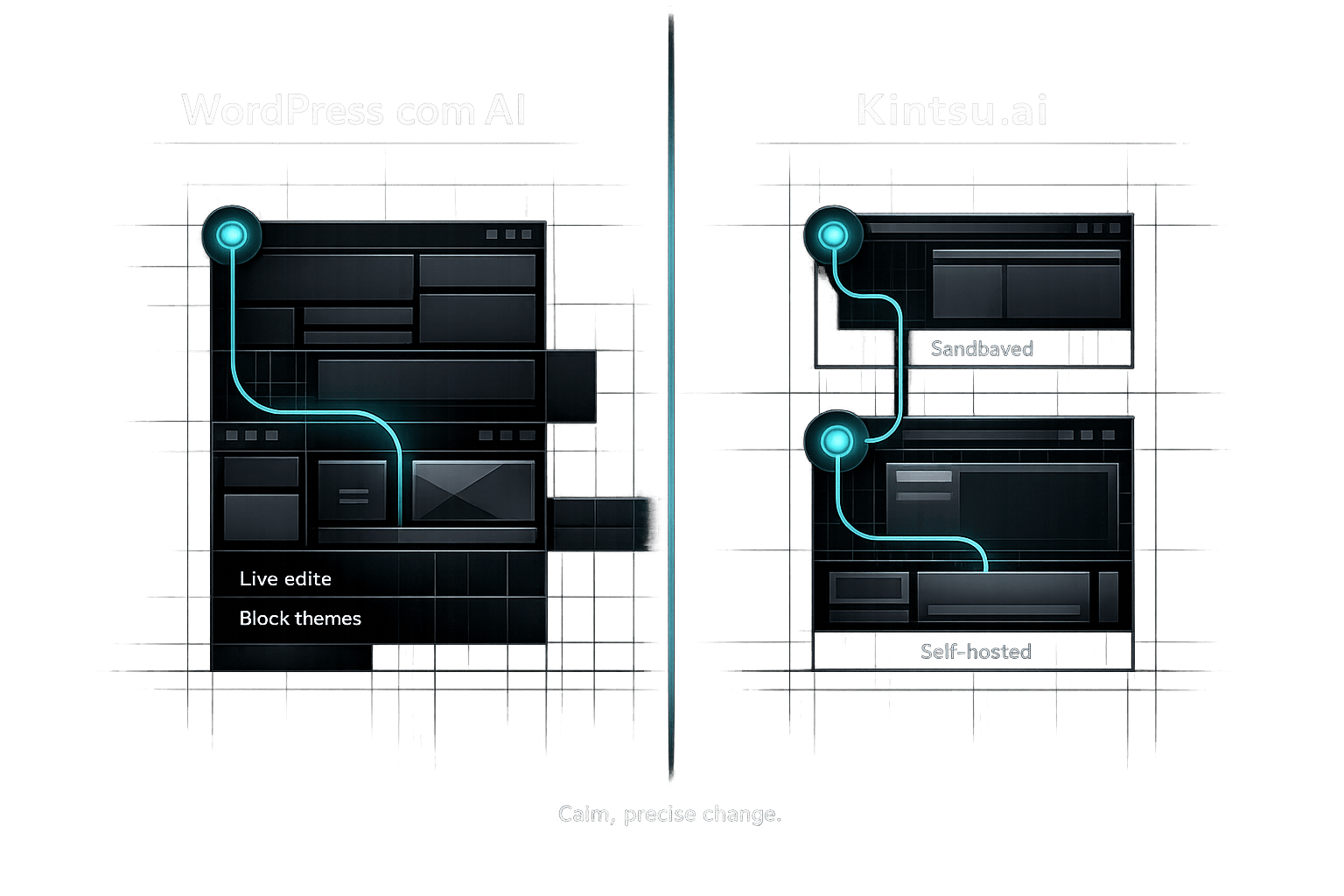
WordPress.com AI Assistant vs Kintsu.ai: Which AI Editor Works for YOUR WordPress Site?
Choosing between WordPress.com AI Assistant and Kintsu.ai depends on your hosting setup and site needs.
-
WordPress.com AI Assistant:
- Only works with WordPress.com Business ($25/month) or Commerce plans.
- Integrated into the Block Editor for live site editing.
- Best for users building or managing sites within the WordPress.com ecosystem.
-
Kintsu.ai:
- Compatible with any self-hosted WordPress.org site.
- Offers a sandbox for previewing changes before publishing.
- Ideal for users who need flexibility with hosting, themes, and plugins.
Quick Comparison:
| Feature | WordPress.com AI Assistant | Kintsu.ai |
|---|---|---|
| Hosting Requirement | WordPress.com only | Works with any host |
| Primary Use Case | Building & editing sites | Managing & updating existing sites |
| Real-Time Updates | Direct edits on live site | Sandbox preview before publishing |
| Pricing | $25/month (Business Plan) | Starts at $24/month (Builder Plan) |
| Theme Compatibility | Block themes only | Block & classic themes supported |
If you're tied to WordPress.com hosting, the AI Assistant is a natural choice. For self-hosted WordPress sites, Kintsu.ai offers more flexibility and control.
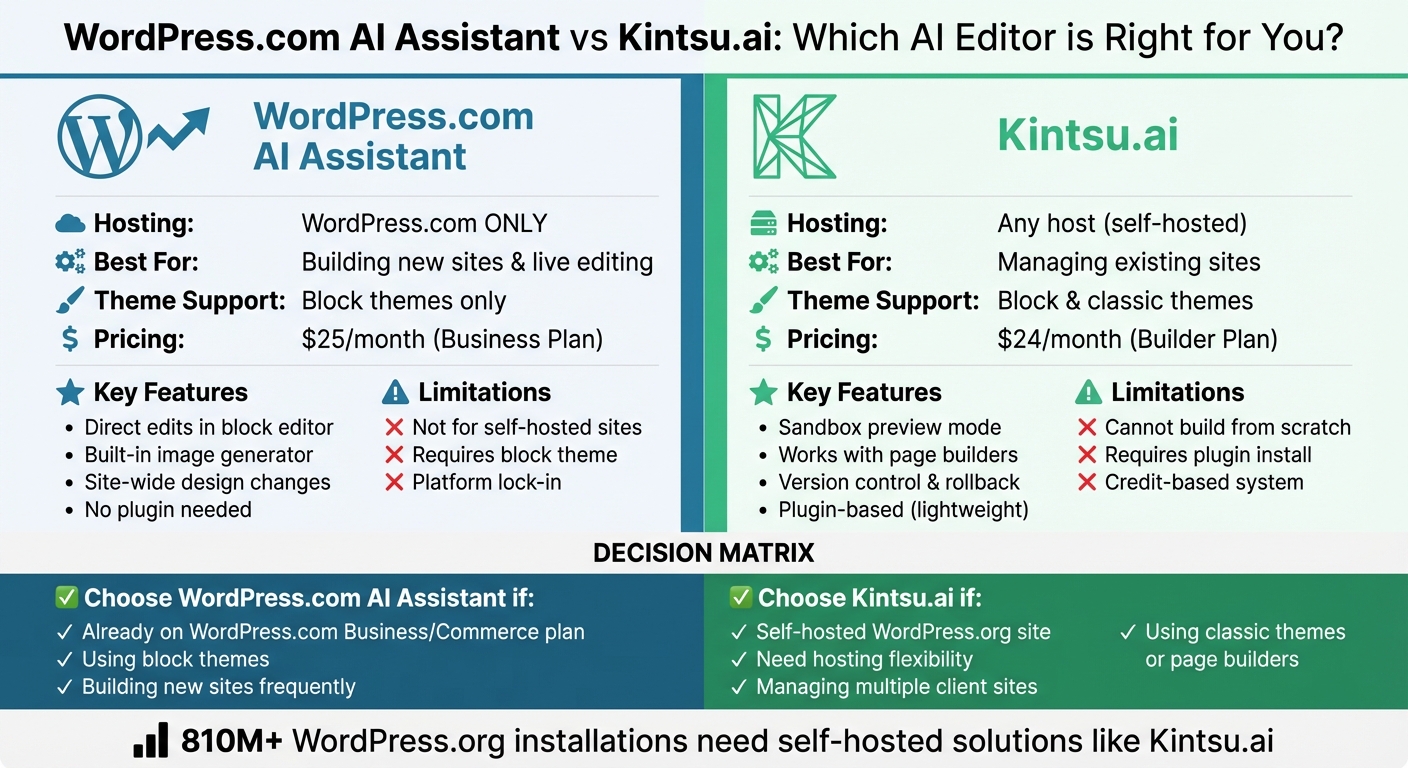
WordPress.com AI Assistant vs Kintsu.ai: Feature and Pricing Comparison
What Is WordPress.com AI Assistant?
The WordPress.com AI Assistant, launched in February 2026, is a built-in tool designed to simplify site management through natural language commands. It works seamlessly within your editing workflow, understanding your site's content and layout to make changes without requiring you to jump between platforms.
"The WordPress AI Assistant works inside your site. It understands your content and layout and can take action where you're already building - no copy-pasting, no prompt engineering, and no code to figure out what to do with." - Ronnie Burt, WordPress.com
This assistant integrates directly into the Block Editor, Media Library, and Block Notes, allowing you to issue commands like "Add a testimonials section" or "Make this image black and white", which it executes automatically. To get started, activate the feature from the AI Tools section in your dashboard. However, it's important to note that full functionality requires a block theme. Users with classic themes will be limited to AI tools in the Media Library.
Features of WordPress.com AI Assistant
This tool is packed with features that handle tasks across design, content, and media management. Here's a glimpse of what it can do:
- Adjust site-wide color palettes and font pairings.
- Modify layouts and rewrite text for different tones.
- Translate content into multiple languages.
- Generate page titles, create images from text prompts, and edit images by replacing objects or applying filters.
The Block Notes feature adds another layer of convenience, enabling users to type "@ai" to fact-check content or brainstorm ideas directly in the editor. This tight integration streamlines tasks for users working within the WordPress.com ecosystem.
"The assistant works alongside you inside the editor to write content, refine layouts, adjust design, and navigate WordPress, with image generation and editing built into the Media Library." - WordPress.com
It can also handle complex, multi-step requests by breaking them into manageable actions. For example, you can ask it to "Open my About page" or even request WordPress-specific help documentation.
WordPress.com AI Assistant Limitations
The assistant is available only with WordPress.com Business ($25/month) and Commerce ($45/month) plans. It does not support self-hosted WordPress.org sites.
This limitation arises because the tool depends on WordPress.com's managed infrastructure and the proprietary Model Context Protocol (MCP), which is optimized exclusively for their hosted environment. WordPress.com is the first platform to offer MCP with OAuth integration by default, but this feature isn't extended to self-hosted installations.
Additionally, for the assistant to work fully within the editor, your site must use a block theme. If you're on a classic theme, you'll only have access to the AI-powered Media Library features. If you're considering upgrading to a Business plan for this tool, double-check that your site uses a block-based theme to unlock its full potential.
sbb-itb-42d7c06
What Is Kintsu.ai?
Kintsu.ai is an AI-driven platform designed to help you make changes to your existing WordPress site using natural language commands. Want to tweak the homepage text, change button colors, or adjust the layout of your pricing table? Just tell the AI, and it handles the rest.
What sets Kintsu.ai apart? It works with any self-hosted WordPress.org site, no matter your hosting provider (like WP Engine, Kinsta, or Bluehost), theme (custom, Divi, Elementor, or others), or plugins. Integration is simple - just install a lightweight plugin that uses standard REST APIs.
"Kintsu.ai works within your site's existing themes, page builders, and plugins to ensure edits respect your structure." - Kintsu.ai
This tool is tailored for managing and updating existing sites, not building new ones. Trusted by over 500 WordPress creators, it offers more than 25 AI-powered features for conversational editing, site management, and design. The sections below explore its capabilities and why it’s a great fit for self-hosted WordPress sites.
Features of Kintsu.ai
Kintsu.ai enables real-time edits to your site’s content and design through simple, conversational commands. You can ask it to adjust tone, fix accessibility issues like missing alt tags, update WooCommerce product descriptions, or refine layouts - all without coding.
One standout feature is its "preview-first" workflow, which applies changes to a sandbox environment before they go live. This ensures you can review and approve edits before they’re published to your production site. Plus, the AI is page-aware, meaning it understands your site’s structure and can target specific sections, like “the FAQ section on the pricing page”.
Kintsu.ai also includes smart guardrails that analyze your active themes, page builders, and plugins (like Gutenberg, Elementor, or Divi). These guardrails help ensure edits are safe and flag potential conflicts.
Other features include version control, which tracks individual changes so you can roll back specific edits without undoing other progress. It also supports multi-language editing, integrates with WooCommerce, and can automatically fix accessibility issues to meet WCAG standards. Together, these tools make Kintsu.ai a powerful solution for site management.
Why Kintsu.ai Works for Self-Hosted Sites
Kintsu.ai is designed with flexibility in mind, making it ideal for self-hosted WordPress.org sites. Unlike hosted AI tools, it connects via standard REST APIs, so it doesn’t require special server configurations or affect your site’s speed or performance.
You retain full control and ownership of your site and data. There’s no platform lock-in, no hosting limitations, and no need to overhaul your current setup. Whether you’re running a custom theme, premium plugins, or a WooCommerce store, Kintsu.ai adapts to your environment instead of forcing you to adapt to it.
The plugin only connects during active editing sessions, remaining dormant otherwise. This setup ensures compatibility with various hosting environments while keeping your site secure and efficient.
Feature Comparison
Both tools offer conversational editing, but they take distinct approaches to achieve it. The WordPress.com AI Assistant integrates directly into the block editor, assisting with tasks like adjusting individual blocks, crafting content, and shaping layouts as you work. On the other hand, Kintsu.ai caters to self-hosted environments and operates on a broader scale. It can take vague instructions like "make this section feel more premium" and translate them into specific layout, copy, and styling updates. These contrasting methods highlight the unique strengths of each tool.
"The WordPress AI assistant is for when you are in the WordPress dashboard... [it] currently does better with design and targeting individual blocks in the editor." - Ronnie Burt, WordPress.com
Real-time updates are another area where these tools differ. The WordPress.com AI Assistant applies changes directly to your live site, whereas Kintsu.ai provides a sandbox preview, letting you safely review edits before making them live.
When it comes to design, the WordPress.com AI Assistant can create entire pages, sections, and even color palettes from scratch. It also includes a built-in image generator. Kintsu.ai, on the other hand, specializes in refining existing designs, focusing on alignment, spacing, and maintaining brand consistency across themes and page builders.
To break it down further, the table below compares their features side by side.
Feature Comparison Table
| Feature | WordPress.com AI Assistant | Kintsu.ai |
|---|---|---|
| Primary Use Case | Building new sites & basic editing | Managing & updating existing sites |
| Conversational Editing | Full chat for site-wide structure and content | Natural language for layout, copy, and styling |
| Real-time Updates | Direct edits in the block editor | Sandbox preview before pushing to live site |
| Content Generation | Writing, translating, and title optimization | Copy updates and multi-language management |
| Design Support | Generates fonts, colors, and new sections | Polishes layouts and ensures brand consistency |
| SEO Optimization | Title generation and basic feedback | AI suggestions for meta tags and hierarchy |
| Safety & Rollback | Basic WordPress revisions | Full version control and individual rollbacks |
| Hosting Requirement | Must be hosted on WordPress.com | Works with any host (Self-hosted or Managed) |
Pricing Comparison
The pricing differences between WordPress.com AI Assistant and Kintsu.ai stem from their hosting requirements and overall approach to integration. WordPress.com AI Assistant combines hosting with AI capabilities, whereas Kintsu.ai operates as a standalone tool that integrates with your existing hosting setup.
WordPress.com provides 20 free AI requests on its Free plan. For full functionality, you’ll need to upgrade to the Business plan at $25/month ($300/year). As Ronnie Burt from WordPress.com explains, "Sites on WordPress.com's Business or Commerce plans can now opt into the WordPress AI Assistant at no extra cost". If you’re running an e-commerce site, the Commerce plan at $45/month offers unlimited AI access, tailored for high-traffic online stores.
Kintsu.ai, on the other hand, uses a credit-based system. Tasks consume between 0.5 and 5 credits, depending on complexity. The Builder plan starts at $24/month (billed annually), providing 150 credits per month, along with features like edit history and rollback options. Unused credits roll over for one billing cycle on paid plans, and annual subscribers enjoy a 20% discount compared to monthly rates.
These pricing models highlight the core difference between the two tools. If you already have a self-hosted WordPress site (which typically costs $50–$150/year for hosting), Kintsu.ai’s $24/month plan adds AI functionality without requiring you to change your hosting setup. In contrast, WordPress.com locks you into its hosting ecosystem, with a minimum cost of $300/year to access plugins and the AI Assistant. This distinction underscores the trade-off between a hosted, all-in-one solution and a flexible, self-hosted approach.
Pricing Comparison Table
| Feature | WordPress.com AI Assistant | Kintsu.ai |
|---|---|---|
| Free Tier | $0 (20 requests total) | $0 (10 credits/month) |
| Entry-Level Paid | $25/mo Business Plan ($300/year) | $24/mo Builder Plan ($288/year) |
| Hosting Requirement | Must use WordPress.com hosting | Works with any host (e.g., Bluehost, SiteGround) |
| Plugin Support Cost | Included in $25/mo+ plans only | Works with existing plugins at any tier |
| Credit/Request System | Request-based (unlimited on paid plans) | Credit-based (0.5–5 credits per task) |
| Staging/Sandbox | Not included | Included in Agency ($65/mo) and Enterprise ($165/mo) |
| Rollback Features | Basic WordPress revisions | Full AI edit history and rollback (Builder+) |
| Annual Discount | Already reflected in pricing | 20% off for annual billing |
| Credit Rollover | N/A | Unused credits roll over one cycle (paid plans) |
| Money-Back Guarantee | N/A | 14-day refund policy |
Limitations and Compatibility Differences
The WordPress.com AI Assistant is exclusive to WordPress.com Business or Commerce plans, which start at $25/month. Unfortunately, this means it’s not available for the massive number of self-hosted WordPress.org sites (over 810 million installations). This restriction also affects compatibility with themes and overall customization. As Ronnie Burt from WordPress.com puts it, "The AI assistant works best with block themes. If you're using a classic theme, the AI assistant won't appear in the editor".
On the other hand, Kintsu.ai takes a more flexible approach. It works with any WordPress installation (version 5.9 and above), including both block and classic editors. It’s also compatible with popular page builders like Elementor and Divi. According to Kintsu.ai's FAQ, "Kintsu AI is compatible with virtually all WordPress hosting providers... As long as your hosting supports a standard WordPress installation, Kintsu AI will work".
While WordPress.com AI Assistant can create an entire site in just 60 seconds, it’s confined to WordPress.com’s ecosystem. Meanwhile, Kintsu.ai focuses on enhancing existing sites without disrupting your current hosting, themes, or plugins. This fundamental difference highlights the contrasting strengths of these tools: one prioritizes speed within a closed system, while the other emphasizes flexibility and compatibility for diverse setups.
Pros and Cons Table
| Tool | Pros | Cons |
|---|---|---|
| WordPress.com AI Assistant | Built into the dashboard; no plugin setup; can create full sites in 60 seconds. | Only available on WordPress.com Business or Commerce plans; incompatible with classic themes. |
| Kintsu.ai | Works with any hosting; supports both classic and block editors; compatible with all major page builders; includes staging for safe edits. | Cannot create a site from scratch; requires an existing site and plugin installation. |
Which Tool Should You Choose?
Your hosting setup plays a key role in deciding which tool fits your needs. As mentioned earlier, the WordPress.com AI Assistant is exclusive to WordPress.com Business or Commerce plans, while Kintsu.ai is compatible with any self-hosted WordPress.org site. Below, we'll break down when each tool is the better choice.
When to Use WordPress.com AI Assistant
If you're already using a WordPress.com Business or Commerce plan, the WordPress.com AI Assistant is a great choice. It integrates seamlessly into your dashboard, working directly within the block editor and Media Library. This means you can tweak layouts, rewrite content, or even generate images without needing to install third-party plugins or leave your site.
This tool shines when it comes to content-focused tasks. Whether you're rewriting paragraphs, translating text, or creating images, it’s designed to save time. In fact, one user shared that tasks that once took days were completed in just minutes.
However, it does have its limits. If you require more advanced structural changes or need compatibility with a wide range of plugins - especially when managing multiple hosting setups - this tool might not cover all your bases.
When to Use Kintsu.ai
For self-hosted WordPress.org users, Kintsu.ai offers unmatched flexibility. It works with any hosting provider and supports both block and classic editors, as well as popular page builders.
Freelancers and agencies managing multiple client sites will find Kintsu.ai particularly useful. Its Agency plan ($65/month for 10 sites) and Enterprise plan ($165/month for unlimited sites) include features like team roles, permissions, and multi-site management. Plus, its built-in staging environment ensures you can test changes safely before making them live.
Kintsu.ai is designed for more advanced tasks, such as fixing accessibility issues, optimizing responsive design, and identifying plugin conflicts. Since it processes AI externally, it’s a lightweight plugin that minimizes performance impact on your site. If you’re managing multiple sites or working across various hosting platforms, Kintsu.ai offers tools and flexibility that go beyond what the WordPress.com AI Assistant can provide.
Conclusion
Your hosting setup plays a key role in deciding which AI editor is the best fit for your WordPress editing needs.
The WordPress.com AI Assistant is tailored specifically for sites hosted on WordPress.com under the Business ($25/month) or Commerce plans. It integrates directly into the WordPress.com dashboard, providing a smooth editing experience. However, keep in mind that it only works with block themes .
On the other hand, Kintsu.ai is ideal for self-hosted WordPress sites. It’s compatible with Gutenberg and popular page builders like Elementor, Divi, WPBakery, and Beaver Builder, offering a level of flexibility that the WordPress.com AI Assistant doesn’t provide. Features like staging and full rollback add an extra layer of control and security . For users managing multiple sites, Kintsu.ai also offers Agency and Enterprise plans.
If you’re a WordPress.com user, the native AI tool integrates seamlessly into your platform. Meanwhile, self-hosted WordPress.org users - making up over 810 million sites - require a more adaptable solution. Select the tool that aligns with your hosting setup to simplify and enhance your WordPress editing experience.
FAQs
Can I use WordPress.com AI Assistant on a self-hosted WordPress.org site?
The WordPress.com AI Assistant is not available for self-hosted WordPress.org sites. It's built specifically for WordPress.com hosted sites and is accessible only on Business plans, starting at $25 per month. On the other hand, self-hosted WordPress.org sites - which power over 810 million websites worldwide - are not compatible with this tool. However, Kintsu.ai offers a solution that works effortlessly with any self-hosted WordPress.org site, no matter the hosting provider, theme, or plugins you use.
Do I need a block theme for WordPress.com AI Assistant to work in the editor?
Yes, the WordPress.com AI Assistant is designed to work exclusively with block themes. It’s specifically optimized for the block editor, meaning it won’t show up if you’re using a classic theme.
How does Kintsu.ai’s sandbox preview and rollback work before publishing changes?
Kintsu.ai provides a secure sandbox environment where you can test changes before making them live. This means you can preview edits without impacting your actual site. Plus, it offers granular rollback options, allowing you to undo specific changes without having to restore the entire site. When you're happy with the updates, you can publish them with confidence, knowing that previous versions are saved and can be restored effortlessly if necessary.