How to Make Website Changes in Plain English
Make website updates using plain-English commands: connect a plugin, describe changes, preview, and publish live without coding.
How to Make Website Changes in Plain English
Managing a WordPress website doesn’t have to be complicated. Kintsu.ai offers a simple solution: just describe the changes you want in plain English, and the AI handles the rest. For example, you can say, “Change the homepage headline to ‘Welcome to Our New Store’” or “Add a phone number field to the contact form.” No coding or technical knowledge is required.
Here’s how it works:
- Connect Kintsu.ai to your WordPress site: Install the plugin and link your site through the Kintsu.ai dashboard.
- Describe your changes: Type clear, simple instructions like “Make the background color white.”
- Preview and adjust: Review AI-generated previews before publishing.
- Publish updates: Apply changes live and test your site.
Kintsu.ai also simplifies tasks like updating content, rearranging layouts, and customizing design elements. It’s perfect for small business owners who want to save time and manage their websites without technical hassle. If you can describe it, Kintsu.ai can do it.
How Kintsu.ai Simplifies Website Updates
Kintsu.ai removes the technical hurdles of managing a website. You simply describe what you want to change in plain language, and the AI takes care of the rest.
For instance, you could type something like, "make the header blue" or "add a testimonials section below the pricing table", and the AI will implement the changes immediately. This straightforward process replaces the need to navigate complex menus or manually write code.
Why Kintsu.ai Works for Non-Technical Users
The platform's no-code design is a game-changer for those without technical skills. Whether you want to tweak text, adjust fonts, or update links, Kintsu.ai allows you to focus on your ideas while the AI handles the technical execution.
This is particularly helpful for small business owners and entrepreneurs who are often managing multiple tasks. It saves time and enables real-time updates, keeping your website fresh and engaging without requiring any technical expertise.
Main Features of Kintsu.ai for WordPress Management
Kintsu.ai is packed with practical tools to make managing your WordPress site easier. One standout feature is its ability to automatically apply local U.S. formats, such as displaying currency as $1,234.56, dates as 12/17/2025, and using imperial measurements. This ensures your website maintains a polished and locally relevant appearance. These features help create a smooth and professional experience for managing your WordPress site.
What You Need Before Using Kintsu.ai
To get started with Kintsu.ai, all you need is an active WordPress site with admin access and a stable internet connection. Once you’ve got those covered, you’re ready to prepare your site and set up your Kintsu.ai account.
Before diving in, make sure your WordPress core, themes, and plugins are all updated to their latest versions. Keeping everything updated helps avoid compatibility issues and software conflicts. Also, confirm that your site is using the Block Editor (Gutenberg) instead of the Classic Editor, as the latter may limit some features. You can check this in WordPress by navigating to Settings → Writing.
Preparing Your WordPress Site for Kintsu.ai
To ensure a smooth integration, take a moment to optimize your WordPress site. Start by reviewing your current plugins. Remove any that you don’t use and ensure the remaining ones are from trusted sources. This not only improves security but also minimizes the risk of conflicts when you integrate Kintsu.ai.
Keep in mind that AI-powered tools can sometimes affect site performance, especially if you’re on a basic shared hosting plan. While most standard hosting setups handle this without issues, it’s a good idea to monitor your site’s performance after integrating Kintsu.ai. If needed, you might want to explore hosting options with more resources.
Setting Up Your Kintsu.ai Account
To begin, head over to Kintsu.ai, sign up with your email, and verify your account. Once you’re in, you’ll find a user-friendly dashboard tailored for managing your WordPress sites.
The dashboard is straightforward, even if you’re new to AI tools. It’s designed with clarity in mind - offering simple options to connect your WordPress site. Instead of overwhelming you with tech jargon, the interface uses plain language, making it easy to navigate and get started without any hassle.
How to Make Website Changes in Plain English
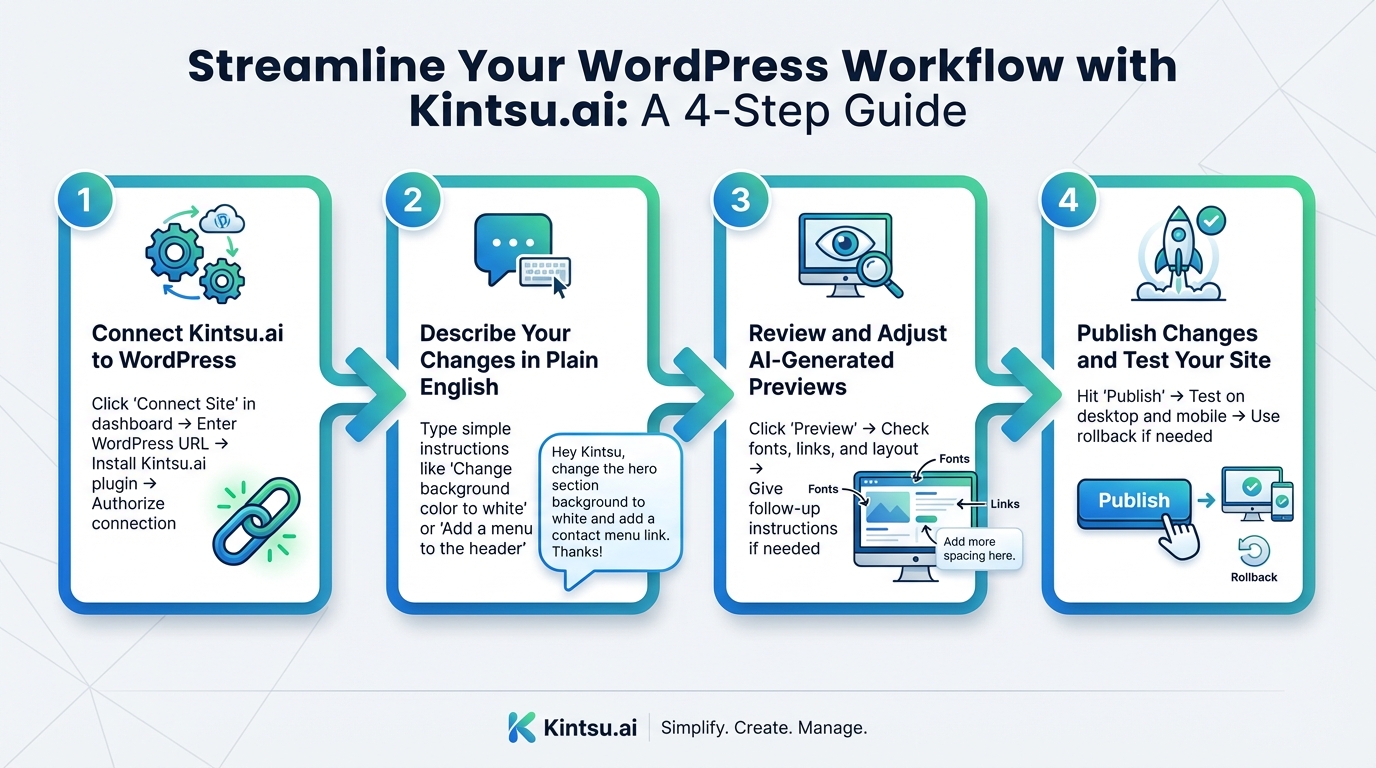
4-Step Process to Make WordPress Website Changes with Kintsu.ai
Once your account is ready and your site is set up, you can follow these four simple steps to make live updates using plain English.
Step 1: Connect Kintsu.ai to WordPress
Start by heading to your dashboard and clicking "Connect Site". Enter your WordPress URL, then go to your WordPress admin panel. Under Plugins → Add New, install and activate the Kintsu.ai plugin. Return to your Kintsu.ai dashboard and finish the integration wizard by authorizing the connection. A confirmation message will let you know your site is successfully linked.
Step 2: Describe Your Changes in Plain English
This is where Kintsu.ai makes things easy. Instead of navigating through WordPress menus or dealing with technical jargon, you just describe what you want in everyday language. The AI takes your plain English instructions and turns them into actionable steps.
For example, you can type something like "Change the background color to white" or "Add a menu to the header." Keeping your instructions short and clear helps the AI understand exactly what you mean.
Step 3: Review and Adjust AI-Generated Previews
Before anything goes live, Kintsu.ai provides a preview of your changes. Click "Preview" to see a real-time version of how your updates will look. Check that fonts, links, and layout align with your vision. If something feels off, you can tweak it by giving follow-up instructions like "Make the text bigger" or "Move that section to the left." This back-and-forth ensures the final result matches what you had in mind - without needing to touch a single line of code.
Step 4: Publish Changes and Test Your Site
Once you're satisfied with the preview, hit "Publish" to apply the updates to your live site. After publishing, test everything - links, forms, and layouts - on both desktop and mobile devices. If something doesn’t work as expected, you can use the rollback feature to undo the changes. This straightforward process empowers you to confidently manage your site updates without any technical hassle.
sbb-itb-42d7c06
Common Website Updates You Can Make with Kintsu.ai
With Kintsu.ai, making updates to your website becomes as simple as typing a few instructions. Forget the technical hassle - just describe what you want, and the AI takes care of the rest. From basic tweaks to more involved changes, here’s how you can streamline everyday tasks using plain English.
Updating Content and Layouts
Need to update your homepage headline, swap out outdated text, or rearrange page elements? It’s as easy as typing commands like, "Replace the About Us section text with this new paragraph" or "Move the testimonials above the pricing table." Kintsu.ai understands your instructions and applies them directly to your WordPress site.
Want to adjust the layout? Just say something like, "Make the sidebar narrower" or "Switch to a two-column layout on the Services page." You’ll see changes in real time, complete with previews, so you can ensure everything looks just right. Keeping your website visually appealing and up-to-date has never been this straightforward - and it’s key to delivering a great user experience while boosting your search engine rankings.
Even design updates, like refreshing your site’s look, are just as simple and don’t require any coding knowledge.
Customizing Website Design
Small design tweaks can make a big difference in how your site feels. With Kintsu.ai, you can easily change colors, fonts, or add visual elements. For example, you could type, "Change the button color to blue," "Use a larger font for headings," or "Add a border around the image gallery." The AI ensures these updates align seamlessly with your site’s overall style.
These quick and easy design changes let you experiment with new looks or better align your site with your brand identity - all without touching a single line of code.
| Update Type | Traditional Method | With Kintsu.ai |
|---|---|---|
| Change headline text | Navigate to the page editor, find and edit manually | Type "Change homepage headline to [new text]" |
| Rearrange page sections | Drag and drop blocks, then adjust spacing | Say "Move testimonials section above pricing" |
| Update button colors | Access theme customizer and find button settings | Say "Change all buttons to green" |
| Adjust mobile layout | Use responsive design tools to preview sizes | Type "Make sidebar full-width on mobile" |
With Kintsu.ai, what used to take several steps now takes just a single command, saving you time and effort while keeping your site polished and user-friendly.
Conclusion
Managing your WordPress site becomes a breeze with Kintsu.ai. By simply describing what you need in plain English, you can make updates that usually require coding skills or hours navigating through complicated dashboards. It removes the technical barriers of managing a site, allowing you to focus on keeping your website fresh, functional, and aligned with your vision.
This tool redefines how web design works for everyone. No need to hire a developer for minor adjustments or spend endless hours watching tutorials. Whether it’s updating content, changing layouts, or tweaking design elements, Kintsu.ai takes care of the technical details while you remain in charge of the creative direction. Its user-friendly approach ensures every update feels effortless and straightforward.
What’s more, the live preview feature adds an extra layer of confidence. You can see changes in real time before they go live, reducing the risk of mistakes and ensuring your site looks exactly how you want it to. No endless clicking through menus - just a seamless, efficient process that saves time and keeps your site running smoothly.
If you’ve been avoiding website updates because they seemed too complex or time-consuming, Kintsu.ai offers a refreshing alternative. With its conversational interface, there’s almost no learning curve. If you can describe your idea, you can make it happen. Discover a simpler way to manage WordPress with Kintsu.ai.
FAQs
How does Kintsu.ai ensure my website updates are accurate and match my instructions?
Kintsu.ai leverages cutting-edge AI to make sure your website updates are accurate and align perfectly with your instructions. By analyzing your input, tracking user behavior, and adjusting based on real-time feedback, it delivers updates that match your specific needs.
To keep things straightforward and transparent, Kintsu.ai offers features like approval checkpoints and audit logs. These tools give you complete oversight of changes, ensuring every update stays true to your vision while keeping the process simple and easy to manage.
What can I do if using Kintsu.ai slows down my website on shared hosting?
If using Kintsu.ai affects your website's performance on a shared hosting plan, the first step is to keep an eye on your site's performance. Use performance tracking tools to pinpoint any slowdowns or bottlenecks.
To boost your site's speed, focus on optimizing its setup. This might include compressing large image files, removing unnecessary plugins, and cleaning up unused or outdated code.
If these adjustments don’t resolve the issue, it might be time to upgrade to a higher-tier hosting plan. Alternatively, reach out to your hosting provider - they can help ensure your site has the resources it needs to function smoothly alongside Kintsu.ai.
Can Kintsu.ai handle advanced design changes or just simple updates?
Kintsu.ai makes managing your website a breeze, whether you're tweaking layouts, refreshing content, or adding a personal touch. Its user-friendly tools let you handle these updates without needing to know a single line of code.
What sets Kintsu.ai apart is its AI-driven capabilities. Even if you're not tech-savvy, you can tackle more intricate design changes effortlessly. This means you can build and customize professional, dynamic websites in real time, no technical background required.