How Machine Learning Personalizes WordPress Sites
Machine learning personalizes WordPress with real-time recommendations, automated SEO and chatbots, improving engagement, conversions, and revenue.
How Machine Learning Personalizes WordPress Sites
Machine learning transforms WordPress sites by creating tailored experiences for users. Instead of showing the same content to everyone, it uses data like browsing history, clicks, and user preferences to deliver dynamic, personalized content. This approach can boost e-commerce revenue by 15% and conversion rates by 35%. Here's how it works:
- Personalization: Suggests products, articles, or layouts based on user behavior (e.g., showing winter gear to users in colder regions).
- Automation: Handles repetitive tasks like tagging images, generating SEO meta tags, and managing site layouts.
- Tools: Plugins like Kintsu.ai, Jetpack, and WordLift make it easy to integrate machine learning into WordPress.
- Results Tracking: Metrics like bounce rates, conversions, and average order value help measure success.
How Edutopia is leveraging AI to power a hyper-personalized recommendation engine.

sbb-itb-42d7c06
How Machine Learning Improves User Experience on WordPress
Machine learning is changing the game for WordPress by turning static pages into dynamic, user-focused experiences. By analyzing data like pages visited, time spent, and user interactions, these algorithms uncover individual preferences and deliver personalized content in real time. As users interact with a site, the experience adapts on the fly to better match their needs and interests.
It doesn’t stop there. Machine learning also taps into contextual signals like geolocation, device type, referral source, and browsing history to fine-tune the interface and content. For example, Natural Language Processing (NLP) goes beyond basic keyword matching to understand search intent. So, if someone searches for "denim", they might also see results for "jeans".
Even the layout of a page can be adjusted dynamically. Machine learning analyzes user behavior - like where they click - and adapts elements such as images, navigation, and overall structure. A returning visitor looking for premium products might see a sleek, high-end layout, while a first-time user could be greeted with a simpler, beginner-friendly design. These capabilities also power real-time recommendations, making the user experience seamless and engaging.
Data Sources for Machine Learning
For this level of personalization, machine learning models rely on various data sources:
- Browsing history: Tracks the sequence of pages a user visits.
- Interaction patterns: Includes clicks, shares, comments, and time spent on specific sections.
- Demographic information: Helps tailor content to specific user groups.
- Referral sources: Identifies how visitors found the site and what they might be looking for.
- Contextual data: Such as device type, location, and session behavior, all of which refine content delivery.
Real Examples of Personalization
The impact of machine learning on WordPress is evident in real-world applications. For instance, in e-commerce, algorithms analyze search history, past purchases, and user demographics to recommend products. This approach has been shown to boost conversion rates by up to 35%. Similarly, dynamic landing pages tailored to visitor profiles can increase user engagement by 20%.
Educational websites use machine learning to assess a user’s skill level and suggest suitable courses or modules. Blogs and content platforms analyze reading patterns to recommend relevant posts, keeping users engaged and reducing bounce rates. AI-powered chatbots also play a role, providing instant, context-aware responses by drawing on previous interactions.
Platforms like Kintsu.ai make these advanced capabilities accessible, enabling WordPress site managers to implement real-time personalization without needing deep technical skills.
Steps to Add Machine Learning to WordPress Sites
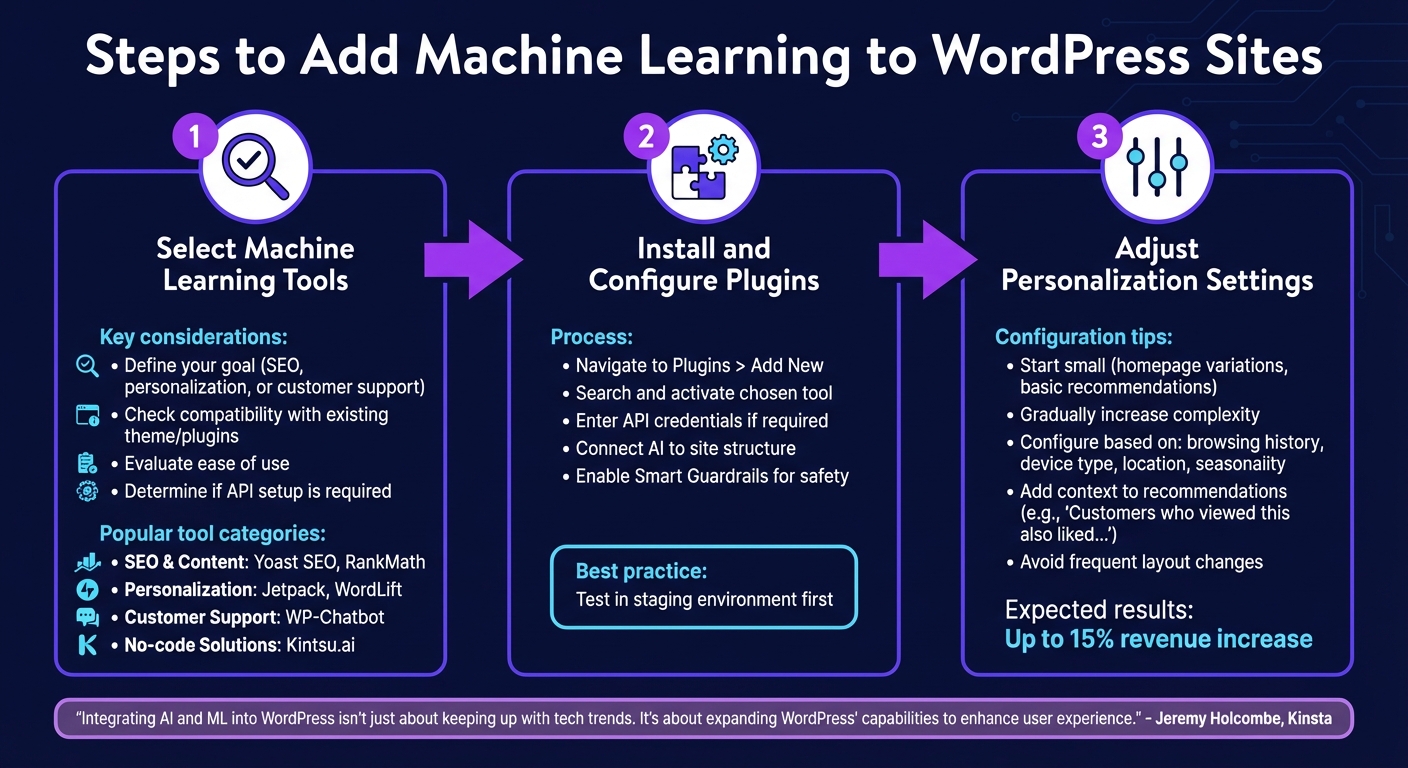
3-Step Process to Implement Machine Learning on WordPress Sites
Selecting Machine Learning Tools
The first step in integrating machine learning into your WordPress site is deciding what you want it to achieve. For SEO and content optimization, tools like Yoast SEO or RankMath offer AI-driven features like readability tips and schema markup. If you're aiming for personalization and product recommendations, plugins like Jetpack or WordLift analyze user behavior to deliver tailored suggestions. Need round-the-clock customer support? AI-powered chatbots, such as WP-Chatbot, can provide personalized responses effortlessly.
For those without technical expertise, platforms like Kintsu.ai make implementation even easier. Instead of coding, you simply describe your desired outcome - something like "make the homepage hero feel more premium" - and the AI takes care of the design and layout adjustments.
"Integrating Artificial Intelligence (AI) and Machine Learning (ML) models into your WordPress website isn't just about keeping up with the latest tech advancements and trends. It's about expanding WordPress' capabilities to enhance the user experience." - Jeremy Holcombe, Senior Editor, Kinsta
When choosing your tools, keep in mind factors like compatibility with your current theme and plugins, ease of use, and whether the tool requires manual API key setup. Some plugins handle API connections automatically, while others may need you to input credentials manually.
Once you've picked the right tools, you can install and configure them using WordPress's plugin system.
Installing and Setting Up Plugins
To install your chosen plugin, navigate to Plugins > Add New, search for the tool, and activate it. If API connections are required, enter your credentials in the plugin’s settings, typically found in a new menu item in your dashboard sidebar.
For tools like Kintsu.ai, setup involves connecting the AI to your site’s structure. After activation, you can use the Builder Chat to make conversational edits. The system includes Smart Guardrails to prevent risky changes, such as those that could disrupt your theme or harm your conversion rates. These guardrails suggest safer alternatives instead.
It’s always a good idea to test new tools in a staging environment, especially on business-critical websites. This allows you to ensure changes work seamlessly with your current setup before going live. Many hosting providers offer one-click staging site creation, and tools like Kintsu.ai include "Safe edit pipelines" to let you preview changes in a controlled environment.
Adjusting Personalization Settings
Once your plugins are installed, fine-tune their personalization settings to align with your site’s goals. Start small - test homepage variations or basic product recommendations - and gradually increase complexity as you see results. For example, on an e-commerce site, you can configure recommendations to show products based on a user’s browsing history, a strategy that has been shown to increase revenue by up to 15%.
To optimize further, consider factors like seasonality, device type, and user location. Machine learning excels at refining content within your user interface, but avoid frequent layout changes, as these can disrupt navigation and reduce usability. When displaying personalized recommendations, add context like "Customers who viewed this also liked..." to help users understand the logic behind their suggestions.
Tracking Machine Learning Personalization Results
Once you've activated personalization, it's crucial to monitor its performance. This helps confirm its effectiveness and keeps things from getting unnecessarily complicated.
Metrics for Personalization Performance
Start by focusing on engagement metrics like time on site, page views per session, and bounce rate. These numbers reveal how users interact with your personalized content. For example, a lower bounce rate often means your personalization efforts are hitting the mark. Next, track conversion metrics - actions like newsletter sign-ups, form submissions, or purchases - that align with your business goals.
For e-commerce platforms, revenue metrics such as Average Order Value (AOV) and Average Revenue Per User (ARPU) show the financial results of personalization. Bear Mattress, for instance, saw a 16% revenue boost after redesigning their cross-sell flow with personalized recommendations. Starbucks also found success by sending out 400,000 personalized messages, leading to a threefold increase in offer redemptions.
Long-term success is best measured with retention metrics like Churn Rate and Customer Lifetime Value (CLV). Additionally, track personalization-specific metrics such as "Persona Rule Triggers" (how often machine learning rules are activated) and "Checks" (how frequently these rules are evaluated). A balanced ratio between these two can reveal whether your audience segments are too broad or too narrow.
"The true potential of personalization is unlocked with the right metric tracking." - Ketan Pande, Content Marketer, VWO
Interestingly, only 30% of companies have the proper metrics in place to gauge the success of their personalization efforts. This means getting it right could give you a competitive edge.
Once your metrics are clear, use WordPress analytics tools to turn this data into actionable insights.
Using Analytics Tools in WordPress
With metrics defined, analytics tools can help you track performance in real time. MonsterInsights, used by over 3 million website owners, provides page-level insights like bounce rates and entrance data directly on your WordPress post screen.
By enabling Custom Dimensions, you can monitor user status and segment performance. Other tools, such as DXP ToolKit and Accelerate, offer real-time widgets in your WordPress dashboard. These widgets show the performance of your top personalization rules or A/B test variants at a glance.
For privacy-conscious users, cookieless tracking tools like Fathom Analytics (starting at $14/month) or Burst Statistics offer an alternative. While they avoid the need for consent banners, they can't track returning visitors. Cookie-based tools like MonsterInsights (starting at $199) provide deeper insights, such as paths taken by new versus returning visitors.
"MonsterInsights takes the hassle out of tracking your pages and posts. No need for coding, developers, or even Google Analytics knowledge." - MonsterInsights
For advanced users, experimental features like MCP (Model Context Protocol) let you query analytics data through AI tools like Claude or ChatGPT, eliminating the need for manual reports.
Improving Based on Performance Data
Use the data you've tracked to refine your personalization strategy. A/B testing is a must - compare personalized content against a control group to pinpoint the effectiveness of specific machine learning strategies. For example, one e-commerce site implemented AI-driven recommendations to streamline their checkout process and saw a 30% increase in conversions within three months. Similarly, a blog using AI-based content personalization achieved a 25% increase in session duration and a 15% rise in page views per session.
Review analytics reports weekly to identify trends. Keep an eye on the ratio of "rule checks" to "rule triggers" to ensure your segments aren't too broad or restrictive. If engagement drops on a personalized post, adjust elements like headlines, visuals, or offers based on real-time data.
Tools like Hotjar provide heatmaps and session recordings, showing exactly where users focus their attention or encounter issues during their personalized journey. These insights can guide redesigns for pages or features causing drop-offs. With 74% of customers frustrated by websites lacking personalized content, continuous optimization isn't just a bonus - it's expected.
Finally, set up Events Reports to track interactions beyond pageviews, such as clicks on personalized calls-to-action or form submissions. This detailed data helps identify which personalization elements perform well and which need tweaking.
Benefits of Machine Learning for WordPress Site Managers
Machine learning doesn't just improve the visitor experience - it changes the game for site managers too. By automating repetitive tasks and introducing smarter workflows, it allows managers to focus more on strategy and growth, rather than getting bogged down by manual processes.
Reducing Time and Manual Work
Say goodbye to tedious tasks. Machine learning tools can handle them in a fraction of the time. For example, content generation platforms like ChatGPT and Article Forge can create blog posts and product descriptions in minutes instead of hours. Similarly, computer vision automates media management by tagging images and categorizing posts instantly. Plugins like TaxoPress make managing taxonomy across thousands of posts a breeze.
Even site updates are becoming easier. Tools like Kintsu.ai let managers make changes to layouts, styles, or content simply by describing what they want. No coding required. Plus, these tools come with built-in safeguards, such as warnings about potential plugin conflicts or risky layout changes, helping to avoid costly errors.
SEO and accessibility tasks are also automated. AI tools can generate meta descriptions, titles, and alt tags automatically. Meanwhile, AI chatbots handle customer inquiries 24/7, reducing the volume of support tickets. For multilingual sites, translation algorithms from tools like DeepL and Google Translate ensure content is localized without extra effort. The result? Lower management costs and more time for big-picture planning.
But machine learning isn't just about saving time - it also helps create stronger connections with your audience.
Increasing User Engagement and Retention
Want visitors to stick around? Machine learning makes it possible by delivering personalized experiences. Real-time behavior analysis powers tailored recommendations, suggesting articles, products, or services that are most relevant to each user. These dynamic adjustments keep visitors engaged.
Natural Language Processing (NLP) takes things further by understanding search intent. For instance, it can differentiate between a beginner and an advanced learner or recognize that "jean skirt" and "denim skirt" are the same thing. This level of understanding enables hyper-personalization. Sites can automatically adapt content based on factors like a visitor’s location (e.g., showing winter gear to someone in a cold climate), referral source, or whether they’re a new or returning user.
And the numbers back it up. AI-driven personalization in e-commerce can increase average order values by 20%. Tailored landing pages and dynamic content? They can boost conversion rates by 35% and engagement by 20%. Even product recommendations powered by machine learning can drive e-commerce revenues up by as much as 15%.
Machine learning isn’t just a tool - it’s a way to transform how WordPress sites are managed and how they connect with users.
Conclusion
Machine learning takes WordPress to a new level by offering personalized experiences that adjust in real time. From suggesting the perfect product to tailoring content based on a visitor's location or interpreting queries with natural language processing, ML makes websites more intuitive and responsive to user behavior.
This isn't just beneficial for visitors. Site managers save time and effort with automation that handles repetitive tasks like generating SEO meta tags or tagging images. Tools like Kintsu.ai simplify even complex changes - just describe what you need, preview the result, and publish, no coding required. As Zander Lourens, Owner of Gratia dei Studio, shared:
"AI did most of the work in 5 minutes, where it would've taken me 2 days".
These advancements highlight the value of ML-driven personalization. By adapting content to each visitor, sites can boost revenue, improve conversion rates, and drive engagement - all essential metrics for standing out in a competitive digital landscape.
With machine learning already reshaping WordPress, the time to start is now. Experiment with small-scale implementations, analyze the results, and refine your strategy. Personalization has the power to enhance user satisfaction and deliver measurable business growth.
FAQs
What data do I need to personalize my WordPress site with machine learning?
To make your WordPress site more tailored to individual users with the help of machine learning, you’ll need to gather specific data about how visitors interact with your site. This includes metrics like page views, time spent on pages, clicks, scroll depth, geolocation, device type, and even time of interaction. By analyzing this information, you can create detailed visitor profiles. These profiles allow machine learning algorithms to predict user preferences and deliver customized content, layouts, or recommendations instantly, creating a more engaging and personalized experience for your audience.
How do I add machine learning to WordPress without coding?
You can integrate machine learning into WordPress without writing a single line of code by using AI-powered tools. These tools enable you to manage and personalize your website with simple natural language commands. For instance, Kintsu.ai allows you to make real-time updates by just describing the changes you want in plain English. No technical expertise is required, making it easy to customize your site effortlessly with AI.
How can I measure if personalization is actually working?
To determine how well personalization is working, keep an eye on visitor profiles, behavior, and engagement metrics. Pay attention to how different content variations influence user actions and conversion rates. Look for patterns in engagement and conversions to evaluate performance and adjust your strategy as needed.