How NLP Powers WordPress Content Changes
See how NLP turns plain-English commands into WordPress actions—create, edit, schedule, translate, and optimize content with AI-powered plugins and review workflows.
How NLP Powers WordPress Content Changes
Natural Language Processing (NLP) is changing how WordPress users manage their websites. Instead of navigating complex dashboards or editing code, you can now make updates using plain English commands. This means tasks like creating posts, updating pages, and scheduling content are faster and easier.
Here’s what you’ll learn:
- What NLP is: A technology that helps computers understand human language.
- Why it matters for WordPress: Simplifies site management for non-technical users.
- How it works: Breaks down your commands, identifies your intent, and executes tasks.
- Tools like Kintsu.ai: Enable conversational commands for WordPress updates.
NLP tools also offer advanced features like tone analysis, SEO optimization, and content translation, making it easier to manage websites efficiently and reach broader audiences.
Core NLP Components That Enable Content Changes
How NLP Processes WordPress Commands: 3-Step Workflow
Every time you issue a conversational command, there’s a sophisticated process working behind the scenes to turn your plain English into actionable tasks within WordPress. These core NLP (Natural Language Processing) components are what make managing your site feel effortless. Understanding them can make setting up NLP for content updates much clearer.
Tokenization and Parsing User Input
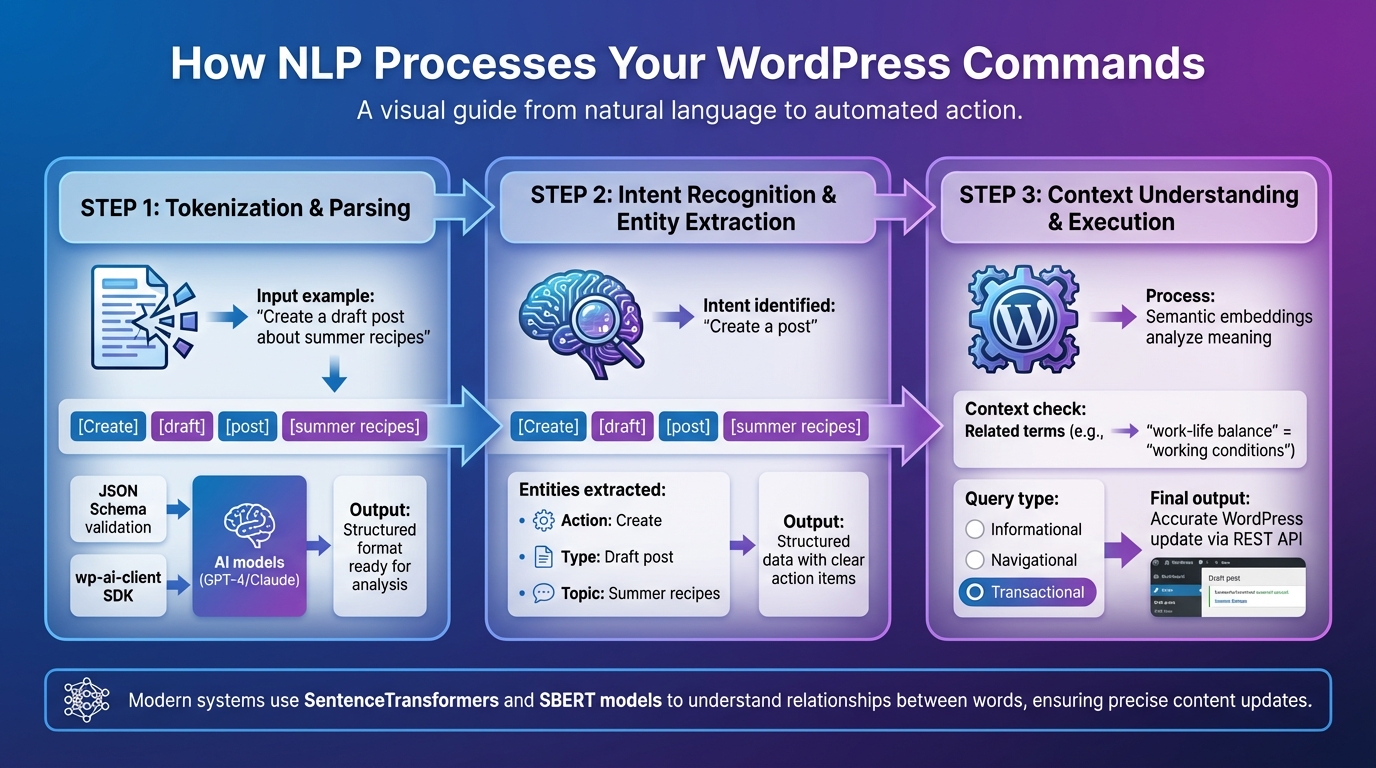
When you type something like, "Create a draft post about summer recipes", the system breaks your command into smaller pieces called tokens - words or phrases like "Create", "draft", "post", and "summer recipes". This step, known as tokenization, prepares your input for deeper analysis.
Next comes parsing, where the system examines how those tokens fit together. Parsing identifies the grammatical structure to figure out what you want to do (e.g., create a draft post) and any specifics (like the topic of summer recipes). To ensure your command is valid and aligned with your permissions, modern WordPress AI integrations use JSON Schemas and an Abilities API.
Once parsed, the wp-ai-client SDK takes over, converting your request into a structured format that AI models like GPT-4 or Claude can understand. This streamlined process allows developers to create features compatible with multiple AI systems without the need for custom code.
Intent Recognition and Entity Extraction
After tokenization, the system determines your intent and pulls out key details. Intent recognition identifies the main action you’re aiming for - whether it’s creating a post, updating a page, or scheduling content. Meanwhile, entity extraction focuses on the specifics, such as post titles, dates, or page names.
Together, these components transform your natural language input into structured data that the system can act on.
"The AI assistant understands exactly what I need. It's like having a senior developer helping me with every task." - Lisa Anderson, WordPress Developer
Context Understanding for Accurate Updates
Context understanding takes things a step further by remembering your previous actions and applying changes with precision. Modern systems use tools like semantic embeddings (via SentenceTransformers) to capture the meaning behind your words. For instance, WordPress can recognize that terms like "work-life balance" and "working conditions" are related, even if the wording isn’t identical.
A great example of this is from March 2025, when Fırat at Automattic’s data.blog used SBERT models and Claude 3.5 to clean up a messy taxonomy. The system successfully identified related posts and grouped company names under the correct tags.
This level of contextual awareness ensures the system understands not just the words you use but also the relationships between them. It evaluates whether your command is informational, navigational, or transactional, then applies updates that align with your actual goal.
Platforms like Kintsu.ai leverage these advanced NLP tools to let WordPress site owners manage content effortlessly using conversational commands. These technologies make NLP-driven content updates a seamless reality.
How to Set Up NLP for WordPress Content Updates
Integrating NLP-powered tools into your WordPress workflow can simplify content management and updates. The process involves adding a specialized plugin to your site, connecting it to an AI model, and using natural language commands to manage your content. Before diving in, make sure your WordPress site is self-hosted, as this is necessary for plugin installation. Here's a step-by-step guide to get started.
Step 1: Install an NLP-Enabled Plugin or Tool
Begin by installing a plugin that links your WordPress site to an AI assistant. A great example is Kintsu.ai, which enables conversational editing with a preview-first workflow - perfect for users who want to see changes before they go live. To install, navigate to Plugins > Add New > Upload Plugin, and upload the plugin's ZIP file.
After activation, head to the plugin settings to generate an API key or authentication token. For added security, set the token to expire within 1–24 hours and make sure to copy it immediately, as you'll need it to connect the AI assistant. If the plugin requires a local server bridge, refer to the setup instructions provided by the tool.
"Claude works within WordPress's existing permission system - it can only do what your user account can do. No direct database access, everything goes through the normal WordPress security checks."
- Brian Nguyen, Marketing Ninja, Kahunam
Step 2: Use Natural Language Commands to Manage Content
Once the plugin is set up, you can start issuing natural language commands to update your site. For example, you might say, "Create a draft post about summer recipes" or "Update the homepage title to Welcome." The NLP engine interprets these commands and executes the appropriate actions in WordPress via the REST API.
Many advanced tools are compatible with popular page builders like Elementor, Divi, and Gutenberg. This means you can manage content updates across different design frameworks without needing to switch between interfaces.
Step 3: Review Changes Before Publishing
A preview-first workflow is an essential feature of tools like Kintsu.ai. This allows you to review AI-generated edits before they go live, ensuring everything looks and reads as intended. You can make adjustments to formatting, tone, or content before approving the changes.
This review step is critical - it gives you complete control over what goes live and ensures that the AI has accurately followed your instructions. It’s a simple way to maintain quality and consistency across your site.
Advanced NLP Features for WordPress Content
Taking your WordPress content to the next level involves tapping into advanced NLP capabilities. These tools go beyond the basics, helping you refine tone, improve SEO, and connect with global audiences in more meaningful ways.
Sentiment Analysis for Tone Adjustment
NLP can analyze the tone of your text and suggest rewrites to better match your intended voice. It categorizes content as positive, negative, or neutral, offering tailored adjustments to align with your goals. For example, you can instantly modify text to sound formal, humorous, or provocative. This is especially handy when a professional tone is needed for LinkedIn, while a casual style works better on Twitter.
NLP tools also flag weak language - like "possibly", "might", or "could" - and recommend stronger, more assertive alternatives to sharpen your message. Studies reveal that optimizing content with tone and sentiment in mind can significantly enhance customer satisfaction by delivering emotionally resonant and contextually appropriate responses. These fine-tuned adjustments ensure your message connects effectively with your audience.
Semantic Matching for Better SEO
Search engines like Google now rely on advanced NLP models, such as BERT and MUM, to interpret the intent behind searches rather than just matching exact keywords. This shift emphasizes the importance of semantic matching, which focuses on topics and relationships rather than isolated keywords. One effective approach is organizing your content into topic clusters: a comprehensive pillar page covers a broad subject, supported by cluster pages that dive into specific subtopics. This structure helps search engines see your site as an authority on the topic.
For example, businesses that reorganize their product pages to answer user questions have reported up to a 3x increase in organic traffic. To implement semantic SEO in WordPress, start by exploring tools like Google’s "People Also Ask" to find related queries. Adding structured data, such as JSON-LD schema markup, helps search engines better understand your content. Plugins like Yoast SEO Premium and Rank Math can further enhance optimization by recognizing synonyms and keyword variations.
"Semantic SEO isn't just optimization - it's a way of thinking holistically about how content, user intent, and search engines interact."
- Koray Tuğberk GÜBÜR, Founder, Holistic SEO & Digital
Automatic Language Translation for Global Audiences
NLP-powered translation tools can help you break language barriers and reach international markets. Consider this: 76% of online shoppers prefer buying from sites that provide information in their native language, and 40% won’t make a purchase if the site isn’t localized. Many modern translation tools use a hybrid approach - AI handles the initial translation for speed, while human editors refine it for cultural nuances and accuracy. When rolling out translations, prioritize high-impact pages like product descriptions and checkout processes before moving to blog content.
From an SEO standpoint, the technical setup is just as important. Use subdirectories (e.g., example.com/es/) or country-specific domains (e.g., example.es) and implement hreflang tags to indicate the appropriate language for each region. Don’t stop at text - localize elements like date formats, currencies, and measurement units to meet regional expectations.
Tools like Kintsu.ai can simplify multilingual content management by letting you update translations through conversational commands, saving you from manually switching between different language versions of your site.
sbb-itb-42d7c06
Troubleshooting Common NLP Content Update Issues
Even the most advanced NLP tools can run into hiccups when handling WordPress commands. The good news? Most problems boil down to a few common issues - and they can be resolved with the right strategies.
Fixing Misinterpreted Commands
Clarity is key when giving instructions. Instead of vague commands like "update the homepage", use precise language: "Update the homepage title to 'Welcome to Our Store'" or "Duplicate the About page." Specific page titles and clear action verbs lead to better results.
For more complicated tasks, break them into smaller, manageable steps. Joel Olawanle, Technical Editor at Kinsta, offers this advice:
"Treat AI like a junior dev - not a magic wand. Don't expect it to nail everything in one giant prompt. Break the work into steps, review what it gives you, and build layer by layer"
. Always test changes in a staging environment before going live. This ensures your commands work as expected without risking disruptions to your production site. If problems persist despite clear instructions, it’s time to investigate API and plugin configurations.
Handling API or Plugin Limitations
When NLP-driven changes fail, the WordPress REST API might be the culprit. Check the API’s status by navigating to Tools > Site Health. If your firewall is blocking requests, whitelist the NLP service in your security settings. Firewalls like Cloudflare or Sucuri occasionally flag legitimate NLP requests as threats, causing disruptions.
Authentication issues are another common roadblock. Brian Nguyen from Kahunam explains:
"Claude operates under the same permission constraints as your WordPress user. If your user can't delete posts, Claude can't either"
. Ensure the connected WordPress user account has the necessary permissions. If you’re using JWT tokens for authentication, keep in mind they often expire within 1 to 24 hours. Additionally, server constraints like outdated PHP versions (below 7.4) or limited memory can lead to timeouts. To pinpoint errors, enable debugging by adding define( 'WP_DEBUG', true ); to your wp-config.php file. Once these technical hurdles are cleared, focus on keeping your updates consistent.
Maintaining Consistency Across Updates
After resolving command and API issues, prioritize consistency by adopting review-first workflows. Some tools allow you to preview AI-generated changes before they go live, minimizing errors.
For bulk updates - like changing the tone of all blog posts to professional - test the command on a staging site first. This helps identify how different templates and page types are affected. Using the Model Context Protocol (MCP) can streamline interactions between AI and WordPress, reducing errors compared to custom setups. If you manage multiple sites, centralized dashboards can keep settings aligned and ensure a cohesive experience across all platforms.
Conclusion
Natural Language Processing (NLP) is transforming how WordPress users manage their content, simplifying what used to be complicated tasks. Instead of navigating through intricate dashboards or learning to code, you can now make updates, schedule posts, and fine-tune content simply by describing your needs in plain English. This shift eliminates the hurdles that once required technical expertise or hours of manual effort.
With NLP-driven automation, even non-technical users can handle advanced tasks like creating custom CSS or monitoring site performance. This means small teams can achieve results that rival enterprise-level operations. The process not only saves time but also gives users the ability to maintain a professional, polished website with ease.
Take Kintsu.ai as an example. This platform allows real-time, code-free website updates through conversational commands, making it possible for business owners, marketers, and content creators to manage their sites without relying on technical support.
NLP tools go beyond simple updates. They help ensure consistency across content, automate SEO tasks like generating alt text, and even provide instant translations for reaching global audiences.
Whether you're managing one website or several, NLP technology makes WordPress management more approachable for everyone. By combining natural language commands with automated optimizations, it creates a workflow that's faster, easier, and more dependable than traditional methods.
FAQs
How does natural language processing make WordPress site updates easier for non-technical users?
Managing WordPress sites just got a whole lot easier, thanks to natural language processing (NLP). Instead of wrestling with complicated coding or navigating through technical dashboards, you can now make updates using simple, conversational commands. For instance, you can say something like, "Change the homepage text" or "Schedule a blog post for tomorrow", and the system takes care of the rest.
What makes NLP so powerful is its ability to understand what you mean, even if your request isn’t perfectly clear. It can interpret vague or complex instructions and turn them into specific actions - whether that’s editing a particular section, tweaking the layout, or handling multilingual content. By simplifying technical tasks into natural conversations, NLP makes it possible for anyone, regardless of their technical skills, to confidently manage and update their WordPress site.
How can I use NLP to make content updates on my WordPress site?
To update your WordPress site using natural language processing (NLP) with Kintsu.ai, here’s how you can get started:
- Link your WordPress site to Kintsu.ai and activate the conversational editing feature.
- Enable AI-driven tools, such as the chat interface, to process natural language commands for making content updates.
- Explain your changes in simple terms - whether it’s modifying posts, pages, or other site elements - and let the AI take care of the details.
With Kintsu.ai, you can effortlessly make updates in real time without needing to touch a single line of code, making content management easier than ever.
How does NLP enhance SEO and help WordPress sites connect with global audiences?
Natural language processing (NLP) plays a key role in improving SEO by helping create smarter, more context-aware content that matches what users are actually looking for. This alignment with user intent not only makes your content more relevant but also boosts its chances of ranking higher on search engines. On top of that, NLP can simplify tasks like crafting meta descriptions, identifying keywords, and generating tags, which makes your site easier to find and more engaging for visitors.
Another major advantage of NLP is its ability to handle multilingual content effectively. With NLP-powered tools, you can create and update content in multiple languages while keeping it culturally appropriate and consistent. This means your site can better connect with diverse audiences, improving its performance in local searches and increasing global visibility. For WordPress site owners, using AI-driven solutions can provide deeper insights into international markets, leading to stronger engagement and a broader reach across the globe.