How NLP Powers Context-Aware Text Editing
How NLP—tokenization, parsing, and embeddings—lets you make precise, code-free WordPress edits while preserving formatting, tone, and speeding up bulk updates.
How NLP Powers Context-Aware Text Editing
Managing websites just got easier. With Natural Language Processing (NLP), you can make changes to your WordPress site by simply typing commands in plain English. No coding. No complex tools.
Here’s how it works:
- NLP interprets your instructions with Natural Language Understanding (NLU) and executes them using Natural Language Generation (NLG).
- Tools like Kintsu.ai let you update headings, modify layouts, or adjust styles through a conversational interface.
- Advanced techniques like tokenization, parsing, and embeddings ensure instructions are accurately understood and applied.
This approach saves time, reduces errors, and makes website management accessible - even for non-technical users. With NLP, editing your website becomes as simple as having a conversation.
NLP Text Cleaning and Preprocessing | Tokenization | Lemmatization | Sententizer | Paragraphizer
Core NLP Concepts Behind Context-Aware Editing
To grasp how NLP powers context-aware text editing, let's dive into three key concepts that transform straightforward instructions into accurate website updates.
Tokenization and Preprocessing
Tokenization involves breaking text into smaller, manageable pieces called tokens. For example, the sentence "Change the price to $1,299.99 on December 25, 2025" is divided into tokens like "Change", "the", "price", "to", "$", "1,299.99", "on", "December", "25," and "2025." This step ensures that elements like " This step ensures that elements like "$" are identified as currency, "1,299.99" as a properly formatted number, and "December 25, 2025" as a date. Advanced techniques such as Byte-Pair Encoding (BPE) and WordPiece are particularly useful for handling complex or rare words. Interestingly, over 70% of companies leveraging advanced tokenization methods report better accuracy in tasks like sentiment analysis [21]. Once tokenization is complete, parsing steps in to clarify word relationships and refine the structure of the instruction.quot; are identified as currency, "1,299.99" as a properly formatted number, and "December 25, 2025" as a date. Advanced techniques such as Byte-Pair Encoding (BPE) and WordPiece are particularly useful for handling complex or rare words. Interestingly, over 70% of companies leveraging advanced tokenization methods report better accuracy in tasks like sentiment analysis. Once tokenization is complete, parsing steps in to clarify word relationships and refine the structure of the instruction.
Sentence Structure Analysis with Parsing
Parsing focuses on understanding the grammatical structure of a sentence by examining how words interact. Techniques like dependency parsing and part-of-speech tagging identify key elements such as subjects, verbs, and objects. For instance, in the instruction "Make the blue button on the homepage larger", parsing helps the system recognize "button" as the target, with "blue" and "on the homepage" providing descriptive details. Parsing also resolves ambiguities in instructions like "Update the product description and price", ensuring the system interprets it as two separate tasks. With structure in place, embeddings take over to assign nuanced meanings based on context.
Context-Based Meaning with Embeddings
Embeddings translate words into numerical representations that capture their meanings and relationships. Unlike basic word-matching techniques, contextual embeddings - used in transformer models like BERT - understand that a word's meaning depends on its surroundings. For example, the word "light" in "Turn on the light" carries a completely different meaning than in "The font is too light."
According to LinkedIn, "Contextual embeddings like ELMo and BERT embeddings capture word meaning based on surrounding context. This allows for more nuanced understanding of language use".
This nuanced understanding fuels tools like Google's search engine and empowers platforms like Kintsu.ai to interpret editing instructions with precision. By leveraging these embeddings, tools can ensure that changes to your WordPress site are not just accurate but also contextually aligned. Such capabilities make precise, code-free website edits a reality.
How NLP Works in Context-Aware Text Editing
Natural Language Processing (NLP) uses techniques like tokenization, parsing, and embeddings to transform natural language instructions into precise changes on WordPress. By applying these methods, user commands are converted into actionable edits that align with the structure and content of a website.
Identifying Page Structure and Elements
To make accurate edits, NLP tools first extract text and links from your WordPress page using web scrapers. They then analyze the page layout to determine which WordPress block - such as a heading, paragraph, or custom element - requires modification. Through semantic analysis, these tools identify patterns in the content and the function of each element within the page. For instance, if a user requests changes to a specific interactive element on the homepage, the system uses contextual clues to locate the exact target. This capability allows tools like Kintsu.ai to pinpoint and modify the right block, ensuring precise updates.
Processing Natural Language Instructions
When users provide instructions, NLP algorithms break down the language to understand the intent behind the request. For example, if the command is "Update all product prices by $10", the system identifies the targets (product prices), the action (update), and the specifics of the change (increase by $10). These interpreted instructions are then translated into WordPress actions, such as editing text, generating new content, or adjusting SEO elements. Before finalizing the updates, the system allows users to review the changes.
Maintaining Formatting and Consistency
NLP doesn’t just execute commands - it also ensures that edits maintain the site's design and formatting. By scanning for inconsistencies in layout elements like chapter titles, subheadings, and paragraphs, NLP tools preserve the visual and stylistic coherence of your site. They also analyze tone and style to align with your pre-established guidelines. Text normalization plays a crucial role here, standardizing content by adhering to American English spelling and formats, such as currency ($1,299.99), dates (December 25, 2025), and measurements (12 in., 5 lb, 75°F).
As Hurix explains, "While converting, machine translation ensures that your content's meaning, tone, style, and formatting stay the same in other languages".
This meticulous approach ensures that even large-scale updates, like adjusting pricing across multiple product pages, maintain consistent formatting and stay true to your brand's voice.
sbb-itb-42d7c06
Step-by-Step Guide: Making Context-Aware WordPress Edits with NLP
Let’s explore how to use NLP to make precise, context-aware edits on your WordPress site. This guide breaks it down step by step.
Preparing Your Website Content
Start by organizing your WordPress content using the block editor. Divide your content into clear, well-defined sections to make it easier for both users and AI tools to navigate. Avoid unnecessary block tags or confusing markup that could disrupt the AI's ability to interpret the content accurately. Keep your tone consistent with your brand, use relevant keywords, and add internal links to create a strong base for AI-driven edits.
When it comes to formatting, stick to U.S. standards: dates (e.g., December 17, 2025), currency ($1,299.99), and measurements (e.g., 12 in., 75°F). These conventions ensure clarity and consistency.
After the AI processes your edits, review the output carefully to confirm accuracy. Once your content is tidy and standardized, you’re ready to connect to an NLP tool.
Connecting to an NLP-Powered Tool
A standout option for managing WordPress edits is Kintsu.ai. This tool uses a conversational interface to let you make edits through natural language commands. Once connected to your WordPress installation, it analyzes your site's structure and content, preparing it for context-aware modifications.
The beauty of this system is that it eliminates the need to navigate WordPress dashboards or deal with complicated settings. You simply describe the change you want, and the tool handles the rest. Using techniques like tokenization, parsing, and embeddings, it processes your instructions and applies the edits accurately. With the connection established, the next step is learning how to write effective instructions.
Writing Clear Natural Language Instructions
When crafting instructions, focus on three key elements: location, intent, and constraints. For instance, specify where the change should happen ("in the second paragraph under the 'Services' heading"), explain the purpose ("rephrase for clarity" or "update the price"), and include any specific details.
A great example of instruction-based editing is the CoEdIT system, developed by Vipul Raheja, Dhruv Kumar, Ryan Koo, and Dongyeop Kang in May 2023. Trained on 82,000 task-specific instructions, CoEdIT demonstrated how to execute edits based on commands like "Make the sentence simpler" or "Write it in a more neutral style", setting new benchmarks in text editing performance.
"CoEdIT takes instructions from the user specifying the attributes of the desired text, such as 'Make the sentence simpler' or 'Write it in a more neutral style,' and outputs the edited text."
- Vipul Raheja et al., Authors of "CoEdIT: Text Editing by Task-Specific Instruction Tuning"
To get the best results, use clear and simple language. For example, instead of saying, "modify the textual content", go with "change the text." Be specific when dealing with numbers - commands like "increase all product prices by $10" are much clearer than "adjust pricing." The more precise your instructions, the better the NLP tool will perform.
Benefits of NLP-Based Context-Aware Editing
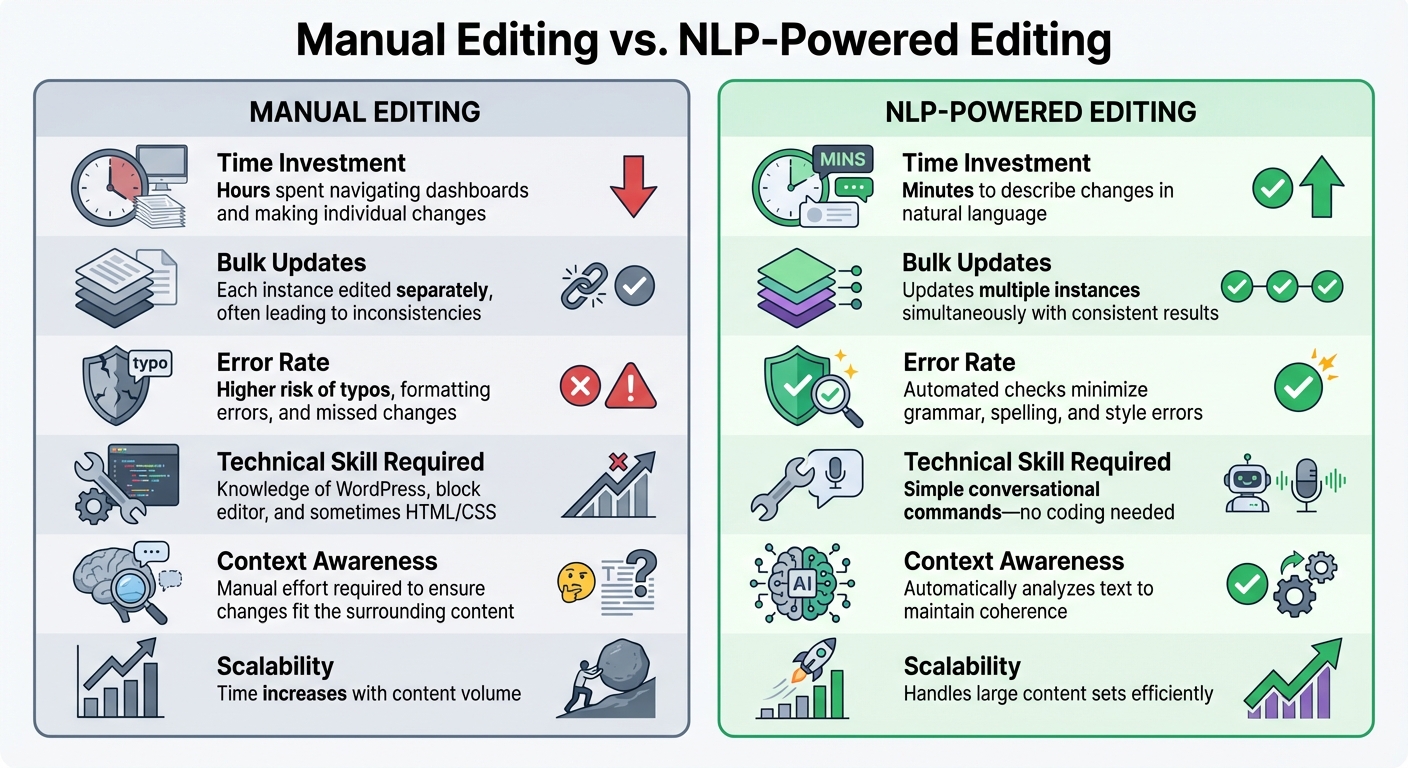
Manual vs NLP-Powered WordPress Editing Comparison
NLP-powered tools are changing the game for WordPress management by taking over repetitive and time-consuming tasks. Instead of clicking through endless dashboards or searching for specific sections to tweak, you can simply describe what you need, and the AI takes care of the rest.
For those managing large amounts of content, these tools ensure a unified tone, style, and messaging across all sections. They also evaluate clarity, readability, and style consistency, making sure your content not only connects with your audience but also aligns with compliance standards. These efficiencies translate into smoother workflows and noticeable improvements in productivity.
Measuring Workflow Improvements
One of the first things you'll notice is how much time you save. By removing the need to juggle multiple tools or manually locate content for updates, NLP-powered systems drastically cut down the hours spent on routine tasks. Teams have reported quicker turnaround times, especially when making bulk changes across several pages or sections.
Another major perk is the reduction of errors. NLP tools automatically maintain formatting and catch deviations, ensuring your content sticks to brand guidelines without the need for tedious, manual reviews. This includes keeping technical details like U.S. formatting standards - dates, currency symbols, and measurements - consistent throughout.
By analyzing the context before making edits, these systems help maintain clarity and coherence while adhering to style guides. This means less time correcting mistakes and more time focusing on strategic efforts like audience engagement and long-term planning.
Comparison: Manual Editing vs. NLP-Powered Editing
The advantages of NLP-powered editing become crystal clear when compared to traditional manual editing.
| Aspect | Manual Editing | NLP-Powered Editing |
|---|---|---|
| Time Investment | Hours spent navigating dashboards and making individual changes | Minutes to describe changes in natural language |
| Bulk Updates | Each instance edited separately, often leading to inconsistencies | Updates multiple instances simultaneously with consistent results |
| Error Rate | Higher risk of typos, formatting errors, and missed changes | Automated checks minimize grammar, spelling, and style errors |
| Technical Skill Required | Knowledge of WordPress, block editor, and sometimes HTML/CSS | Simple conversational commands - no coding needed |
| Context Awareness | Manual effort required to ensure changes fit the surrounding content | Automatically analyzes text to maintain coherence |
| Scalability | Time increases with content volume | Handles large content sets efficiently |
Take tools like Kintsu.ai as an example. They allow you to make changes using conversational commands, removing the technical hurdles that can slow down traditional WordPress editing. These clear advantages pave the way for exploring how such tools can enhance your overall content strategy.
Conclusion
Natural Language Processing (NLP) is reshaping how websites are managed, making tasks simpler and more efficient. With NLP-powered tools, managing a website no longer requires deep technical knowledge. Instead of wrestling with code or navigating complicated interfaces, you can simply describe what you want to update in plain English, and AI takes care of the rest. This makes maintaining your site easier while opening up opportunities for smarter content strategies.
What makes these tools stand out is the way they save time and mental energy. By automating tedious tasks like data entry or organizing content, NLP allows you to shift your attention to more strategic and creative efforts. This means you can dedicate more time to producing content that genuinely resonates with your audience.
NLP tools also help refine your content by analyzing it for clarity, readability, and consistency with your brand’s style. They catch formatting issues and ensure your messaging stays cohesive, leaving you free to focus on the bigger picture.
A great example of this transformation is Kintsu.ai, which uses conversational interfaces to allow real-time edits without the need for technical setup.
FAQs
How does NLP simplify website updates for users without technical skills?
Natural Language Processing (NLP) takes the hassle out of website updates by letting users make changes using plain, everyday language. Instead of diving into code, you simply describe what you want, and the system takes care of the rest. It interprets your request, applies the changes, and ensures everything fits seamlessly within the context of your site.
For instance, you could say something like, "Change the homepage header text" or "Update the contact page hours." The system then automatically handles the technical side of things. This approach makes website management quicker and easier for everyone - even if you have zero coding experience.
How do tokenization and parsing enhance context-aware text editing?
Tokenization splits text into smaller pieces, such as words or sub-words, so AI can process and analyze it more effectively. Parsing takes it a step further by examining these pieces to identify grammatical structures and relationships, helping the system interpret the context and meaning behind the text.
Together, these methods allow NLP models to better understand language nuances, enabling them to make smarter, context-sensitive edits to written content.
How do NLP tools help maintain consistent formatting and style on a website?
Natural Language Processing (NLP) tools are a game-changer when it comes to keeping your content's formatting and style consistent. By analyzing the context and structure of your writing, these tools rely on predefined rules and models to ensure uniform language, tone, and formatting across your entire website.
The result? Your site maintains a polished, professional appearance without the hassle of constant manual tweaks. It's a huge time-saver and takes the burden off your shoulders while ensuring your content feels cohesive and well-organized.