How AI Speeds Up WordPress Databases
AI tools analyze and fix slow WordPress queries, automate indexing, and cut load times—offering adaptive gains over manual cleanup while requiring monitoring.
How AI Speeds Up WordPress Databases
Your WordPress database can make or break your site’s performance. Slow databases lead to longer load times, hurting user experience, SEO rankings, and even revenue. While basic tools clean up junk data, they often miss deeper problems like inefficient queries or missing indexes. AI-powered solutions like Kintsu.ai solve this by analyzing your site’s specific needs, automating fixes, and optimizing queries for faster performance.
Key Takeaways:
- Speed matters: 53% of mobile users leave if a site takes over 3 seconds to load.
- AI tools vs. standard tools: AI tools adapt to your site’s behavior, fixing slow queries and preventing future problems. Standard tools rely on manual effort and predefined rules.
- Real results: AI-driven tools have reduced query times from 35.4 seconds to 5.6 seconds and boosted mobile PageSpeed scores by 20%.
Whether you run a small blog or a high-traffic site, AI tools offer a smarter way to keep your database running smoothly. But they come with a price tag and need careful monitoring. For simpler setups, manual tools may still be enough.
1. Kintsu.ai
Database Query Optimization
Kintsu.ai focuses on improving WordPress database performance through lightweight, targeted edits. Instead of relying on bulky scripts or widgets that can slow down your site, it prioritizes efficiency to keep your site running smoothly.
The platform works by converting natural language requests into precise WordPress updates. You simply describe the changes you need, and Kintsu.ai evaluates your site’s current structure to implement updates without compromising performance.
"Kintsu.ai operates in the reality of WordPress sites: themes, page builders, plugins, and years of accumulated decisions - and focuses on edits that respect that structure".
It also detects potential plugin conflicts, alerting you to compatibility issues before they cause problems. Plus, its safe edit pipeline lets you preview changes before they go live, ensuring your database remains stable and functional.
This attention to detail translates into noticeable speed improvements.
Performance Gains
By avoiding unnecessary bloat and respecting your site’s existing setup - whether it’s themes, page builders, or plugins - Kintsu.ai maintains database responsiveness. This ensures your site stays fast and reliable, even as updates are made.
For high-stakes websites, Kintsu.ai offers staging-friendly workflows, enabling you to test AI-driven changes in a safe environment. Version control and rollback options also allow you to reverse specific edits if needed, giving you added peace of mind.
Its practical design ensures that these benefits are easy to implement, as outlined below.
Ease of Integration
Kintsu.ai is designed for users of all skill levels, requiring no coding knowledge to get started. Features like the no-code Builder chat and Discussion mode make it simple to brainstorm and execute performance updates. This user-friendly approach ensures that anyone can achieve meaningful improvements without technical roadblocks.
With over 25 AI-powered tools for conversational editing, site management, and design, Kintsu.ai has become a trusted solution for more than 500 WordPress creators.
Scalability
Whether you’re running a personal blog or managing a large enterprise site, Kintsu.ai adapts to your needs. Small-scale users benefit from its straightforward no-code tools, while larger organizations can utilize collaboration features and approval workflows for critical updates. For agencies handling multiple clients, audit trails and version control make it easy to track and manage changes across teams.
sbb-itb-42d7c06
Boost Your WordPress Database Performance with ChatGPT in Minutes!
2. Standard WordPress Optimization Tools
Standard optimization tools for WordPress operate based on predefined settings, unlike AI-driven tools that adapt to site-specific behavior. Popular options like WP-Optimize, WP-Sweep, and Advanced Database Cleaner focus on removing unnecessary data, such as post revisions, trashed comments, expired transients, and orphaned metadata. For those comfortable with more hands-on methods, tools like phpMyAdmin and WP-CLI allow developers to run SQL commands like OPTIMIZE TABLE to defragment databases or convert storage engines from MyISAM to InnoDB.
The Query Monitor plugin is another essential tool, designed to identify slow or redundant queries caused by plugins during page loads. For advanced optimizations, developers can create custom composite indexes on tables like wp_postmeta, which can significantly enhance performance. As Mark Jaquith, a WordPress Core Lead Developer, shared:
"Adding the right composite index to wp_postmeta took our WooCommerce product filtering queries from 2.3 seconds down to 12 milliseconds. It was a one-line SQL change that transformed our entire site performance".
These tools and techniques provide a solid foundation for improving WordPress performance, as outlined below.
Performance Gains
When databases are optimized, the improvements can be dramatic. For example, optimized databases have been shown to reduce Time to First Byte (TTFB) from 1.8 seconds to just 0.3 seconds - an 83% decrease. Similarly, database tuning has been credited with improving average page load times by 40–65% on large hosting platforms.
However, achieving these results often requires technical expertise. Developers need to understand how to add the right indexes, configure caching layers, and use specific WP_Query flags like 'no_found_rows' => true, which helps avoid unnecessary calculations.
Ease of Integration
Most standard optimization tools are either free or reasonably priced. For instance, WP-Optimize starts at $49 per year, while WP-Sweep is entirely free. These plugins integrate seamlessly into the WordPress admin dashboard, making routine maintenance accessible even for users without technical skills. For larger websites, WP-CLI offers the ability to automate maintenance with scriptable commands. However, tasks like query profiling, index creation, and advanced cache configuration often require a developer's expertise or assistance from managed hosting providers.
While these tools are easy to set up, their effectiveness may diminish as database demands increase.
Scalability
Although standard tools can handle growth when properly configured, they do have limitations. Around 68% of WordPress performance issues stem from unoptimized queries, missing indexes, or database bloat. Large tables can lead to cleanup processes timing out. Additionally, the wp_options table often becomes a bottleneck; if autoloaded data exceeds 800 KB to 1 MB, site performance can degrade significantly and may even result in 502 errors during traffic spikes.
These constraints highlight the importance of adopting more advanced and adaptive approaches for growing websites. Tools that evolve with site demands are essential for maintaining long-term performance.
Pros and Cons
AI-Powered vs Standard WordPress Database Optimization Tools Comparison
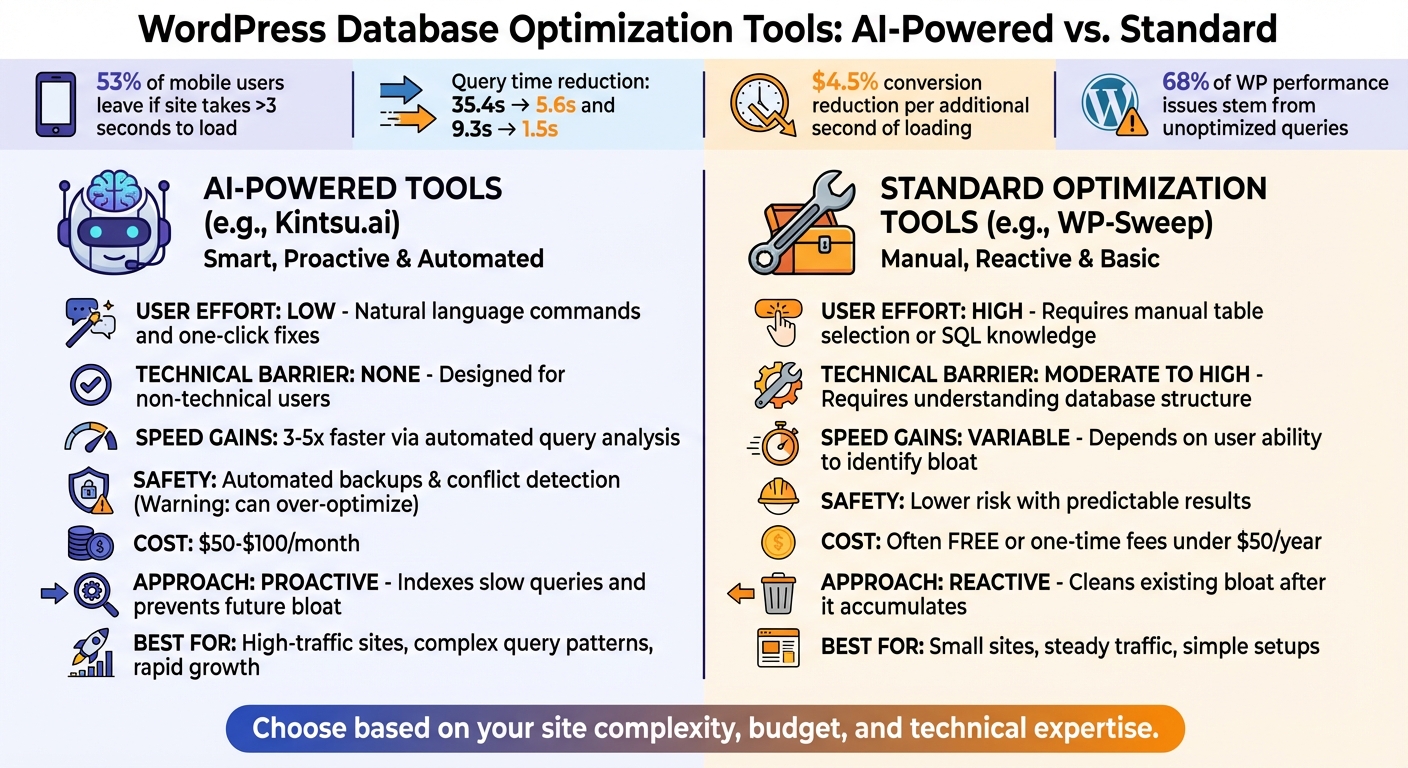
When it comes to improving WordPress database performance, AI tools offer quick, automated solutions, but they require careful oversight to ensure site stability. The decision to use AI-powered tools or stick with traditional optimization methods depends largely on factors like your technical expertise, budget, and the time you're ready to dedicate.
AI-powered tools, such as Kintsu.ai, simplify the process by allowing updates through natural language descriptions, automatically analyzing and indexing slow queries to significantly reduce execution times. While these tools can deliver impressive results, they come with their own set of challenges.
For example, AI tools can sometimes over-optimize, potentially disrupting your site. As Ravi from WisdmLabs points out:
"AI optimization tools are aggressive. They'll break your site occasionally. Always test on staging first and keep backups."
Additionally, these tools often come with a price tag, typically costing between $50 and $100 per month. They also require ongoing attention:
"'Set it and forget it' is marketing nonsense. You need to monitor performance, adjust settings, and fix issues when they arise."
On the other hand, traditional optimization tools, like WP-Sweep, are generally free or come with a one-time fee under $50 per year. They rely on predictable, rule-based cleaning methods to remove unnecessary data like revisions, spam, and orphaned metadata. These tools are less risky, but they demand more manual effort and technical knowledge, especially for advanced tasks like creating composite indexes. For users with simpler setups or smaller sites, traditional tools can often deliver sufficient results without the recurring costs or risks tied to AI automation.
Comparison Table
| Feature | AI-Powered Tools (e.g., Kintsu.ai) | Standard Optimization (e.g., WP-Sweep) |
|---|---|---|
| User Effort | Low; natural language commands and one-click fixes | High; requires manual table selection or SQL knowledge |
| Technical Barrier | None; designed for non-technical users | Moderate to High; requires understanding database structure |
| Speed Gains | 3–5x faster via automated query analysis | Variable; depends on the user's ability to identify bloat |
| Safety | Automated backups and conflict detection, but can over-optimize | Lower risk; predictable results based on specific actions |
| Cost | $50–$100/month typically | Often free or one-time fees under $50/year |
| Approach | Proactive; indexes slow queries and prevents future bloat | Reactive; cleans existing bloat after it accumulates |
Ultimately, the choice depends on your site's needs. AI tools are ideal for fast-growing sites or those with complex query patterns, offering adaptive solutions to keep performance optimized. For smaller sites with steady traffic, traditional tools often provide a simpler, cost-effective way to maintain database health.
Conclusion
AI-powered database optimization shifts the focus from merely reacting to issues to actively managing performance. While traditional tools are effective for routine maintenance, AI solutions like Kintsu.ai tackle deeper structural performance challenges that conventional methods often miss. The key difference? Traditional tools focus on general cleanup, while AI tools use pattern recognition and tailored strategies to optimize databases more effectively.
For websites with high traffic or rapid growth, the impact of AI optimization can be dramatic. Test cases highlight query time reductions, such as dropping from 35.4 seconds to 5.6 seconds, or from 9.3 seconds to just 1.5 seconds. These improvements not only enhance user experience but also drive better conversion rates - considering that every additional second of loading time can reduce conversions by nearly 4.5%. These results highlight the game-changing potential of AI in improving database efficiency and supporting better decision-making.
The right choice for your site depends on its complexity and growth needs. A straightforward blog with steady traffic might do fine with traditional tools. But if your site is business-critical, with complex queries, custom post types, or heavy plugin usage, AI tools excel by offering smarter indexing and predictive conflict resolution that traditional methods simply can’t match.
Another advantage of tools like Kintsu.ai is their user-friendly, conversational interface. This eliminates the need for complex, code-heavy solutions by allowing performance updates through natural language commands. This not only resolves current issues but also helps prevent future inefficiencies.
If your database exceeds 1–2 GB, or if you’re dealing with slow admin panels or timeout errors, it’s worth considering AI optimization. Preview-first pipelines ensure safe testing of changes, while real-time metrics help validate improvements before deploying them to production. By adopting AI-driven tools like Kintsu.ai, you’re not just improving current performance - you’re also laying the groundwork for long-term scalability.
FAQs
How do I know if my WordPress database is the real bottleneck?
If you're trying to figure out whether your WordPress database is slowing things down, start by logging query execution times. Tools like Query Monitor or New Relic can help you pinpoint the culprits. Pay attention to slow queries - these often involve things like full table scans or too many JOINs.
Another thing to watch for is database bloat. Oversized tables, such as wp_postmeta or wp_options, can signal unoptimized data that's dragging down performance. Keep an eye out for these signs to identify and address potential database issues.
What should I test on staging before applying AI database changes?
Before making AI-driven database changes in your staging environment, it's essential to test thoroughly to ensure everything runs smoothly. Here's what to focus on:
- Core functionality: Double-check that all key features, plugins, and customizations function as expected. Any disruption here could lead to major issues.
- Database performance: Assess whether queries are running efficiently and if there’s any noticeable improvement in performance.
- Compatibility: Look for potential conflicts with existing plugins or themes. These can cause unexpected glitches.
- Backup procedures: Test your backup and recovery processes to make sure you can restore data if something goes wrong.
- User flows: Simulate typical user interactions to identify any problems that might affect the user experience.
Thorough testing like this minimizes risks and helps protect your live site from unintended consequences.
When does AI optimization cost less than manual database tuning?
AI-driven optimization tends to be more budget-friendly compared to manual database tuning, especially when automated processes are involved. These systems operate around the clock, minimizing the need for human involvement and cutting down on both time and resource expenditure.