Ultimate Guide to AI Content Scheduling for WordPress
Learn how AI automates WordPress post scheduling, fixes missed schedules, optimizes timing using audience data, and manages multiple sites from one dashboard.
Ultimate Guide to AI Content Scheduling for WordPress
Managing a WordPress site can be overwhelming, especially when it comes to maintaining a consistent publishing schedule. AI tools simplify this process by automating tasks like content creation, scheduling, and optimizing posting times based on audience behavior. This ensures your site stays active without requiring constant manual effort.
Here’s what you’ll learn:
- How WordPress manual scheduling works and its common challenges (e.g., "Missed Schedule" errors, time zone issues).
- How AI improves scheduling by automating workflows, fixing errors, and analyzing engagement data.
- Step-by-step setup for AI scheduling tools, from choosing the right platform to customizing workflows.
- Advanced techniques like bulk scheduling, real-time adjustments, and performance-based scheduling for multiple sites.
With AI, you can save hours of work, avoid scheduling errors, and ensure your content consistently reaches your audience at the right time. Tools like Kintsu.ai even allow seamless management of multiple WordPress sites from one dashboard.
Let’s dive into how AI transforms WordPress scheduling.
How WordPress Scheduling Works Without AI
Manual Scheduling Basics
WordPress includes a built-in scheduling feature, but it's entirely manual. Whether you're using the Block Editor or the Classic Editor, the steps are straightforward: open your post, find the scheduling option in the sidebar (under 'Status & Visibility' or 'Publish immediately'), set your desired date and time, and click 'Schedule.'
Behind the scenes, WordPress uses something called WP-Cron to handle these scheduled tasks. But here's the catch - WP-Cron isn't a traditional cron job. Instead, it only runs when someone visits your site. So, if no one visits your site at the exact time your post is scheduled, the post might not go live until the next visitor shows up. While this system is easy to use, it comes with its own set of challenges.
Problems with Manual Scheduling
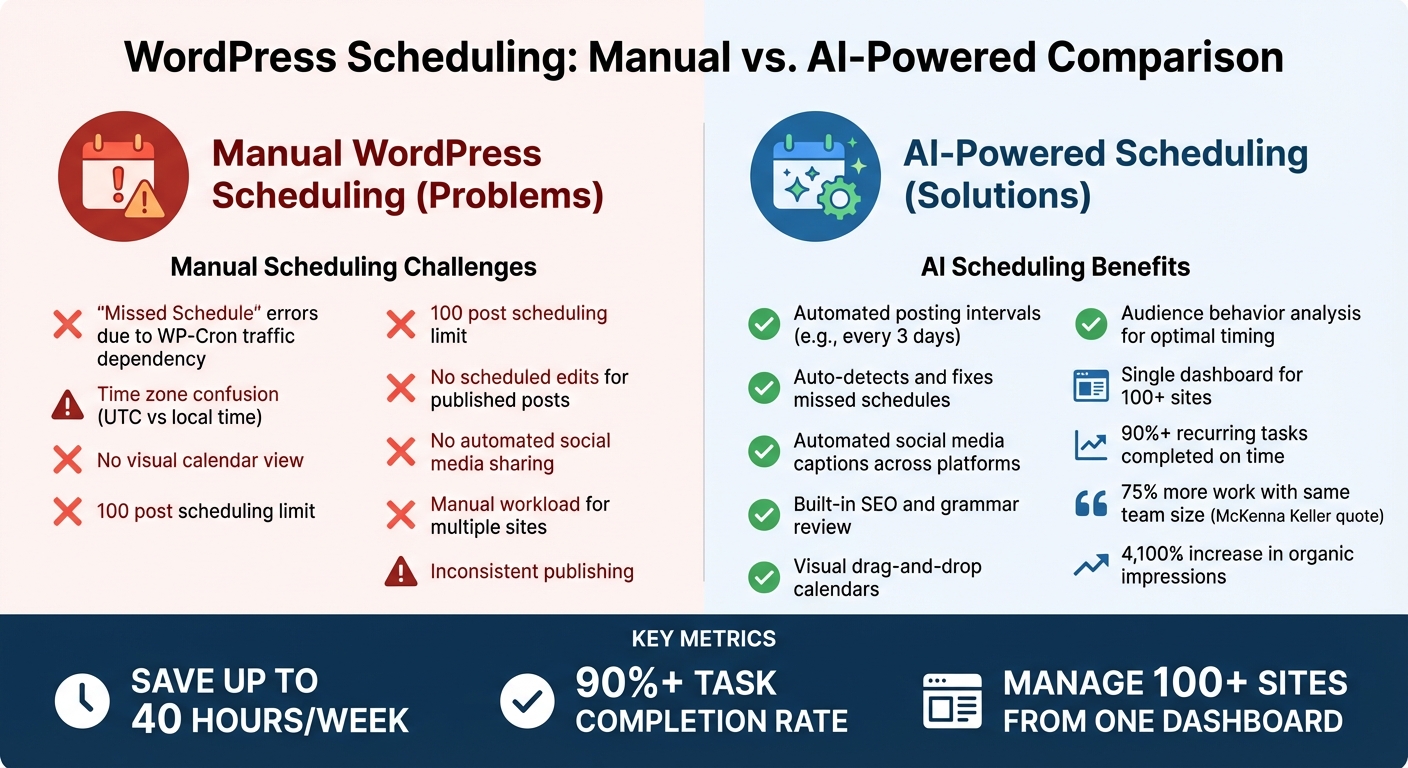
One of the biggest headaches is the "Missed Schedule" error. Since WP-Cron depends on site traffic, low-traffic websites are especially prone to delays in publishing. When this happens, you might see a red "Missed Schedule" alert in your posts list. This dependency on visitors can make it hard to maintain the reliability and consistency that active WordPress sites need.
Time zones add another layer of complexity. WordPress defaults to UTC, so if you forget to adjust it to your local time zone - like Eastern or Pacific time - your carefully planned 8:00 AM post might end up publishing in the middle of the night at 3:00 AM instead. On top of that, the standard interface doesn’t offer a visual calendar, making it tricky to spot gaps in your content schedule. There’s also a limit: you can only schedule up to 100 posts at a time. And if you need to update a published post, those changes go live immediately - you can’t schedule edits for later.
For those managing multiple sites or high-volume blogs, manual scheduling quickly becomes overwhelming. James Parsons, founder of Content Powered, highlights the importance of consistency:
"Inconsistency makes it harder for those users to become invested in your site, and they may start to forget about you over time".
Manual scheduling also lacks features that could save you time, like automated social media sharing, post expiration, or adjusting post timing based on data insights. Without these tools, you're left doing everything by hand - adding hours to your workload each week.
How to Build an AI Agent to Auto-Schedule WordPress Blog Posts
How AI Improves Content Scheduling in WordPress
Manual vs AI-Powered WordPress Scheduling: Key Differences and Benefits
Manual scheduling in WordPress often comes with its fair share of headaches - think WP-Cron failures or timezone mismatches. AI steps in to transform this error-prone process into a streamlined, automated system. Instead of manually setting publish times, AI tools use rule-based intervals to queue content according to your preferences, saving you time and reducing errors.
AI Automation Features
AI-powered scheduling tools can automate posting intervals - like every three days or five posts per week - filling your calendar without constant input. If WordPress cron jobs fail due to low traffic or server issues, AI detects and resolves missed schedules by automatically publishing posts.
But it doesn’t stop there. These tools can also generate tailored social media captions and schedule them across platforms like Facebook, LinkedIn, and Instagram the moment your post goes live. Some even include built-in reviewing features to ensure drafts meet SEO standards, maintain proper grammar, and align with your brand voice before they’re added to the publishing queue.
AI also provides the flexibility to adapt schedules dynamically, ensuring your content remains relevant in real-time.
Real-Time Adjustments with AI
AI doesn’t just automate; it helps you stay nimble. With visual drag-and-drop calendars, you can quickly rearrange posts when priorities change. AI analyzes audience behavior to recommend the best times to post for maximum engagement.
For those managing multiple WordPress sites, AI tools simplify bulk adjustments from a single dashboard, eliminating the need to switch between admin panels. Platforms like Kintsu.ai offer these capabilities, combining real-time scheduling adjustments with intuitive site management through a conversational interface.
Better Accuracy and Consistency
AI ensures your content goes live exactly when planned, creating a reliable presence that builds trust with your audience.
Additionally, AI tools can enforce quality standards by setting minimum SEO score requirements - like an 80% rating on plugins such as Yoast or Rank Math - before allowing posts to be published. This safeguards against subpar content slipping through. Professional bloggers have reported saving up to 40 hours per week using AI marketing calendars, with over 90% of recurring tasks completed on time. McKenna Keller, Content Manager at Evernest, shares her experience:
"Since we've implemented CoSchedule, our company's doubled in size. Without this tool, we'd be floundering. Instead we're completing 75% more work with the same team."
For websites that rely on evergreen content, AI tools like SocialBee can organize posts into category-based folders and automatically recycle top-performing content. One user even noted a staggering 4,100% increase in organic impressions within 90 days after using AI-driven trend analysis and automated scheduling.
AI doesn’t just make scheduling easier - it elevates the entire process, ensuring precision, consistency, and measurable results.
Setting Up AI Content Scheduling for WordPress
Getting started with AI scheduling is simple. It all comes down to three main steps: picking the right tool, connecting it to your WordPress site, and customizing it to fit your publishing goals. With the precision and flexibility AI scheduling offers, here’s how you can set up your workflow.
Choosing AI Tools for Scheduling
First, decide between using integrated WordPress plugins or standalone AI applications. Plugins work directly within your WordPress dashboard, streamlining your workflow by eliminating the need to switch between tools. On the other hand, standalone apps often require you to manually copy and paste content, which can slow things down.
When evaluating your options, focus on features, ease of integration, and cost. Look for tools that support top AI models and consider if you’ll need to manage multiple websites. Your level of technical expertise will also play a role in determining the best fit.
Connecting AI Tools to WordPress
Once you’ve chosen a tool, the next step is connecting it to your WordPress site. Most AI plugins require an API key from providers like OpenAI, Google, or Anthropic. These keys can typically be added under the "Settings" or "Integrations" section in your WordPress dashboard. To avoid surprise expenses, make sure to set billing caps - both soft and hard limits - on your provider's dashboard.
If you’re using external AI writing apps that post directly to WordPress, you’ll need to generate Application Passwords for secure access. This can be done from your WordPress user profile and is a safer alternative to sharing your admin password.
Don’t forget to check your site’s timezone settings under Settings > General. Aligning the timezone with your target audience ensures posts go live at the most effective times. If you encounter reliability issues with standard scheduling, additional triggers can be configured.
Customizing Your AI Workflow
After connecting the tool, you can fine-tune it to suit your content strategy. Choose between Manual, Semi-Auto, and Full-Auto modes depending on whether you want to focus on bulk content creation ("Shotgun") or precise, targeted edits ("Scalpel") .
Define your brand tone and SEO requirements to maintain consistent quality across posts. Some tools, like AI Power, offer dynamic placeholders - such as {original_tags}, {categories}, or {url_content} - to help keep your site structure intact during automated publishing.
To enhance your posts, integrate royalty-free image APIs like Pexels, Unsplash, or Pixabay directly into your AI tool. This makes it easy to include featured images in scheduled posts. Additionally, if you’re using RSS triggers, setting frequency limits (e.g., one post every six hours) can help avoid overwhelming your audience.
Platforms like Kintsu.ai make customization even easier by allowing you to adjust scheduling parameters and workflows with plain English instructions. This flexibility ensures your AI scheduling adapts to your specific needs in real time.
sbb-itb-42d7c06
Advanced AI Scheduling Techniques
Once you're comfortable with the basics, AI can elevate your content scheduling game. These advanced techniques help you publish smarter, manage multiple sites more efficiently, and fine-tune your strategy based on real-world performance data. They integrate seamlessly into your existing workflow, making them both practical and powerful.
Data-Driven Scheduling with AI
AI isn't just about automating post times - it’s about precision. By analyzing past engagement data, machine learning pinpoints when your audience is most active and likely to engage. This beats generic scheduling advice by tailoring timing to your specific audience.
Advanced AI systems also identify "Publish-Value Event Windows" (P-VEWs) - 72-hour periods where your content is more likely to gain visibility. These windows are calculated using factors like competitor activity, algorithm trends, and how quickly Google prioritizes new content in your niche. Missing these windows can reduce organic visibility by up to 49%.
"Demand Arrival drives visibility more than content volume." - SEORated
AI goes a step further by categorizing keywords based on search intent, whether users are seeking information, navigating, or ready to buy. Using a technique called Temporal Clustering, AI groups related content around peak interest periods, increasing session duration by as much as 87%. For instance, enterprise buyers often engage more with top-of-funnel content published late on Sundays, outperforming Tuesday morning posts by 31% in engagement velocity.
The payoff? AI-driven timing can double your content ROI and improve top-of-funnel visibility by 64%. High-performing B2B SaaS posts, for example, are usually published within ±96 hours of demand peaks, with 89% of successful posts aligning with AI-identified demand windows.
Managing Multiple WordPress Sites
For those juggling multiple WordPress sites - whether for clients or a personal portfolio - AI is a game-changer. Specialized tools allow you to manage 100+ WordPress sites from a single dashboard, eliminating the hassle of logging into each site separately.
One standout technique is AI-built staggering, which prevents scheduling conflicts across different accounts. Agencies often use a "bulk and refine" approach: AI bulk-publishes content to identify high-traffic niches, while human editors step in to polish the best-performing posts.
To avoid "Missed Schedule" errors across multiple sites, synchronize time settings and set up server-level cron jobs to run every 15 minutes . This ensures that your scheduling runs smoothly, even across a large network of sites.
Adjusting Schedules Based on Performance
AI thrives on adaptability. Advanced performance metrics like Early Indexation Rate (EIR) and Time-to-Visibility Lift (TVL) allow for dynamic adjustments to your editorial calendar. This means your schedule isn’t static - it evolves based on how your content performs.
By linking AI tools to real-time data sources like Google Trends, you can forecast high-ROI topics up to 12 weeks in advance. When AI detects a surge in demand, it adjusts your schedule to capitalize on that momentum. Timing your content 36–48 hours before a trend peaks can boost visibility by 74%, thanks to Google's preference for fresh content.
Automated dashboards make this process even easier, sending real-time alerts for significant changes, such as a drop in keyword rankings or a spike in engagement. Some workflows even include AI "reviewing agents" to check drafts for accuracy before they’re automatically scheduled.
The result? A content calendar that adapts to your audience's ever-changing behavior. With AI-powered forecasting now operating 1.6x faster than traditional funnel modeling, staying flexible isn’t just smart - it’s essential in today’s competitive landscape.
Best Practices for AI Content Scheduling
AI can streamline content scheduling, but to ensure it aligns with your brand, you need a mix of automation and human oversight. This balance guarantees efficiency without compromising your brand’s voice and quality.
Keeping Control Over AI Scheduling
Think of AI as your assistant, not a decision-maker. Start by defining clear parameters - your brand’s tone, style, and SEO guidelines. These will help AI-generated content reflect your established identity. A useful strategy is the "Shotgun & Scalpel" method: let AI handle bulk scheduling to target high-traffic niches, but manually fine-tune critical pages to maintain quality.
"Success lies in balancing automation with human insight: refine your prompts and settings, edit AI-generated drafts, and inject real-world examples."
- WP AI Writer
Avoid the temptation to publish in bulk. Instead, stagger your posts to keep readers engaged and help search engines recognize consistent updates. Also, check that your WordPress timezone settings align with your audience’s peak activity hours - this can significantly boost engagement.
Reviewing AI Recommendations
AI is fast, but it’s not flawless. Always review drafts for accuracy, clarity, and alignment with your brand. Running content through plagiarism checkers ensures originality, while tools like Rank Math or Yoast help verify SEO elements like headers, keywords, and meta descriptions.
Before scheduling, confirm that every draft meets your quality and SEO standards. As Edric Martinez from The WP Troubleshooter puts it:
"Always have human backup - editors improve quality and detect mistakes."
- Edric Martinez, The WP Troubleshooter
Track performance metrics using tools like Google Analytics to compare AI-scheduled posts with manually scheduled ones. These insights will help you adjust AI settings over time, fine-tuning elements like tone, creativity, and keyword usage to better fit your goals.
Staying Compatible with WordPress Updates
Even with solid scheduling practices, compatibility is key to keeping your system running smoothly. Since WordPress powers over 40% of websites, its frequent updates can sometimes disrupt third-party AI tools. To avoid issues, choose AI tools that stay updated with WordPress features like the Gutenberg editor and plugins like WooCommerce.
Schedule site updates during low-traffic hours and use automated tools to check your site’s health post-update. Don’t just stop at the homepage - test other key areas to quickly catch any layout or functionality problems.
When linking external AI tools to WordPress, use secure methods like "Application Passwords" to protect your API connections. If you encounter missed scheduling issues, set up a missed-schedule handler or custom cron job to address overdue posts. Regularly reviewing update logs can also help you catch and resolve problems before they disrupt your publishing workflow.
Conclusion
AI content scheduling turns WordPress into a powerful tool, simplifying what used to be a manual and time-consuming process. By automating repetitive tasks, you free up time to focus on the bigger picture - your strategy and brand development.
This shift in workflow is transformative. As Ivana Cirkovic from ManageWP explains:
"Content automation isn't about replacing human work or creativity; it is merely about utilizing technology to improve workflow efficiency and productivity in far less time and effort."
- Ivana Cirkovic, Digital Marketer and Content Strategist, ManageWP
In a world where consistency is critical, AI helps even small teams or solo creators keep pace with larger operations. It ensures a steady publishing schedule, optimizes SEO on the fly, and handles multilingual content with ease - all while reducing human error.
To make the most of AI scheduling, always double-check its recommendations for accuracy, confirm your timezone settings to avoid scheduling mishaps, and keep your WordPress installation up to date. These steps ensure smooth performance and reliability, building on earlier strategies to overcome manual scheduling challenges.
AI scheduling isn’t just a tool - it’s a game-changer for staying competitive. When you combine automation with thoughtful human oversight, you create a content strategy that’s efficient, consistent, and scalable as your audience grows.
Ready to take the next step? Check out Kintsu.ai for smarter, AI-powered WordPress management.
FAQs
How does AI help ensure scheduled posts are published on time in WordPress?
AI helps ensure your scheduled posts in WordPress are published exactly when they’re supposed to by actively managing and monitoring the publishing process. Unlike old-school server-based cron jobs that can sometimes fail or get delayed, AI handles scheduled tasks in real time, minimizing the chances of missed posts.
This hands-off solution simplifies content management, so you can concentrate on crafting quality content without stressing over technical glitches.
What are the advantages of using AI to manage multiple WordPress sites?
Managing multiple WordPress sites with AI can streamline your workflow, saving both time and effort - especially for agencies or businesses juggling several websites. These tools handle repetitive tasks like scheduling posts, updating content, and managing media across sites. By automating these processes, you not only cut down on manual work but also reduce the chance of errors slipping through.
AI also boosts productivity by enabling real-time updates and simplifying content creation. Tools like Kintsu.ai let you make changes by simply describing what you want, no technical expertise required. This ensures your sites maintain consistent branding and stay optimized for SEO. Plus, it offers the flexibility to scale your WordPress network with ease, making growth and maintenance far less daunting.
How can AI tools help schedule content for better audience engagement?
AI tools make content scheduling smarter by analyzing audience behavior, including activity patterns, time zones, and even seasonal trends. This means your posts can go live when your audience is most active, boosting both visibility and engagement.
If you’re a WordPress user, AI can take your scheduling game to the next level. It can recommend or adjust publishing times based on peak engagement periods, helping you stay consistent, keep your audience interested, and even enhance your SEO efforts. By automating these tasks, you not only save time but also ensure your content reaches the right audience at the perfect moment.