How AI Improves WordPress Security Patch Management
AI-driven patching turns WordPress security from reactive firefighting into continuous, proactive protection.
How AI Improves WordPress Security Patch Management
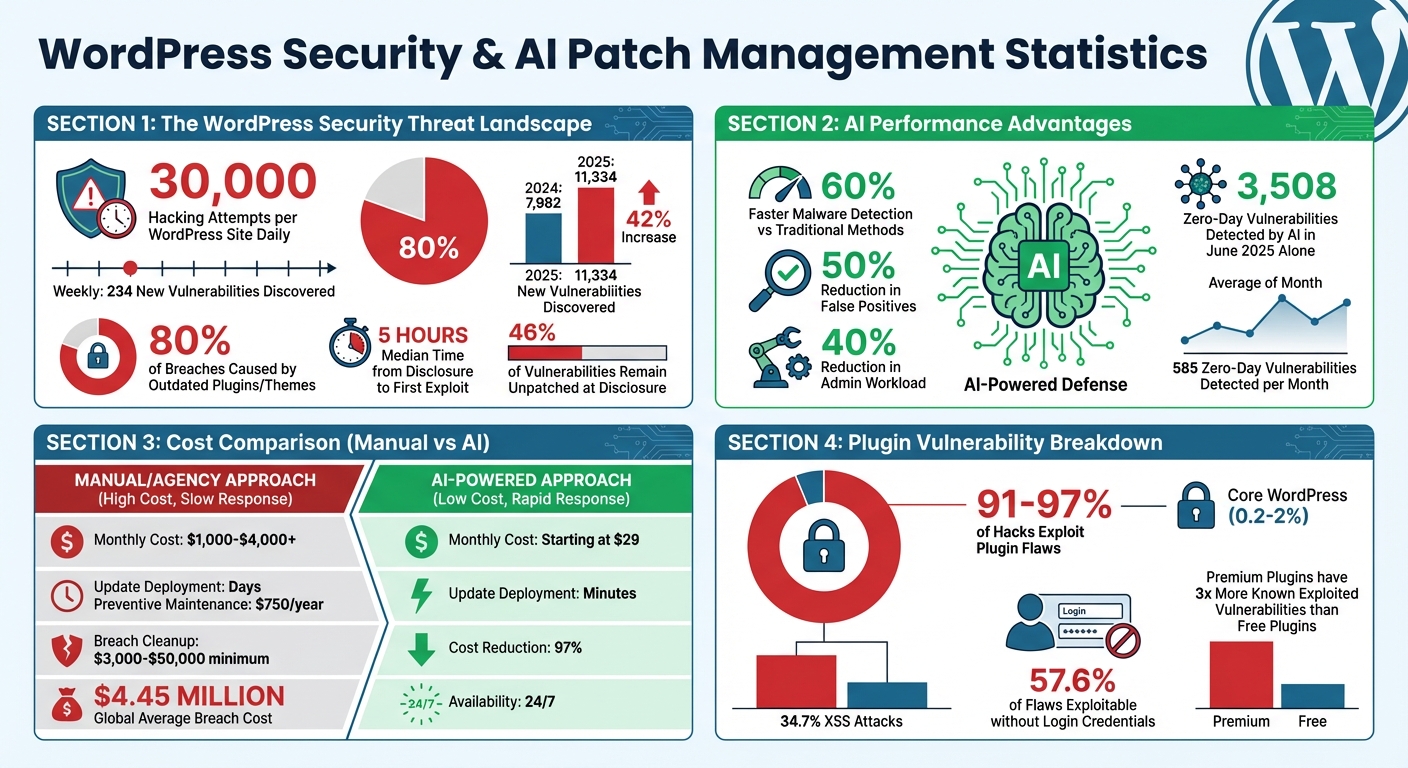
WordPress sites face 30,000 hacking attempts daily, and outdated plugins or themes are behind 80% of breaches. Manual patching can’t keep up with the 234 new vulnerabilities discovered weekly, leaving sites exposed. AI changes the game by automating updates, detecting threats faster, and prioritizing fixes based on risk. It even shields sites with virtual patches before official updates are ready.
Key Insights:
- AI detects malware 60% faster and reduces false positives by 50%.
- Virtual patching blocks attacks within hours, protecting sites during critical windows.
- AI saves 40% of admin workload by automating scans, risk assessments, and patching.
- Cleanup costs after a breach can range from $10,000 to $50,000 - prevention is far cheaper.
AI-powered tools streamline security, prevent downtime, and protect your site’s reputation. Here’s how they work and why they outperform manual methods.
AI vs Manual WordPress Security Patch Management: Key Statistics and Cost Comparison
WordPress Security Vulnerabilities Explained
Common WordPress Security Risks
WordPress security issues often stem from a few critical weak points. Shockingly, between 91% and 97% of all WordPress hacks exploit plugin flaws, while vulnerabilities in the WordPress core itself account for only 0.2% to 2% of breaches.
The major threats in 2026, known as the "Big 7", include Broken Access Control, Cross-Site Scripting (XSS), SQL Injection (SQLi), Supply Chain Attacks, REST API exploits, Outdated Technology, and Nulled Software. Among these, XSS alone accounts for 34.7% of reported vulnerabilities, with 57.6% of flaws being exploitable without login credentials.
One particularly sneaky tactic involves "Ghost Admins." These attackers exploit broken access control to create hidden administrator accounts directly in the database, giving them ongoing backdoor access. Supply chain attacks are another growing concern, where hackers compromise trusted plugin developer accounts to push malicious updates to thousands of websites.
For example, in November 2025, two critical vulnerabilities (CVE-2025-6327 and CVE-2025-6325) were identified in the King Addons for Elementor plugin (versions up to 51.1.36), allowing unauthorized users to upload malicious files and escalate privileges to administrator level. That same month, a command-injection vulnerability (CVE-2025-9501) was discovered in W3 Total Cache, affecting all versions prior to 2.8.13. This flaw enabled attackers to execute arbitrary PHP code through specially crafted comments.
Premium plugins face even greater scrutiny, with three times more Known Exploited Vulnerabilities (KEV) than free plugins. This disparity is likely due to less attention from security researchers. Adding to the problem, the rise of AI-generated plugins has introduced poorly developed tools, many of which contain critical security flaws.
Problems with Manual Patch Management
The traditional approach to patching vulnerabilities - manual updates - is struggling to keep up with the sheer volume and speed of modern threats. In 2025 alone, 11,334 new vulnerabilities were discovered in the WordPress ecosystem, marking a 42% increase compared to 2024. That’s an average of 31 new security flaws every day. Worse, the time from public disclosure to the first exploit is alarmingly short - just 5 hours. As the Patchstack State of WordPress Security Report highlights:
"The weighted median time to first exploit is 5 hours. This suggests that the most heavily targeted vulnerabilities are typically attacked within hours, not days."
Adding to the challenge, 46% of vulnerabilities remain unpatched by developers at the time of disclosure. For instance, during a 48-hour window in October 2025, Wordfence blocked 8.7 million attack attempts targeting outdated versions of the GutenKit and Hunk Companion plugins.
Manual patch management requires constant vigilance - core updates roughly five times a year, weekly plugin updates, and continuous monitoring of security advisories. Human error often compounds the problem. Administrators may delay updates to avoid compatibility issues, neglect patching staging environments, or overlook inactive plugins that still contain exploitable code.
Glenn Brooks, CEO and Founder of WebWize, summed up the risk perfectly:
"The danger isn't updating… it's updating everything at once after you've fallen behind."
The financial stakes are equally daunting. While preventive maintenance costs around $750 annually, cleaning up after a breach starts at a minimum of $3,000. On a larger scale, the global average cost of a data breach is approximately $4.45 million.
These challenges highlight the pressing need for smarter, automated solutions like AI-driven patch management to stay ahead of evolving security risks.
sbb-itb-42d7c06
AI, Automation, and the Race to Secure WordPress | Rashmi Nagpal (Patchstack)

How AI Improves WordPress Security Patch Management
Managing security patches manually can be slow and risky, leaving websites vulnerable. AI, however, provides a faster, more dynamic solution by processing threats in real-time.
AI transforms WordPress security by shifting from reactive patching to proactive defense. Instead of waiting for vulnerabilities to be exploited, AI-powered tools continuously monitor, analyze, and protect websites. This means threats are processed far quicker than any human team could manage.
For instance, AI-driven malware detection is about 60% faster than traditional methods and reduces false positives by roughly 50%. That kind of efficiency is critical when a typical WordPress site faces an average of 30,000 hacking attempts daily.
Real-Time Threat Detection with AI
AI works like a 24/7 security guard, learning the normal behavior of your site - tracking logins, navigation, and file changes. It flags anything unusual right away. For example, if a user logs in and makes critical changes within seconds, AI can recognize this as suspicious and block the action.
A great example of this is from June 2025, when the AI-driven platform AppTrana detected 3,508 zero-day vulnerabilities - averaging 585 per month. It analyzed code patterns resembling known exploits before they were publicly documented, stopping vulnerabilities from being exploited before official patches were available.
AI can also tackle polymorphic malware, which constantly changes its signature to evade traditional scanners. As Thomas Raef, founder of "We Watch Your Website", explains:
"No matter how hackers obfuscate their code, certain signatures and behaviours must remain to keep their malware functional."
In a September 2025 study, Raef demonstrated how an AI model trained on 300,000 malware samples automatically cleaned over 111,000 infected WordPress sites, cutting analysis time from days to seconds.
Even better, AI doesn’t just alert you to a problem - it acts. It can block malicious IPs, quarantine infected files, or roll back to secure backups instantly, without waiting for human intervention.
Automated Patch Prioritization
Not all vulnerabilities are equally dangerous, and AI tools help prioritize which ones to address first. They analyze vulnerability scores alongside real-world attack data to decide which threats need immediate attention.
Before applying a patch, AI maps dependencies to ensure minimal code changes, preserving functionality and avoiding conflicts. It also examines error messages, logs, and behavior to fix root causes rather than just symptoms. Once a patch is applied, AI verifies the fix and checks for any unintended side effects.
This kind of prioritization is essential today. Between 2024 and 2025, 7,966 new WordPress vulnerabilities were reported - a 34% jump from the previous year. With about 234 new vulnerabilities emerging weekly, manual triage simply isn’t feasible.
Virtual Patching with AI
AI doesn’t just prioritize patches; it also provides immediate protection through virtual patching, which shields your site even when an official fix isn’t available. Instead of altering your site’s code, virtual patching enforces security policies to block exploits before they can reach vulnerable areas.
By analyzing incoming HTTP requests, AI-powered systems filter out malicious patterns at the network or application layer. Vulnerability-specific rules, often tied to Common Vulnerabilities and Exposures (CVE) IDs, block threats like SQL injection or cross-site scripting.
As OWASP defines it:
"Virtual patching is a security policy enforcement layer which prevents the exploitation of a known vulnerability."
Take the case of CVE-2025-11749, a critical flaw in the AI Engine WordPress plugin affecting over 100,000 sites. Discovered in November 2025, the vulnerability allowed attackers to harvest bearer tokens from the REST API index. While developers worked on an official patch, virtual patching blocked exploit attempts at the request level, protecting sites during the critical window before the update was ready.
For high-traffic sites, where immediate updates might cause downtime, virtual patching provides a safer alternative. By blocking threats at the request level instead of scanning every file, it reduces server load and offers more precise protection with fewer false alarms.
Adding AI to Your WordPress Workflow
Leveraging the power of real-time threat detection and automated patch prioritization, integrating AI into your WordPress workflow takes security management to a whole new level. The best part? You can do this without completely reworking your existing setup. By adopting a preview-first approach, AI tools can generate proposed changes for your review before applying them, ensuring you stay in control.
Modern AI tools simplify tasks dramatically. For example, a simple request like "secure this section" can be translated into precise WordPress edits, all while respecting your theme and plugin configurations. These tools also identify potential conflicts ahead of time, alerting you if an update might interfere with active plugins. Below, we’ll dive into how to set up AI dashboards, use conversational AI for easier management, and compare AI-driven workflows to the traditional manual approach.
Setting Up AI-Powered Dashboards
Start by enabling AI-powered updates in your WordPress dashboard. Schedule updates during off-peak hours, define a testing window for critical pages, and set up notifications to track update results.
Handling dynamic content is another key step. Use CSS selectors in a "Hide selectors" field to exclude elements like sliders or carousels from AI testing. This minimizes false-positive rollback triggers and ensures smoother updates. As Daniel Pataki, CTO of Kinsta, puts it:
"Keeping sites secure and up to date shouldn't be a time-consuming task, and with Kinsta Automatic Updates, our customers can stay protected with minimal effort."
AI-powered visual regression testing is another game-changer. It detects even pixel-level changes and can automatically roll back updates if the changes exceed your pre-set sensitivity thresholds, reducing the risk of downtime.
Conversational AI for Security Management
Conversational AI takes security management a step further by simplifying complex tasks into plain English commands. Platforms like Kintsu.ai allow you to say things like "secure this section", and the AI translates that into technical edits while ensuring no risky changes are made. It also supports granular version control, so you can roll back specific changes without affecting the rest of your site.
For example, you can ask the AI to "perform a comprehensive audit of the WordPress site structure" to identify misplaced code or areas that don’t align with best practices. When dealing with critical areas like WooCommerce checkout or user authentication, you can include specific instructions like "proceed with utmost caution" and "examine all dependencies" to ensure updates are handled meticulously.
Kintsu.ai, trusted by over 500 WordPress creators, makes these updates seamless with its "vibe coding" approach, which focuses on enhancing existing sites safely. As Kintsu.ai explains:
"Kintsu.ai helps you move from 'can you change this?' to 'it's done' using conversation-driven edits that respect the reality of WordPress."
Manual vs. AI-Driven Workflows Compared
When you compare manual security patch management to AI-driven workflows, the advantages of using AI become clear:
| Feature | Manual Patch Management | AI-Driven Workflow |
|---|---|---|
| Update Safety | Relies on trial-and-error testing | Previews potential impacts before applying updates |
| Conflict Detection | Issues discovered only after site breaks | Warns of conflicts in real time |
| Site Audits | Requires extensive manual code reviews | Automated reviews using natural language prompts |
| Rollback Capability | Full site restoration from backups | Allows selective, reversible updates |
| Interface | Complex navigation in WP-admin | Conversational commands in plain English |
| Error Handling | Manual log analysis | AI-guided debugging with step-by-step instructions |
AI-driven workflows also create detailed audit logs, documenting what was changed, where, and why. This transparency is critical for maintaining compliance and ensuring long-term stability for your site.
Best Practices for AI-Powered Patch Management
Keeping your WordPress site secure means staying ahead of potential threats. With WordPress sites facing 30,000 hacking attempts daily and a sharp increase in vulnerabilities - 7,966 new ones reported in 2024–2025 (a 34% rise from the previous year) - proactive measures are crucial. AI-powered tools can help streamline patch management, but combining them with smart practices ensures even stronger protection.
Scheduling Regular AI Security Scans
Automated security scans are a cornerstone of effective site defense. Start by documenting all your installed plugins and themes, then configure your AI-driven security tools to run scans during off-peak hours. Features like firewall protection, malware detection, file integrity checks, and login security (with limits on failed attempts) are essential. These tools use behavioral analysis to understand your site’s typical activity - such as login times and user behavior - and flag anything unusual.
Set up email alerts for key events like suspicious logins, unexpected file changes, or new plugin installations. Monthly or quarterly security audits are also important. Use these audits to review blocked attack patterns and fine-tune your AI’s sensitivity to reduce false positives. For added efficiency, cloud-based AI tools process threats off-server, making them up to 10 times lighter than traditional plugins while still offering strong protection.
Rollback and Backup Strategies
Even with robust AI tools, a reliable backup and rollback plan is non-negotiable. WordPress 6.6, launched in mid-2024, introduced an automated rollback feature that steps in when plugin or theme updates cause PHP errors. The system reverts to the previous working version automatically, saving you from manual fixes.
Stick to the 3–2–1 backup rule: keep three copies of your data, store them on two different media types, and ensure one copy is off-site (using services like Amazon S3 or Google Drive). AI can optimize backup schedules by adjusting frequency based on site traffic, focusing only on recent changes to save storage space and speed up restoration.
Always test your backups in a staging environment to confirm they work before an actual emergency arises. As Alex Granata, an International WordPress Support Specialist at DreamHost, explains:
"Enabling auto updates is an easy way to help most users keep their site as secure as possible, as well as ensuring you have access to all of the latest features from your favorite plugins."
By combining regular scans, backups, and rollback plans, you’ll be well-prepared to handle unexpected issues.
Predictive Modeling for Future Threats
Predictive modeling takes WordPress security to the next level. Using machine learning, AI can analyze your site’s code to identify potential vulnerabilities - even before they’re officially documented or exploited. This is particularly valuable for zero-day threats, which lack existing patches. In June 2025 alone, AI tools identified 3,508 zero-day vulnerabilities, averaging 585 discoveries per month.
Virtual patching is another powerful tool in this space. It applies temporary safeguards at the network level, blocking exploit attempts until an official fix is available. This is critical because major vulnerabilities are often exploited within 24–48 hours of being disclosed.
Enable behavioral anomaly detection to catch suspicious actions, like a new user making drastic changes right after logging in. AI tools can also monitor your plugins and alert you if any are flagged as potential risks for inclusion in the CVE (Common Vulnerabilities and Exposures) database. This kind of proactive defense helps you stay ahead of threats, rather than constantly playing catch-up.
Conclusion
Keeping your WordPress site secure doesn’t have to feel like an uphill battle. With 30,000 hacking attempts targeting WordPress sites daily and 234 new vulnerabilities surfacing every week, relying on manual updates and reactive fixes just isn’t enough anymore. AI-powered tools are changing the game, shifting the focus from scrambling to patch vulnerabilities to staying one step ahead through features like behavioral analysis, virtual patching, and predictive threat modeling.
The benefits go beyond just better security. There’s a huge difference in cost and efficiency between traditional methods and AI-driven solutions. While agencies may charge $1,000–$4,000+ per month and take days to roll out updates, AI tools like Kintsu.ai start at just $29/month and can handle updates in a matter of minutes. That’s a 97% cost reduction, along with 24/7 availability and safeguards to prevent plugin conflicts or layout issues before they happen.
AI also frees up your time. By automating threat detection and cutting false positives by 50%, these tools can reclaim about 40% of your weekly administrative time. Plus, with 60% faster malware detection, you’re not just saving time - you’re improving response speed. Features like sandbox testing, granular version control, and audit trails replace outdated trial-and-error methods, letting you preview changes, identify conflicts, and roll back updates selectively when needed.
The stakes are higher than ever as hackers increasingly use AI to launch automated attacks. Sticking with outdated methods leaves your site vulnerable. AI-powered platforms provide a proactive defense, using behavioral anomaly detection, virtual patching for zero-day threats, and instant responses that traditional approaches simply can’t match.
Whether you’re managing one site or many, integrating AI into your workflow isn’t just a smart move - it’s essential. It’s about building a security system that evolves and learns alongside the threats it faces. Start with Kintsu.ai’s free plan (which includes one site connection and 10 AI edit credits) to explore its preview-first approach and smart safeguards. From there, you can scale as needed. Your site deserves a defense that works as tirelessly as the attackers trying to breach it.
FAQs
Will AI updates break my WordPress site?
When done properly, AI updates typically don't disrupt WordPress sites. On the contrary, they enhance security by automating patch management and offering real-time threat detection. This helps minimize the chances of vulnerabilities being exploited.
How does virtual patching protect zero-day flaws?
Virtual patching adds a temporary shield to protect against zero-day vulnerabilities, stepping in before official updates are released. It works by intercepting and blocking malicious traffic aimed at exploiting these flaws, creating a layer of defense.
This method is especially helpful for websites running outdated plugins or software. It reduces the risk of exposure and keeps systems secure until the official patches are available, effectively minimizing the danger posed by zero-day exploits.
What should I automate vs keep manual in patching?
Automate tedious tasks like real-time updates, threat detection, malware scanning, and verifying patch rollouts with AI-driven tools like Kintsu.ai. These tools simplify processes such as spotting vulnerabilities, applying patches, and monitoring threats, saving you time and effort.
However, keep manual control over crucial decisions. Tasks like evaluating complex threats, double-checking patches before deployment, and tailoring security policies require human judgment. This oversight reduces false positives and ensures patches are tailored to your site’s specific requirements.