How AI Improves Local SEO for WordPress Sites
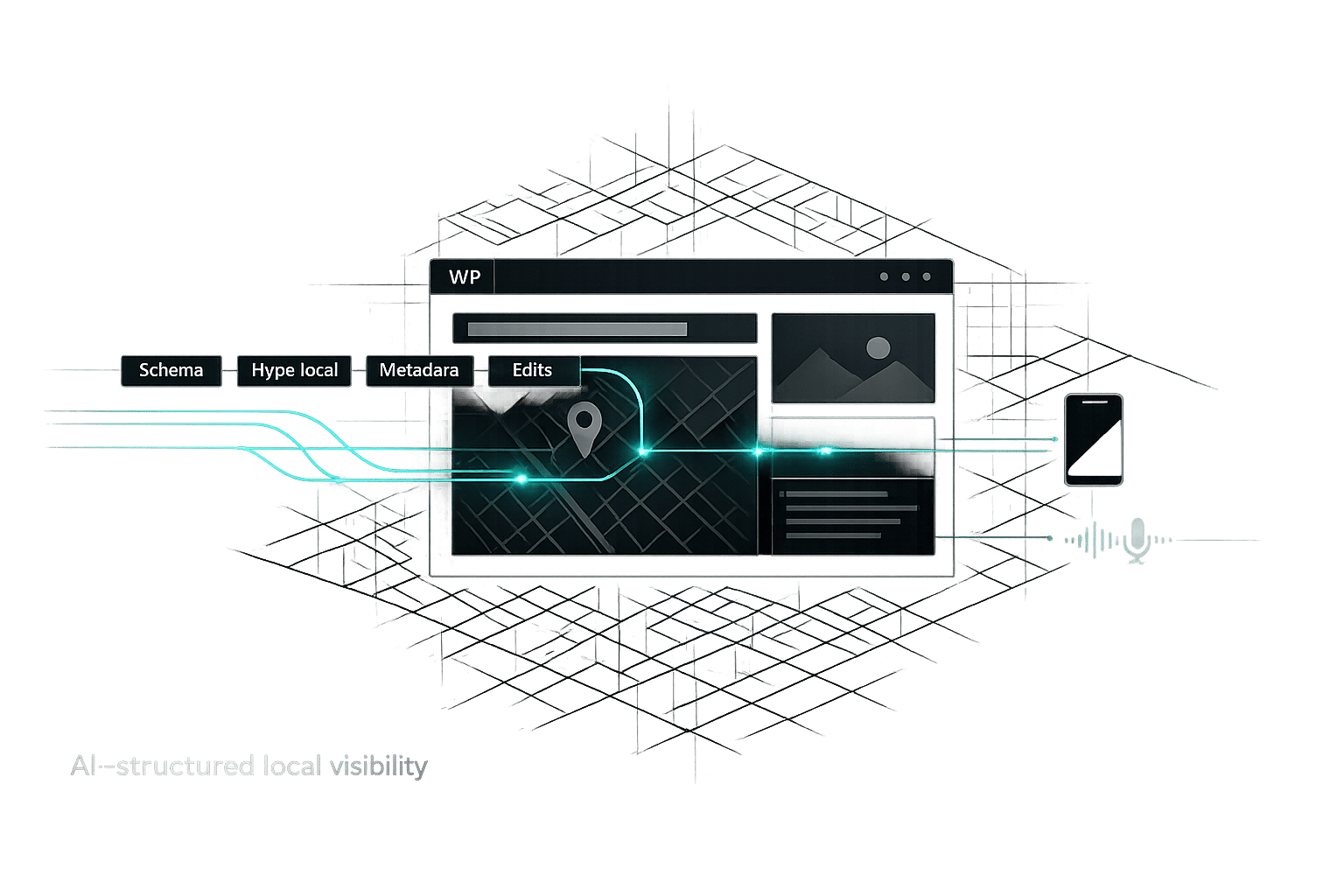
Use AI to automate schema, hyperlocal keywords, metadata, and real-time WordPress edits to boost local search visibility and voice/mobile traffic.
How AI Improves Local SEO for WordPress Sites
If you're a small business owner with a WordPress site, AI can simplify local SEO and help you attract more local customers. Here's what you need to know:
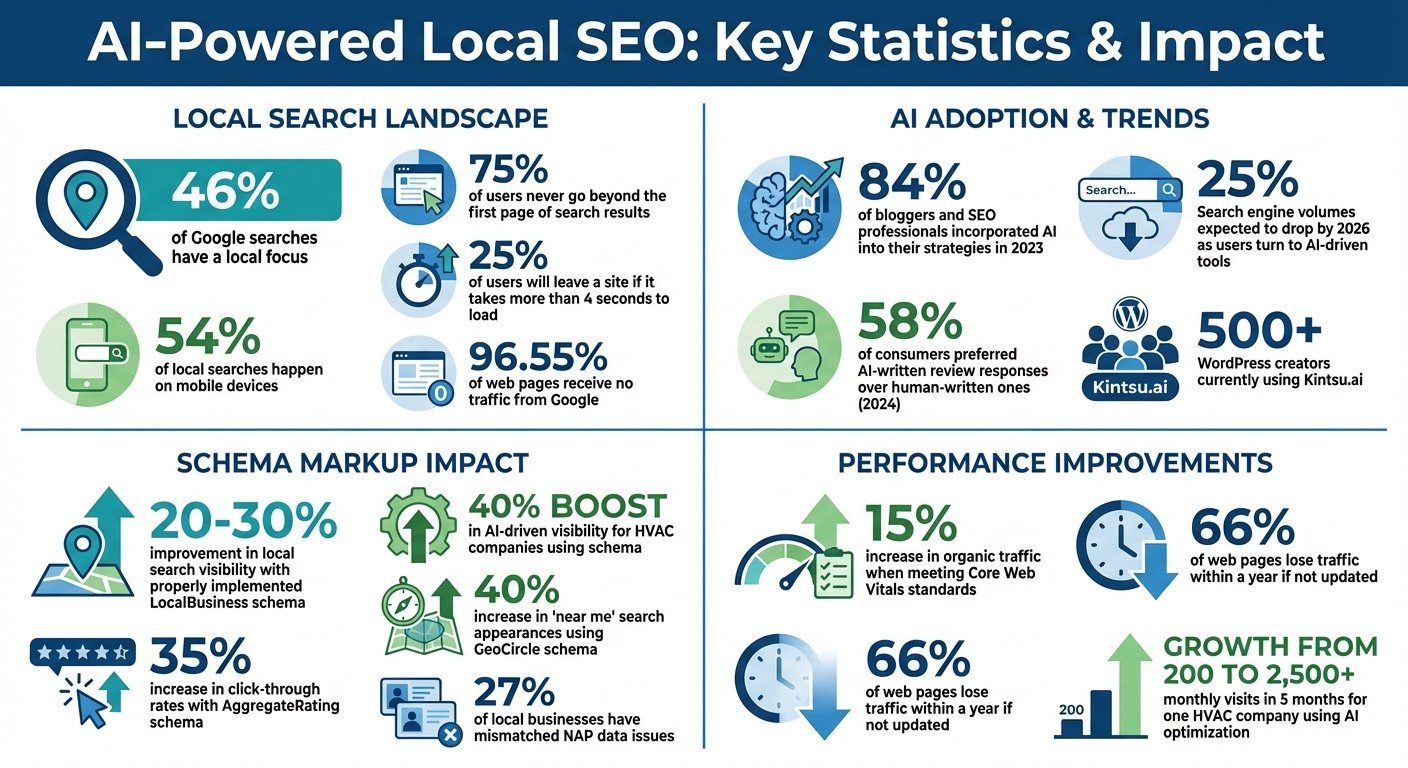
- 46% of Google searches have a local focus, but 75% of users never go beyond the first page.
- AI tools automate time-consuming tasks like schema markup, keyword research, and metadata updates.
- They identify hyperlocal keywords (e.g., "coffee shop near Central Park") and optimize your site for voice searches and mobile users.
- AI plugins integrate directly into WordPress, making updates easy with conversational commands like, "Add LocalBusiness schema for my bakery."
- Tools like Kintsu.ai ensure your business info stays consistent across platforms, detect errors, and improve search visibility.
AI isn't just about saving time - it makes local SEO more precise, helping your business stand out in search results and AI-driven answers. Whether it's creating structured data, managing reviews, or optimizing for "near me" searches, AI tools are transforming how local businesses compete online.
AI-Powered Local SEO Statistics and Impact for WordPress Sites
This AI Agent for Local SEO Ranks Businesses on Google Automatically
sbb-itb-42d7c06
AI-Powered Local Keyword Research
Optimizing local SEO on WordPress used to mean hours of manual work - sifting through multiple tools to identify effective keywords. Now, AI has simplified the process by analyzing real-time data to uncover local search intent and phrasing with unmatched precision.
Traditional methods often relied on exact-match phrases and historical search volumes. AI takes things further by focusing on search intent. Whether someone is gathering information, ready to make a purchase, or searching for a specific location, AI identifies these patterns. It also detects long-tail conversational queries that manual methods might overlook and organizes related keywords into topic clusters. A recent survey showed that 84% of bloggers and SEO professionals incorporated AI into their strategies in 2023. AI doesn’t just process thousands of keywords in minutes - it also predicts which terms are gaining or losing relevance based on shifting trends.
How AI Finds Hyperlocal Keywords
AI digs deeper than generic terms like "plumber Miami." It identifies hyperlocal keywords tailored to specific neighborhoods, landmarks, or even local slang. Instead of just "coffee shop New York", it might highlight phrases like "best coffee shop near Central Park" or "coffee shop in Williamsburg with WiFi." These hyperlocal phrases improve your chances of appearing in "near me" searches and voice queries.
By combining your services with detailed geographic data - not just city names but specific districts, commercial zones, or informal neighborhood names - AI tools can spot opportunities you might miss. For example, they analyze autocomplete suggestions, scan competitor URLs to uncover targeted locations, and identify ranking gaps. This approach is especially helpful if your business serves multiple neighborhoods or wants to capture voice search traffic from queries like "Who’s the best emergency plumber in Denver?" With these insights, AI-powered tools make it easier to refine your strategy directly within WordPress.
Using AI Plugins to Speed Up Keyword Research
AI plugins streamline your workflow by integrating directly into WordPress, so you no longer need to juggle multiple tools. These plugins offer autocomplete suggestions for keyphrases and location-specific terms as you type, making it easier to discover high-volume local keywords without leaving your dashboard. They also perform competitor gap analysis, scanning competitor websites to identify keywords your site may be missing.
Manually organizing 50 to 100 local keywords into topic clusters could take hours, but AI handles it in minutes. Plus, it provides predictive insights into which keywords will hold more value over time. With search engine volumes expected to drop by 25% by 2026 as users turn to AI-driven tools like ChatGPT, having adaptive AI tools is essential to staying visible to local customers.
Automating Local SEO Tasks with AI
Local SEO used to be a grind. Tasks like adding structured data, verifying your NAP (Name, Address, Phone), and tweaking metadata demanded manual effort. But now, AI tools step in to streamline these processes, instantly updating details when business information changes. One area where this automation shines is schema markup.
Simplified Schema Markup
Schema markup is like giving search engines a cheat sheet about your business - what you do, where you’re located, and the services you offer. Without it, search engines rely on your HTML, which often leads to misinterpretation. With schema, you’re handing over precise, structured data.
"If you rely solely on HTML text, you are forcing the AI to guess relationships. If you use Schema.org markup, you are handing them the answer key." - LovedByAI
AI tools make schema markup easy. They can generate full JSON-LD scripts from simple inputs. Just describe your business type, location, and services, and the AI creates structured data for categories like Restaurant, Attorney, or Physician.
This has a real impact on local search visibility. For example:
- Properly implemented
LocalBusinessschema can improve visibility in local search results by 20–30%. - HVAC companies using this schema saw a 40% boost in AI-driven visibility.
- Adding
AggregateRatingschema to include reviews increased click-through rates by up to 35%.
AI also helps avoid common issues like "double schema" conflicts, where WordPress themes and plugins generate overlapping data. These tools identify and fix such problems, ensuring your schema stays clean and up-to-date across all location pages.
One standout feature AI offers is mathematical service areas. Instead of listing cities or ZIP codes - which can confuse search engines - AI uses GeoCircle schema with latitude, longitude, and radius data. This approach is far more precise, increasing the chances of appearing in "near me" searches by 40%.
AI also keeps your NAP data consistent. Mismatched information across your website and Google Business Profile can hurt your rankings, and a recent audit found that 27% of local businesses faced this issue. AI plugins flag these inconsistencies before they cause problems.
| Schema Property | Purpose | Local SEO Benefit |
|---|---|---|
LocalBusiness |
Defines your physical business entity | Establishes credibility as a real-world business |
GeoCoordinates |
Provides exact latitude/longitude | Boosts accuracy in map results and "near me" searches |
areaServed |
Defines geographic service boundaries | Helps AI determine if you serve specific locations |
hasOfferCatalog |
Structures your service/product lists | Improves AI responses to "who provides [service]" queries |
openingHours |
Lists your operating schedule | Answers "is [business] open now" queries directly |
Platforms like Kintsu.ai simplify this process for WordPress users, offering conversational tools to update structured data and local SEO elements - no coding required. These advancements make managing local SEO less intimidating for business owners.
But schema is just the start. AI also elevates your metadata game.
Localized Metadata and Content Recommendations
AI doesn’t just automate; it strategizes. It analyzes your competitors’ rankings and suggests meta titles, descriptions, and headings tailored to outperform them. Instead of guessing, the AI studies the top results in your area and recommends what works.
This technology also ensures your metadata is unique and location-specific while maintaining brand consistency. Duplicate content penalties are a thing of the past. Plus, AI keeps an eye on Core Web Vitals and other technical SEO metrics, flagging issues that could hurt your rankings. Meeting Core Web Vitals standards alone can lead to a 15% increase in organic traffic.
One particularly useful feature is identity triangulation. Using the sameAs property, AI links your site to verified sources like Wikidata, government records, and social profiles. This builds authority and reduces the risk of AI tools spreading incorrect information about your business.
"AI search engines are becoming the new local directory. When someone asks ChatGPT for 'the best Italian restaurant near me,' your local schema determines whether you're in that conversation." - Yue Zhu, Product Manager, Seenos.ai
A great example of AI-driven success comes from an HVAC company in Ogden, Utah. They partnered with Advanced Local to optimize their WordPress site. By adding LocalBusiness schema to every page, rewriting headers into questions, and removing slow plugins, they grew their monthly visits from 200 to over 2,500 in just five months. They even showed up in AI-generated answers for queries like "what to do if your AC breaks in Ogden".
AI doesn’t just make local SEO easier - it makes it smarter.
Making Real-Time Site Updates with AI
For small business owners tackling local SEO, the challenge often isn't figuring out what needs to change - it's figuring out how to make those changes. Traditional WordPress editing can feel overwhelming, with its maze of dashboards and complex plugin interfaces. Using a conversational approach simplifies this process, making real-time updates both practical and accessible.
Updating Local SEO Elements Through Conversational Commands
Platforms like Kintsu.ai bring a fresh perspective with their conversational "Builder Chat", which turns your requests into actual WordPress edits. For example, you could say, "Add LocalBusiness schema for my Miami bakery services" or "Update the footer contact info with our new phone number," and the AI takes care of the technical details. Even vague instructions like "Make the homepage hero feel more local" are understood, with the AI adjusting copy, layout, or keywords to match your intent. You can also pinpoint specific sections for updates, such as "on the pricing page FAQ" or "only in the footer," giving you precise control over changes.
One standout feature is the preview-first workflow - before any changes go live, you can see exactly how they’ll look. This eliminates guesswork and prevents accidental disruptions. Kintsu.ai also incorporates smart safeguards that flag potentially risky edits, helping you maintain your site’s structure and conversion goals. With over 500 WordPress creators already using the platform and more than 25 AI-driven features, Kintsu.ai is tailored for no-code site management. Beyond simple edits, it breaks down technical barriers, ensuring updates are seamless and aligned with your site’s design.
Removing Technical Barriers for Small Business Owners
Conversational AI takes things further by automating schema and metadata updates, removing the need for technical expertise. What used to feel like a daunting task - asking, "Can you change this?" - now becomes as simple as hearing, "It's done." You don’t need to know WordPress architecture, PHP, or CSS because the AI integrates smoothly with your existing themes and plugins.
Additional features like conflict detection alert you to potential issues with active plugins, while rollback functionality allows you to reverse individual changes if needed. For businesses serving multilingual communities, the AI can even manage multi-language content, ensuring consistent visibility in local searches across different languages. This combination of simplicity and flexibility makes it easier than ever for small business owners to stay on top of their SEO without getting lost in the technical details.
Improving Local SEO Results with AI-Driven Insights
AI is taking local SEO to the next level by analyzing data patterns that would otherwise require hours of manual effort. From spotting customer sentiment in reviews to identifying technical issues that slow down mobile experiences, AI helps turn local searches into loyal customers.
Monitoring and Responding to Customer Reviews
Customer reviews are more than just feedback - they directly influence your local search rankings. AI tools can track how often reviews are coming in (known as review velocity), a key metric recognized by search engines. If your review rate starts falling behind your competitors, AI can alert you to adjust your outreach strategy.
But it doesn’t stop there. AI also helps craft personalized response templates that feel local and specific. For instance, instead of replying with a generic "Thanks for your review", the AI might suggest something like, "We’re thrilled you loved our gluten-free options at our Downtown location." Interestingly, a 2024 survey revealed that 58% of consumers preferred AI-written responses over those written by humans.
Beyond managing reviews, AI plays a role in improving the technical aspects that affect mobile and voice search performance.
Optimizing for Mobile Speed and Voice Search
Mobile searches dominate local SEO, with 54% of local searches happening on mobile devices. AI can dig into your WordPress database to identify and fix slow queries, automate indexing, and streamline load times - all without you lifting a finger. This is crucial since 25% of users will leave a site if it takes more than 4 seconds to load. Every second counts when it comes to retaining potential customers.
Voice search is another area where AI shines. By structuring your content to provide clear and concise answers, AI ensures your site is ready for questions like, "Where can I find organic dog food near me?" This strategy places direct answers prominently at the top of your pages, making them more likely to be pulled into voice assistant responses. As LocalMighty puts it:
"AI Local SEO in 2026 is not about letting software 'do SEO for you.' It is about using automation intelligently to scale precision, consistency, and speed across search, Maps, and AI discovery systems without sacrificing trust."
AI also tracks your performance in real time, analyzing Map Pack rankings by time of day and monitoring how often your business is included in AI-generated answer citations. With traditional search volumes expected to drop by 25% by 2026 due to AI-driven answers, adapting to these new discovery patterns is becoming more important than ever. By using AI tools strategically, you can stay ahead in this evolving SEO landscape.
Step-by-Step Guide: Implementing AI for Local SEO on WordPress
Using AI to enhance local SEO on WordPress doesn’t require advanced technical skills. AI tools simplify complicated tasks, helping your site stand out to nearby customers by improving local relevance.
Setting Up AI Tools for WordPress
Start by integrating Kintsu.ai with your WordPress site. This platform works seamlessly with your existing themes and plugins, offering over 25 AI-driven features for managing your site without coding. With more than 500 WordPress creators already using Kintsu.ai, it’s a proven tool for optimizing local SEO.
Before making any AI-driven updates, create a backup of your site and prepare clear prompts. Use the "Safe Edit Pipeline" to preview changes before they go live. For example, you can use the "Builder Chat" feature to make simple, plain-English requests like, “Update the contact section for our Seattle branch.” This approach allows you to target specific sections like the homepage or footer for localized updates. If you’re unsure about a change, the "Discussion Mode" helps clarify requirements before implementation.
Once the setup is complete, shift your focus to creating content tailored to your local audience.
Generating and Reviewing AI-Suggested Local Content
Develop dedicated pages for each service area, often called “city pages.” These pages should include hyper-local details, like customer testimonials and FAQs specific to the area, to avoid penalties for thin content. AI tools can also help streamline the creation of SEO elements such as title tags, meta descriptions, headings, and internal links.
Organize your content using question-based headings and provide concise answers - ideally within the first 30 words of each section. This format is particularly effective for AI-powered search results. For example, an HVAC company significantly boosted its traffic by rewriting headers and crafting localized service pages.
Optimize your visuals by renaming images with local keywords and adding descriptive ALT text. Embedding an interactive Google Map using a "Custom HTML" block can enhance trust without requiring extra plugins. For technical accuracy, always test AI-generated JSON-LD with Google’s Rich Results Test to catch any errors.
After publishing your localized content, regular audits are essential to maintain and improve performance.
Running AI Audits for Continuous Improvement
To ensure your site stays optimized, conduct weekly audits to monitor accessibility, performance, and keyword coverage. Pay special attention to high-impression keywords with low click-through rates (CTR) and use AI to refine your meta descriptions. Monthly audits can help you compare your content with competitors, identifying missing keywords or subtopics.
Use AI Traffic Reports to track visits from large language model (LLM)-driven platforms. Focus your updates on the top-performing 20% of pages, as these likely drive 80% of your traffic. This strategy helps counteract content decay - 66% of web pages lose traffic within a year if not updated. Before finalizing changes, use staging workflows to ensure AI-generated updates don’t conflict with your site’s existing plugins or layout.
| Audit Type | Frequency | Key Metric to Track |
|---|---|---|
| Technical Audit | Monthly | Crawlability, Broken Links, Core Web Vitals |
| Content Audit | Quarterly | Content Gaps, Semantic Keyword Usage |
| Performance Audit | Weekly | CTR, Scroll Depth, AI Platform Citations |
Conclusion
AI has reshaped how small businesses tackle local SEO on WordPress, transforming what were once complicated, time-intensive tasks into quick, conversational updates.
Take Kintsu.ai, for example. Trusted by over 500 WordPress creators and featuring more than 25 AI-powered tools, it turns a simple request like "can you change this?" into "it's done" through conversational edits. Its smart guardrails and preview-first workflow allow even non-technical users to tweak SEO settings without fear of breaking their site’s layout.
But it’s not just about saving time - accuracy is a game-changer too. AI-powered sentiment analysis helps uncover patterns in customer reviews that might otherwise go unnoticed. Automated accessibility enhancements, such as refining alt tags and organizing heading structures, improve both user experience and search rankings. These combined benefits of efficiency and precision create a strong foundation for a successful local SEO strategy.
AI also ensures local SEO stays adaptable in a changing search environment. With a staggering 96.55% of web pages receiving no traffic from Google, optimizing for conversational queries and voice search is essential for being found locally. As Rob Tindula, Director of SEO at NP Digital, puts it:
"Local SEO isn't just surviving the generative AI shift – it's thriving".
This conversational, streamlined approach signals the future of local SEO for WordPress users. For site owners looking to compete locally, AI delivers the tools needed to stand out - no technical expertise required.
FAQs
What local SEO tasks should I automate first with AI?
To get started with local SEO, focus on automating essential tasks. Begin by claiming and verifying your Google Business Profile, ensuring your business's NAP (Name, Address, Phone number) information is consistent across all local listings. Adding local schema markup to your website is another important step to help search engines better understand your business's location.
AI can also play a big role in optimizing your content for location-specific keywords and managing customer reviews effectively. Tools like Kintsu.ai simplify these tasks by enabling real-time updates and task management through conversational commands. This approach not only saves time but also reduces the effort required to maintain a strong local SEO presence.
How do I prevent schema conflicts in WordPress when using AI?
To keep your schema markup in WordPress conflict-free when working with AI tools, make sure it's properly structured and avoids any overlapping or duplicate entries. Opt for plugins specifically built for LocalBusiness schema to create valid JSON-LD code effortlessly. It's also a good idea to audit your existing markup to catch and eliminate any redundancies.
Include essential properties such as areaServed, priceRange, and openingHoursSpecification. These details not only enhance AI's ability to interpret your data but also ensure your structured information remains consistent and accurate.
How can I track whether AI is improving my local rankings and calls?
To keep tabs on how AI is influencing your local rankings and call volume, consider using AI-powered tools to monitor search performance over time. These tools can help you analyze shifts in local rankings, visibility, and overall SEO progress.
On top of that, integrating call tracking solutions with your website or Google Business Profile is a smart move. This allows you to measure any uptick in calls and inquiries directly linked to your efforts.
By combining these insights, you’ll get a clear picture of how effective your AI-driven local SEO strategies really are.