How AI Enhances WordPress Theme Colors
Use AI to update WordPress theme colors quickly, enforce WCAG contrast, create responsive palettes, and keep branding consistent without coding.
How AI Enhances WordPress Theme Colors
AI tools are transforming how WordPress site owners customize theme colors. Instead of spending hours tweaking CSS or paying costly design agencies, you can now describe your vision in plain English, and AI handles the rest in minutes. Tools like Kintsu.ai ensure your site looks polished, accessible, and consistent without requiring technical expertise. Key benefits include:
- Faster updates: AI reduces design update times from days to minutes.
- Cost savings: Traditional methods cost $1,000–$4,000/month, while AI tools start at $29/month.
- Accessibility compliance: AI automatically checks contrast ratios to meet WCAG standards.
- Responsive design: AI optimizes colors for desktop, tablet, and mobile views.
- Consistent branding: Apply cohesive color schemes across your entire site effortlessly.
Build a WordPress Block Theme with AI (Claude Code Did This from Scratch!)
Why AI Improves WordPress Theme Colors
The standard color tools in WordPress often create unnecessary hurdles. A striking 84% of WordPress themes and plugins have accessibility issues, and even those marked "accessibility-ready" only meet minimal directory standards, falling short of full WCAG AA compliance. Ensuring accessibility can be tedious - just one UI element might require 15 or more color and contrast checks across its various states. Jonathan Whiting, Director of Training at WebAIM, summed up this challenge:
"There are oftentimes where I spend almost half of my evaluation time just cataloging issues related to color and contrast."
The task becomes even more complex with gradient backgrounds or image overlays, where traditional accessibility tools often stumble. Customizations further complicate things, disrupting carefully calculated contrast ratios.
Color Psychology and Accessibility Standards
These challenges highlight the need to align design choices with both color psychology and accessibility standards. It’s not just about making things look good - getting colors right directly impacts usability. According to WCAG 2.1 Level AA, text must meet a minimum contrast ratio of 4.5:1 for normal text and 3:1 for larger text (defined as at least 18pt or 14pt bold). Yet, many designers only check the default state of elements, missing accessibility issues that arise during user interactions, such as a focus indicator disappearing when navigating via keyboard.
The pressure to meet these standards is growing. With the European Accessibility Act set to take effect in 2025, many websites will need to comply with WCAG standards as a legal obligation rather than just a best practice. AI tools streamline this process by automatically verifying contrast ratios and identifying violations, eliminating the need for time-consuming manual checks.
AI Color Analysis for Better User Experience
Once accessibility and design standards are clear, AI steps in to bridge the gap between creative vision and technical execution. It can take vague requests - like "use soft pastels" or "focus on blues and grays" - and translate them into precise adjustments, including specific hex codes and contrast optimizations. These tools are built with WordPress best practices in mind, ensuring that your theme’s structure remains intact while maintaining a consistent brand aesthetic across every page. Instead of the disjointed look that often results from manual, page-by-page edits, AI applies a cohesive color palette across your entire site in just minutes.
The time savings are impressive. AI-powered adjustments take minutes, compared to the two business days typically required for manual design updates. Plus, the system performs automated visual quality assurance across desktop, tablet, and mobile views, catching layout issues before they go live. Whether you provide specific hex codes or describe the mood you’re aiming for, AI intelligently applies the changes to key design elements like buttons and headers.
Benefits of AI-Generated Color Schemes
AI-generated color schemes bring a host of practical benefits that make customizing websites faster, easier, and more cost-effective. Tasks that once took days can now be completed in minutes, cutting costs by a staggering 97%. For instance, while manual updates could cost over $1,000 per month, AI tools start at just $29 per month and are available 24/7.
Automatic Accessibility and Contrast Verification
One standout feature of AI is its ability to ensure accessibility without manual testing. It automatically checks contrast ratios to meet WCAG standards, guaranteeing that text remains readable after color changes. Built-in validation ensures every update aligns with accessibility guidelines before going live.
AI doesn’t just flag issues; it also suggests solutions. It scans for problems like poor contrast, missing alt tags, and incorrect heading hierarchies, making your site more inclusive without requiring manual audits. If a requested color change might compromise accessibility, AI steps in with smarter, safer alternatives.
Automatic Adjustments for Dark Mode and Mobile
Responsive design is another area where AI shines. It automatically tweaks color schemes for different screen sizes and viewing modes, ensuring your design works seamlessly across devices.
For mobile users, AI focuses on optimizing interfaces for touch screens and maintaining proper contrast, even on smaller displays where glare can be an issue. These automatic adjustments eliminate the need for hours of manual testing and CSS fine-tuning, making it easier to maintain a polished, user-friendly design.
Consistent Colors Across Your Entire Site
AI also ensures visual consistency across your entire site. With simple natural language prompts, you can apply a new color palette site-wide, and AI ensures that buttons, headings, and other elements follow uniform styling rules. This prevents the "piecemeal" look that often results from manual updates.
"Make your WordPress site look intentional, modern, and professional without rebuilding templates or hiring designers for every tweak."
- Kintsu.ai
Even the smallest details, like hover states, shapes, and spacing, are standardized. AI applies consistent styling to similar components across your site, ensuring that every footer, call-to-action button, and header looks polished and professional. This level of cohesion, which would typically require extensive manual work, creates a seamless brand experience.
sbb-itb-42d7c06
How to Use Kintsu.ai for WordPress Theme Colors
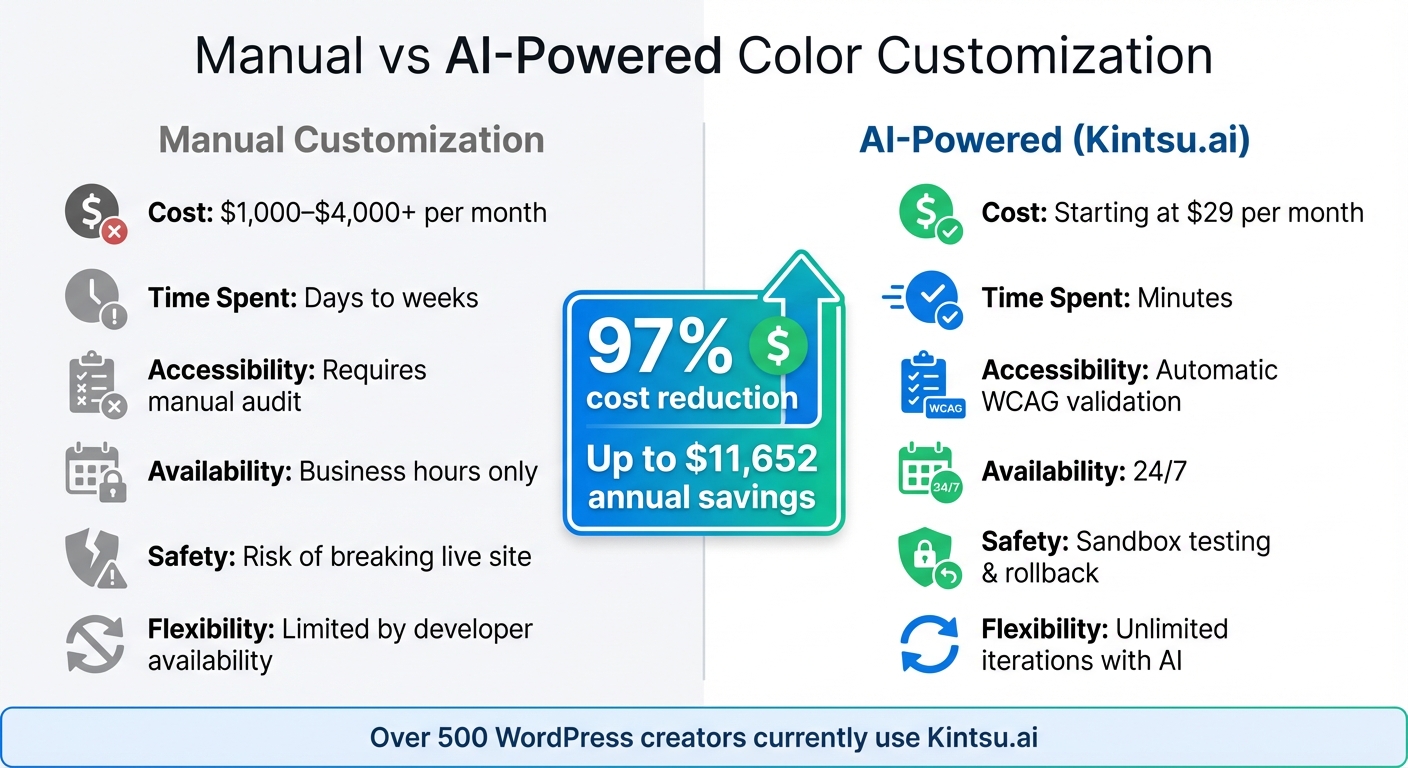
Manual vs AI-Powered WordPress Color Customization Comparison
Transform your WordPress theme colors effortlessly with Kintsu.ai - no coding required, and it takes less than 5 minutes.
Step 1: Connect Your WordPress Site to Kintsu.ai
Start by creating a free account at kintsu.ai, then install the Kintsu AI plugin from your WordPress admin panel. Once the plugin is activated, it will generate a secure HTTPS access key. Copy this key and paste it into your Kintsu AI dashboard to complete the connection.
Kintsu.ai works seamlessly with WordPress 5.9+ and popular page builders like Elementor, Divi, and Gutenberg. Rest assured, your WordPress admin credentials remain private - only hashed access keys are used for secure connections.
Once your site is connected, you're ready to define your vision for color updates.
Step 2: Describe Your Color Preferences
Using the Builder Chat, explain your desired changes in plain English. For example, you might say, "Update the homepage hero to bright blues for a tech company" or "Use soft pastels for call-to-action buttons on an organic brand." You can also specify changes for particular areas, like "only in the footer" or "on mobile only."
If you have specific HEX codes or brand guidelines, share them to ensure the updates align perfectly with your brand identity. The clearer your instructions, the better the results.
"Kintsu AI is an AI-powered WordPress management platform that lets you modify your website through natural conversation."
- Kintsu.ai
Step 3: Preview and Apply AI-Suggested Colors
Once you submit your request, Kintsu.ai generates the suggested color changes in a sandbox environment, allowing you to preview them in real time without affecting your live site. The system also checks contrast ratios and ensures WCAG compliance automatically.
If the preview looks good, you can apply the changes to your live site with a single click. Need tweaks? Refine your prompt or use the rollback feature to undo changes instantly. Every update is tracked in version history, so you’re always in control.
This intuitive process saves time and money while protecting your site’s functionality.
Comparison: Manual vs. AI-Powered Color Customization
Kintsu.ai streamlines what used to be a slow and expensive process. Traditional methods can cost between $1,000 and $4,000+ per month and take days to complete. In contrast, Kintsu.ai starts at just $29 per month and handles updates in minutes - a massive cost and time saver.
| Aspect | Manual Customization | AI-Powered (Kintsu.ai) |
|---|---|---|
| Cost | $1,000–$4,000+ per month | Starting at $29 per month |
| Time Spent | Days to weeks | Minutes |
| Accessibility | Requires manual audit | Automatic WCAG validation |
| Availability | Business hours only | 24/7 |
| Safety | Risk of breaking live site | Sandbox testing & rollback |
| Flexibility | Limited by developer availability | Unlimited iterations with AI |
Currently, over 500 WordPress creators use Kintsu.ai. On average, theme updates require just 1.5 credits, and even the free plan includes 10 AI edit credits per month. That’s plenty of room to experiment with different color schemes before finalizing your design.
Advanced Tips for AI-Powered Theme Colors
Clear and effective instructions can help you create polished, accessible color schemes that elevate your website's design.
Writing Effective Prompts for AI Tools
When working with AI tools, crafting precise prompts is key. Use a framework that includes Role, Context, Mood, and Constraints to guide the AI effectively. For instance, instead of saying, "change my site colors", try something more detailed:
"Act as an expert WordPress designer for a landscape photographer portfolio. Use an organic, earthy, calm palette that meets WCAG contrast standards."
This level of detail ensures the AI, like Kintsu.ai, understands both the "what" and the "why" of your request.
"A better AI prompt gives the model a clear direction instead of guesswork. It explains not just what you want, but how and why you want it." - Mahmuda Akter Isha, Content Writer, WriteRush
Incorporate specific design terms like "monochromatic", "complementary", or "earth tones" to steer the AI toward professional results. You can also use negative prompts to eliminate unwanted options, such as "avoid neon colors" or "do not use high-contrast yellows." Treat the first output as a starting point, and refine it with follow-ups like "Make the primary color softer" or "Increase text-to-background contrast."
Once you have a draft palette, test it thoroughly to ensure it works across all devices and environments.
Testing Colors Across Different Devices
What looks great on your desktop monitor might not translate well to mobile screens, especially in bright outdoor settings. With over 50% of internet traffic coming from mobile devices, testing your color scheme across various screen sizes is non-negotiable. Kintsu.ai's sandbox preview feature allows you to see how your palette performs on different viewports before making it live.
Pay close attention to contrast ratios - text that’s legible on a large monitor might be hard to read on smaller screens. Testing under varied lighting conditions can also reveal potential issues. For example, colors that seem vibrant indoors might become washed out in sunlight. Additionally, check how gradients or color-heavy elements affect load times, especially on slower networks.
For the most accurate results, test your colors on actual devices, not just simulators. Ensuring accessibility and consistency across devices will make your site more user-friendly.
Combining AI with WordPress Theme Customizers
Once your colors are tested and finalized, use WordPress theme customizers to refine the details. AI tools like Kintsu.ai can handle the heavy lifting - creating accessible, visually appealing palettes - but WordPress's built-in tools give you the precision to tailor these colors to your brand.
After generating your palette, go to Appearance > Customize in WordPress to adjust finer details, like header backgrounds or logo placement. This blend of AI efficiency and manual customization ensures your site reflects your vision.
"AI isn't here to replace developers or designers. Instead, it lowers the entry barrier for non-technical users while speeding up workflows for professionals." - Tishonator, Developer
This collaborative approach lets AI handle the technical aspects of color theory and accessibility while you retain full creative control. Use the WordPress Site Editor to make final tweaks, ensuring the design aligns perfectly with your goals.
Conclusion
AI-powered tools like Kintsu.ai are changing the game when it comes to managing WordPress theme colors. Forget waiting on developers or wrestling with complicated CSS - just describe what you want in plain English, and the tool brings your vision to life in minutes. Plus, it takes care of accessibility checks and ensures consistent colors across your site. You can even preview changes in a safe sandbox before making them live.
The benefits go beyond just design. AI-driven color management can cut costs by 97%, slashing update times from days to mere hours. On average, this could save businesses around $11,652 annually, compared to the hefty $1,000–$4,000+ monthly fees charged by agencies. It’s not just about saving money - it’s about creating a consistent, compliant, and polished user experience.
With features like automated accessibility checks, instant rollbacks, and natural language commands, technical expertise is no longer a requirement. Whether you’re refreshing your brand’s colors for a new campaign or ensuring ADA compliance, AI does the heavy lifting while giving you complete creative control.
FAQs
Will AI change my colors without breaking my theme?
Yes, AI can assist with changing your theme colors without messing up your website's layout or functionality. For example, tools like Kintsu.ai allow you to make adjustments by processing simple, plain-English requests. You can even preview these changes in real time. This ensures that your site's structure stays intact while giving you the freedom to achieve the color customizations you want.
How do I keep my brand colors while staying WCAG compliant?
To keep your brand colors intact while meeting WCAG compliance, focus on creating enough contrast between text and background elements. According to WCAG standards, normal text should have a contrast ratio of at least 4.5:1, while large text requires a minimum of 3:1.
Using AI tools can simplify this process by automatically tweaking color contrast to meet these standards. These tools ensure your site stays visually accessible while maintaining your brand's identity, so you don't have to sacrifice design for compliance.
What should I include in my prompt to get better color results?
When using AI to tweak WordPress theme colors, the key is to be as specific as possible in your prompts. For instance, instead of vague requests, try instructions like: “Set the header background to navy blue” or “Apply a pastel palette across the site’s design.” Clear, detailed guidance ensures the AI can deliver results that align with your vision while maintaining a polished and cohesive look.