Best Practices for Multilingual WordPress SEO
Practical WordPress multilingual SEO checklist: pick URL structure, implement hreflang and canonicals, localize keywords and metadata, set sitemaps, and verify indexing.
Best Practices for Multilingual WordPress SEO
If you want your WordPress site to reach audiences across different languages, multilingual SEO is essential. A poorly optimized multilingual site can lead to missed traffic and low engagement. Here’s what you need to know:
- URL Structure Matters: Use subdirectories (
example.com/es/), subdomains (es.example.com), or country-specific domains (example.es) to organize language versions. Subdirectories are often the most SEO-friendly. - Hreflang Tags: These tags help search engines serve the correct language version to users. Ensure they are bidirectional, self-referencing, and error-free.
- Localized Keywords: Direct translations don’t work. Research keywords for each language and region to match local search habits.
- Metadata & Content: Translate and localize metadata (titles, descriptions, alt text) and ensure content aligns with regional preferences.
- Sitemaps & Search Console: Create language-specific sitemaps and configure Google Search Console to track each version’s performance.
- Internal & External Links: Ensure internal links keep users within the same language. Build backlinks from local, high-authority sources.
Quick Tip: Avoid relying on machine translations. AI search engines evaluate content quality separately for each language, and native-level translations perform better.
Multilingual SEO & GEO for Beginners: How to Rank in Any Country with AI
sbb-itb-42d7c06
Set Up Your URL Structure for Multiple Languages
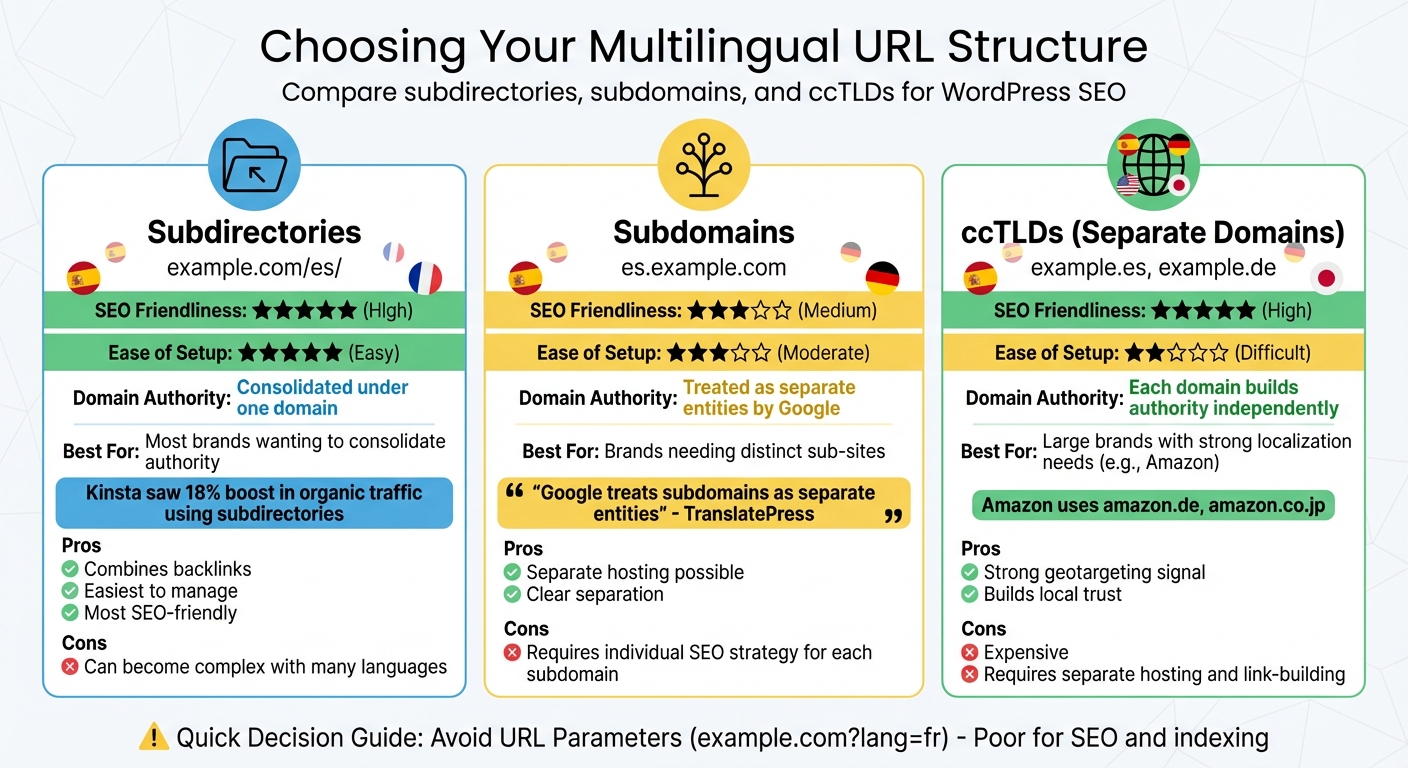
Multilingual WordPress URL Structure Comparison: Subdirectories vs Subdomains vs ccTLDs
Organizing your URL structure effectively improves how search engines crawl your site and helps users navigate between language versions. This setup also consolidates your SEO authority, avoiding the risk of splitting rankings across multiple versions.
With 75% of online shoppers preferring content in their native language and 60% of non-English speakers rarely purchasing from English-only websites, it’s crucial that your URL clearly indicates the targeted language.
Pick Between Subdirectories, Subdomains, or Separate Domains
There are three main URL structures to consider: subdirectories, subdomains, or separate domains (ccTLDs). Each has its own SEO impact:
Subdirectories (e.g., example.com/es/) group all language versions under one domain. This method combines backlinks and domain authority, making it a popular choice for WordPress sites. For instance, in December 2024, Kinsta saw an 18% boost in organic traffic after translating their blog into 10 languages using subdirectories like kinsta.com/es/.
Subdomains (e.g., es.example.com) create separate sections of your site. While they allow hosting on different servers, Google may treat subdomains as separate websites. Colin from TranslatePress explains:
"Google generally treats subdomains as separate entities, which means that your subdomains might not benefit from the full authority of your root domain".
This means each subdomain needs its own SEO and link-building strategy.
Separate domains or ccTLDs (e.g., example.es) use country-specific extensions, signaling geotargeting to search engines and building trust locally. Amazon uses this approach with domains like amazon.de for Germany and amazon.co.jp for Japan. However, this setup is costly and complex, as each domain requires independent hosting, SEO, and link-building efforts.
| Structure | SEO Friendliness | Ease of Setup | Best For |
|---|---|---|---|
| Subdirectories | High | Easy | Most brands; consolidates authority |
| Subdomains | Medium | Moderate | Brands needing distinct sub-sites |
| ccTLDs | High | Difficult | Large brands with localization needs |
Once you’ve chosen a structure, ensure your URLs clearly indicate the language without relying on parameters.
Avoid URL Parameters for Language Versions
Using URL parameters (e.g., example.com?lang=fr) for different language versions is not recommended. They complicate indexing and analytics.
Search engines often struggle to crawl parameter-based URLs, and they provide weak geotargeting signals compared to subdirectories or ccTLDs. Parameters can also create duplicate content issues, as the same page with different parameters might be treated as separate URLs. Plus, these URLs are harder for users to share or remember.
When setting up WordPress multilingual plugins like WPML or TranslatePress, choose directory-based language settings (e.g., "different languages in directories") instead of parameters. If you’re switching from a parameter-based setup, use 301 redirects to maintain link equity and avoid broken links.
Add hreflang Tags and Canonical Attributes
Hreflang tags are essential for designating the target language and region of each page on your site. They ensure search engines don't mistake different language versions as duplicate content. When implemented correctly, these tags can boost relevant regional traffic by up to 40% within a few months.
Important Note: Avoid mixing hreflang tags with non-self-referencing canonical tags. As TranslatePress points out, this can confuse search engines.
To get it right, make sure hreflang tags are both bidirectional and self-referencing. Use ISO 639-1 language codes (e.g., "en" for English) and, if necessary, pair them with ISO 3166-1 Alpha 2 region codes (e.g., "US" for the United States), formatted like this: en-us. Always include an x-default tag to define a fallback page for users whose language preferences don't match any of your versions.
How to Add hreflang Tags in WordPress
For WordPress users, plugins like WPML, TranslatePress, or Polylang are the go-to tools for automating hreflang tag generation. These plugins handle the process as you translate content, minimizing the chance of errors.
If you'd rather implement hreflang tags manually without using translation plugins, you can use a snippet manager like WPCode. Here’s how:
- Install WPCode and navigate to Code Snippets > Header & Footer.
- Add your hreflang code with absolute URLs. For example:
<link rel="alternate" hreflang="es-es" href="https://example.com/es/" />. - Include an
x-defaulttag for fallback purposes. - Save your changes and clear your site’s cache.
There are three main ways to implement hreflang tags:
- HTML
<head>: Best for smaller websites. - XML sitemaps: Ideal for larger sites to avoid cluttering the HTML.
- HTTP headers: Useful for non-HTML files like PDFs.
Stick to one method to avoid unnecessary complexity and potential errors. After implementation, verify your tags by inspecting the page source or using tools like Google Search Console's International Targeting report. Google has supported hreflang since 2011, and Yandex also recognizes it. However, Bing primarily relies on the HTML lang attribute.
Once hreflang tags are set up, ensure your canonical tags are properly configured to consolidate ranking signals.
Combine Canonical Tags with hreflang Tags
Hreflang tags help target specific audiences by language and region, but canonical tags play a different role - they consolidate SEO authority.
Each localized version of your site should include a self-referencing canonical tag pointing to its own URL. This tells search engines that the localized version is the authoritative page for that language. Avoid pointing a translated page’s canonical tag to the original version, as this can confuse search engines and hinder proper indexing of the translated content.
Here’s how they work together:
- Canonical tags consolidate link equity to the correct localized URL.
- Hreflang tags ensure the right audience sees the right version.
These tags must remain separate in your <head> section and use absolute URLs with the full protocol and domain. Combining them into a single tag is not recommended, as it can lead to errors and mismanagement.
Research Keywords for Each Language
Keyword research is a critical part of optimizing a multilingual WordPress site, and it goes far beyond simple translations. Search behavior, terminology, and user preferences vary widely by region. With only 25.9% of internet users speaking English and about 40% of Google searches occurring in non-English languages, relying solely on direct translations could mean missing out on significant opportunities.
Take this example: while users in the US might search for "vacation packages", UK users are more likely to look for "holiday packages." In Germany, people search for "Kfz-Versicherung" instead of the literal translation, "Autoversicherung." Similarly, in Spanish-speaking markets, Mexicans use "celular", whereas Spaniards prefer "móvil".
AI search engines further emphasize the need for tailored content. As Seenos.ai explains:
"AI search engines evaluate content quality independently in each language, meaning machine-translated content will underperform compared to natively written, culturally adapted content".
Search volume and keyword performance don’t automatically carry over between languages. A popular English keyword might have minimal impact when directly translated into another language. The numbers back this up: 72.4% of consumers are more likely to buy products when information is available in their native language. Localized content also tends to rank three to five times higher than simple translations. Even in countries with strong English proficiency, like the Netherlands, 87% of users prefer searching in their native language.
Account for Regional and Cultural Differences
Regional differences go beyond language and touch on how people approach their online searches. For instance, US users often prioritize quick purchasing options, while German users lean toward detailed product comparisons. These preferences reflect different stages of the buyer journey, which your keyword strategy should address.
Timing also plays a big role. Holidays like Mother’s Day don’t occur on the same date worldwide. For example, search interest in Mother’s Day gifts peaks at different times in the US and UK. Seasonal trends, local holidays, and regional events all influence search behavior. Device usage is another factor - while 95% of people in the UAE use mobile internet, only 32% of Indians own a smartphone.
Even technical terms can differ dramatically. In Mexico, businesses must comply with CFDI tax stamping requirements, a term vital for local SEO but unlikely to appear in a generic Spanish translation. Similarly, while "skincare routine" might work as a direct translation in French, local users are more likely to search for "rituel beauté".
Once you’ve identified these nuances, the next step is to use specialized tools to refine your keyword strategy.
Use Tools for Multilingual Keyword Research
Collaborate with native speakers or local SEO experts to find "seed keywords" - broad phrases that reflect local slang, idioms, and cultural context. These keywords will serve as the starting point for deeper research.
Geotargeted keyword research tools can help you dig deeper. Google Keyword Planner is a go-to for understanding local search volumes, while Google Trends can track interest over time in specific regions. For competitor analysis, platforms like SEMrush (starting at $119/month) and Ahrefs (starting at $99/month) offer keyword data for more than 140 countries.
In markets with dominant local search engines, include tools like Baidu Index for China, Yandex Wordstat for Russia, and Naver for South Korea. For app-related keyword insights, use tools like Sensor Tower or data.ai.
Finally, study the top local competitors in your target market. Analyze their high-performing keywords, content formats, and search intent to uncover gaps and opportunities that align with local preferences. This approach ensures your content resonates with the audience you’re trying to reach.
Optimize Metadata and On-Page Elements for Each Language
Once you’ve identified localized keywords, the next step is to adjust your metadata and on-page elements to align with local search habits and cultural expectations.
Translate and Localize Your Metadata
A direct translation of metadata often falls flat. For example, while "cheap hosting" translates literally to "alojamiento barato" in Spanish, native speakers are more likely to search for "hosting económico". This difference is crucial, especially since 60% of Google searches are in non-English languages, and 76% of users prefer content in their native language.
Focus on translating and localizing key elements like title tags, meta descriptions, image alt text, and URL slugs. Use tools such as TranslatePress (with its SEO Pack add-on at $79/year) or WPML’s String Translation feature (starting at €39/year) to make these adjustments. For example, update a URL slug from /en/how-to-cook to /es/como-cocinar to provide clear context for both users and search engines.
Keep text expansion in mind during the process. Languages like German tend to take up more space than English, while Chinese is more concise. This can affect whether your title tags are fully displayed in search results. Aim for around 60 characters for titles and 155 characters for meta descriptions, though these limits can vary depending on the language.
Don’t forget to translate social metadata - such as Open Graph titles and descriptions for platforms like Facebook and Twitter. This ensures that links shared across social media look polished in every language. After translating, inspect your page source to confirm correct implementation of hreflang tags and localized meta tags.
Once your metadata is localized, shift focus to your content to ensure it resonates culturally.
Check Content for Cultural Accuracy
Localizing metadata is just one piece of the puzzle. Your content must also reflect local cultural nuances. While machine translation tools can offer a starting point, they often produce awkward phrasing that reduces click-through rates. As Google cautions:
"Automated translations don't always make sense and could be viewed as spam".
This is why native speaker review is non-negotiable. Native speakers can identify linguistic subtleties, idiomatic expressions, and cultural context that machines simply miss. For instance, using "fall" for a U.S. audience versus "autumn" for a U.K. audience may seem minor, but these nuances build trust and relevance with your audience.
Localization doesn’t stop at text. Adjust images and multimedia to align with local culture. Whether it’s featuring regional dishes, familiar settings, or relatable models, these details help your content feel authentic. Even image alt text should be contextually translated to describe the image in a way that resonates locally, rather than relying on generic terms.
Lastly, if you’re targeting regions where search engines like Baidu (China), Yandex (Russia), or Seznam (Czech Republic) dominate, tailor your metadata specifically for those platforms. This ensures your content performs well across different search ecosystems.
Set Up Language-Specific Sitemaps and Search Console
Once you've localized your content, it's crucial to help search engines easily find and track each language version. Configuring your sitemaps and setting up Google Search Console correctly ensures that Google can crawl, index, and monitor your multilingual pages effectively.
Choose Between Separate or Combined Sitemaps
Many WordPress SEO plugins, like All in One SEO (AIOSEO) or Rank Math, can detect multilingual setups and automatically generate sitemaps for each language. For example, AIOSEO might create nested sitemaps such as /fr/sitemap.xml for French or /de/sitemap.xml for German - no manual setup required.
Your URL structure will guide your choice of sitemap configuration:
- Subdirectories (e.g.,
example.com/es/): A combined sitemap index is the simplest option. Submit just one URL to Search Console (e.g.,sitemap_index.xml), and Google will find all language versions. - Separate domains (e.g.,
example.es) or subdomains (e.g.,es.example.com): You'll need to create and manage individual sitemaps for each language version.
| Sitemap Method | Best For | Pros | Cons |
|---|---|---|---|
| Combined Sitemap (Index) | Subdirectory structures | Easier to manage; consolidates authority | Can grow too large for many languages |
| Separate Sitemaps | Subdomains or separate domains | Clear targeting; easier debugging | Requires submitting multiple sitemap URLs |
Remember, XML sitemaps are capped at 50,000 URLs or 50 MB per file. If your site exceeds these limits, separate sitemaps are a must. Also, ensure every URL returns a 200-OK status and avoid canonical tags that point to a different language version.
Configure Google Search Console for Each Language
Google Search Console (GSC) is essential for tracking how each language version performs in search results. Start by deciding between these two property types:
- Domain properties: Cover all subdomains and protocols (requires DNS verification).
- URL Prefix properties: Apply to specific folders or subdomains (easier setup but more limited).
For subdirectory structures, add a single property to GSC and use the “Page” filter in the Performance report (e.g., filter pages with /es/) to focus on specific languages. For subdomains or separate domains, verify each version as a separate property for detailed tracking of indexing and traffic.
Submit your main sitemap index URL (e.g., sitemap_index.xml) to GSC. Google will automatically find the individual language sitemaps within it. To make updates seamless, enable the ping feature in your SEO plugin so search engines are notified whenever you publish or update a translated page. Use the URL Inspection tool regularly to check the index status of translated pages and ensure Google recognizes your hreflang tags. Additionally, the Countries report in GSC can show how each language version performs in its target region.
When language variant tagging is implemented correctly, sites can experience up to a 40% boost in regional traffic within months. For instance, Kinsta saw an 18% increase in organic traffic after translating their blog into 10 languages.
Manage Internal and External Links for Multilingual SEO
A well-thought-out linking strategy ensures that both users and search engines stay within the same language. For example, if someone is reading your Spanish content, every link they click should guide them to more Spanish pages - not back to English ones. This approach not only improves the user experience but also helps search engines better understand your site’s structure. Tools like WPML can help by automatically adjusting translated links.
Follow Internal Linking Best Practices
Keep your audience in the same language. Imagine a French reader clicking a link on your site, only to land on an English product page. That kind of disruption can hurt user flow and increase bounce rates. To avoid this, tools like AIOSEO's Link Assistant can help you identify orphaned translated posts and add relevant internal links. Additionally, mirroring your navigation structure across all language versions ensures users can easily find what they need without switching back to the original version.
Localizing your 404 pages with helpful, same-language links is another way to keep bounce rates low. To maintain consistency, create a master glossary for each language to ensure brand names and key terms are uniform across your site.
Build External Links in Target Languages
Once your internal links are optimized, it’s time to focus on building strong external connections in your target languages.
Local backlinks are more impactful than non-local ones. For instance, a link from a respected German blog will do far more to boost your German pages than a link from a high-authority English site that doesn’t cater to your target audience. Take Canva as an example: in 2025, its French subdirectory (/fr_fr/) earned backlinks from thousands of .fr domains. This effort helped it rank for over 431,000 keywords and drive 10.8 million organic visits per month - 90% of which came from France.
Instead of merely translating English content, create assets tailored to specific markets. Adobe’s "AI and Digital Trends Report" is a great example. While the English version earned over 7,000 backlinks, the fully adapted German version attracted 175 high-quality local backlinks, significantly boosting its regional authority. Use SEO tools to filter potential link opportunities by country-specific TLDs like .de, .fr, or .jp, and pitch guest posts to regional publishers in their native language. Additionally, competitor backlink analysis can reveal local link-building opportunities. Don’t overlook country-specific directories, like gelbeseiten.de for Germany, to establish foundational trust.
"Strong backlinks follow strong relevance. If your content is useful, local, and specific, the links come naturally." - Andrew Shum, Head of SEO, SeoProfy
Check Crawlability and Indexing for All Language Versions
Make sure each language version of your site has a unique, static URL. This ensures search engines can properly index the content. Without this setup, entire language versions could remain invisible to search engines, leading to missed traffic opportunities. This step works hand-in-hand with earlier sitemap and hreflang configurations, ensuring your content is not only structured correctly but also accessible to search engines.
Use Static Translations Instead of Dynamic Tools
Avoid dynamic JavaScript-based translation widgets, as they fail to create unique, crawlable URLs. Instead, opt for WordPress plugins like WPML or TranslatePress. These tools generate dedicated static URLs, such as yoursite.com/es/ for Spanish, which search engines can index effectively.
Also, don't redirect users based on their browser language. Doing so can block crawlers from accessing all language versions, limiting your site's visibility.
For example, in August 2025, a U.S. subdomain saw its indexation increase by 150% after implementing self-referencing hreflang tags.
Verify Indexing and Crawlability with Tools
Once static URLs are set up for each language, it's critical to check that these pages are being crawled and indexed correctly.
Google Search Console is a must-have tool for monitoring how search engines index your multilingual site. If you’re using language subdirectories (e.g., yoursite.com/de/ for German), consider setting up separate properties for each one. This helps you track indexing status and pinpoint crawl errors. Use the URL Inspection tool to see how Google renders each page and confirm that your hreflang tags are functioning as intended.
To validate hreflang tags, tools like SISTRIX Hreflang Validator or Screaming Frog SEO Spider are invaluable. They help identify common issues such as syntax errors or missing reciprocal links. Research shows that 75% of hreflang implementations contain errors, such as incorrect ISO codes or missing return tags. For a free option, try the Merkle Hreflang Testing Tool, which checks tags in HTML, HTTP headers, and XML sitemaps.
Finally, make sure your XML sitemap includes all localized URLs. This allows search bots to discover your content efficiently.
"If two pages don't both point to each other, the tags will be ignored. This is so that someone on another site can't arbitrarily create a tag naming itself as an alternative version of one of your pages." - Google Search Central
Conclusion
Creating a multilingual WordPress site that truly succeeds goes beyond just translating text - it’s about building a strong technical foundation and tailoring content for each audience. The steps outlined in this checklist help ensure that search engines can effectively crawl, index, and rank every language version of your site.
Start with the technical basics: use subdirectory URL structures to consolidate domain authority, implement bidirectional hreflang tags to avoid duplicate content issues, and create language-specific XML sitemaps to improve crawling efficiency. These steps address common issues that impact 33% of international websites.
Localization is what sets thriving multilingual sites apart. This means researching keywords for each market, adjusting metadata, and adapting elements like currencies, dates, and imagery. With only 25.9% of internet users speaking English, and 76% of consumers preferring to shop on websites in their native language, localization isn’t just helpful - it’s essential. In fact, 72.4% of people are more likely to make a purchase when information is presented in their own language. These numbers highlight the massive opportunity in reaching global audiences.
Ongoing verification is crucial to maintaining success. Tools like Google Search Console can help monitor indexing for each language version, while solutions like Screaming Frog make it easy to validate hreflang tags. Tracking performance by market ensures you’re getting the most out of your efforts. For example, companies like Wise have achieved nearly 70% of their organic traffic from non-English markets by following these strategies.
To simplify management, advanced tools can be a game-changer. For instance, Kintsu.ai offers an AI-powered platform that allows real-time updates through a conversational interface - making it easier to handle both technical optimizations and localization without any coding expertise.
"International SEO implementation is a one-time effort with long-term compounding returns. Done correctly, it opens organic channels in markets where competitors have no presence." – Digital Applied
Investing in multilingual SEO pays off over time, unlocking global opportunities with the technical and localization strategies outlined in this checklist.
FAQs
Which WordPress URL structure is best for multilingual SEO?
The ideal URL structure for multilingual SEO is to use subdirectories (e.g., example.com/en/). Subdirectories are not only simpler to manage but also allow you to share domain authority across languages. Plus, they integrate seamlessly with hreflang tags and sitemaps, ensuring precise regional targeting.
How can I fix hreflang errors that prevent pages from ranking?
To resolve hreflang errors, it’s crucial to ensure the tags are implemented properly. Here are some common issues and how to address them:
- Missing or Broken Tags: Double-check that hreflang tags are present on all relevant pages and that none are broken.
- Incorrect Syntax: Verify the syntax of your tags. They should follow the correct format and include valid ISO language and region codes (e.g.,
en-usfor English in the United States). - Reciprocal Links: Ensure that hreflang tags point back to the corresponding language versions. For example, if Page A links to Page B, Page B must link back to Page A.
- Fallback Pages: Add an
x-defaulttag to guide users to a default page if no specific language or region version matches. - Consistent URL Structures: Use uniform URL patterns across language versions to avoid confusion.
Regularly validating and monitoring your hreflang tags is essential. This ensures search engines interpret your regional and language targeting correctly, helping users find the right version of your site.
How can I check if Google is indexing all language versions?
To keep track of which pages are indexed by Google and to spot any potential issues, you can use the Page Indexing report in Google Search Console. This tool provides valuable insights into how your site is performing in search.
For multilingual websites, it's crucial to ensure that each language version is properly marked using hreflang tags. These tags help Google understand the relationship between different language versions of your content. Be sure to follow Google’s guidelines carefully so that search engines can correctly interpret and index each version of your site.